nasıl format atıcağım

Durum
Üzgünüz bu konu cevaplar için kapatılmıştır...
Onaylı Üye
Katılım
11 Nis 2020
Mesajlar
110
Tepki puanı
10
Ödüller
5
Yaş
26
6 HİZMET YILI
Arkadaşlar biligsayarımın fabrika ayarlarına dönemsini istiyorum ama bena diyorki bazı dosylar eksik yapamazsın diyor o dosyaları nasıl bulabilirim
 
Seçkin Üye
Katılım
3 Nis 2020
Mesajlar
311
Çözümler
7
Tepki puanı
21
Ödüller
2
Yaş
30
6 HİZMET YILI
ayarlara girip kurtarma var oraya tıkla ve sıfırla kismi var oraya tikla ve bilgisyarini sifirla
 
Seçkin Üye
Katılım
9 Nis 2020
Mesajlar
319
Tepki puanı
20
Ödüller
4
Yaş
29
6 HİZMET YILI
hangi windows var sende ve hangi bilgisay?
 
Seçkin Üye
Katılım
4 Nis 2020
Mesajlar
305
Tepki puanı
21
Yaş
26
6 HİZMET YILI
ayarlarda güncelleştirme ve güvenlik kurtarmaya tıkla olacaktır
 
Gamer
Seçkin Üye
Katılım
8 Nis 2020
Mesajlar
409
Çözümler
1
Tepki puanı
20
Yaş
38
6 HİZMET YILI
what should you want to format
 
Seçkin Üye
Katılım
3 Şub 2019
Mesajlar
306
Tepki puanı
13
Ödüller
6
Yaş
28
7 HİZMET YILI
Hocam şimdi bak sana anlatayım güzelce. Kendim 12 yasinda öğrendim format atmasını o gün bugündür mahalledeki herkesin PC ye parayla format atıp harcligimi çıkarttim. Format dosyalarını indirip herhangi bir siteden onu bir cdye yazdirman lazım veya bir flash belleğe. Onun programlari var. Google da bulabilirsiniz. Sonra bilgisayarı komple kapatın. Açarken bios a girmeniz lazim. Biosdan Boot menüsüne gelip 1.surucuye flash belleği veya CD yi seçmeniz lazım. Save and exit diyip çıkın. Sonra kurulum menüsü gelir. Ordan c yi seçip biçimlendir diyin ve her şeye ileri diyin. Yükleme tamamlanınca kendini kapatır PC. O sırada hemen flash belleği çekin. Veya cdyi çıkarın. Sonra kendisi ayarlar her şeyi. Ve format tamamlanir. Yeni sisteminiz kurulur
 
Onaylı Üye
Katılım
11 Nis 2020
Mesajlar
110
Tepki puanı
10
Ödüller
5
Yaş
26
6 HİZMET YILI
Hocam şimdi bak sana anlatayım güzelce. Kendim 12 yasinda öğrendim format atmasını o gün bugündür mahalledeki herkesin PC ye parayla format atıp harcligimi çıkarttim. Format dosyalarını indirip herhangi bir siteden onu bir cdye yazdirman lazım veya bir flash belleğe. Onun programlari var. Google da bulabilirsiniz. Sonra bilgisayarı komple kapatın. Açarken bios a girmeniz lazim. Biosdan Boot menüsüne gelip 1.surucuye flash belleği veya CD yi seçmeniz lazım. Save and exit diyip çıkın. Sonra kurulum menüsü gelir. Ordan c yi seçip biçimlendir diyin ve her şeye ileri diyin. Yükleme tamamlanınca kendini kapatır PC. O sırada hemen flash belleği çekin. Veya cdyi çıkarın. Sonra kendisi ayarlar her şeyi. Ve format tamamlanir. Yeni sisteminiz kurulur
bios ne
 
The Chosen One
Seçkin Üye
Katılım
19 Şub 2019
Mesajlar
595
Tepki puanı
41
Ödüller
5
Yaş
34
7 HİZMET YILI
Try to use EaseUs file recovery tool.

Data Recovery Wizard is very easy to install and use. That's because the program offers a wizard-driven interface, letting even beginners restore photos, videos, music files, and documents in a blink of an eye.

I will show a step by step guide for how to use the data recovery software, including how to download and install, and how to complete the data recovery process without a hitch. Let's get started!

Download & Install Data Recovery Wizard
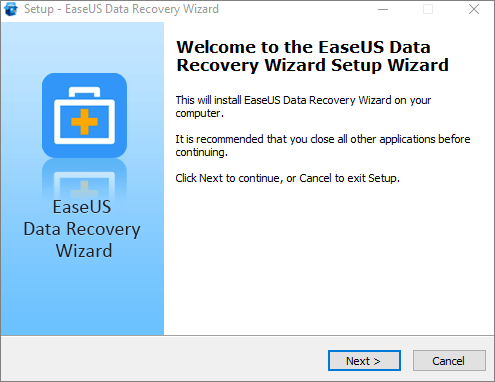
The file you are downloading is named "drw_trial.exe". Now double click on the downloaded file to launch the installation. You'll see a 'Welcome' dialog that asks if you would like to continue. Click "Next".

easeus data recovery wizard setup - welcome


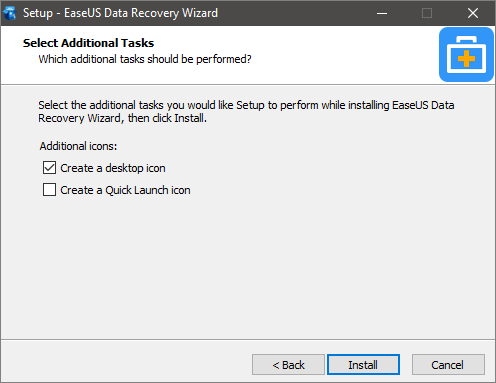
The easiest way to do the next few windows is to use default installation settings. So, accept the license agreement and click "Next" in all windows of the installer. When you see the Select Additional Tasks panel, check "Create a desktop icon" and go on to finish the installation.

easeus data recovery wizard setup - create a desktop icon


That's all! The program is installed and ready for use. Its icon is on the desktop. It is available to handle all data loss situations, so you can try it to
Bağlantıları görmek için lütfen Giriş Yap
, retrieve formatted, corrupted, inaccessible or lost data. Now, let's recover files.

Scan & Recover Lost Data
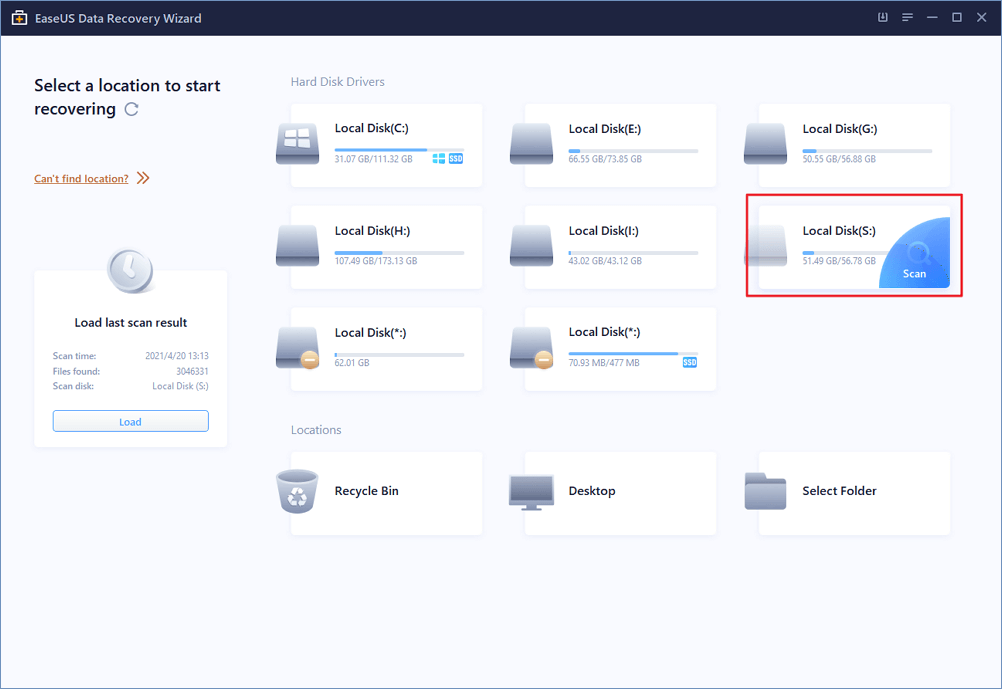
Step 1. Select a location to scan.

Launch EaseUS Data Recovery Wizard, hover on the partition, external hard drive, USB, or memory card where you lost data, and then click "Scan".

select a location and click scan


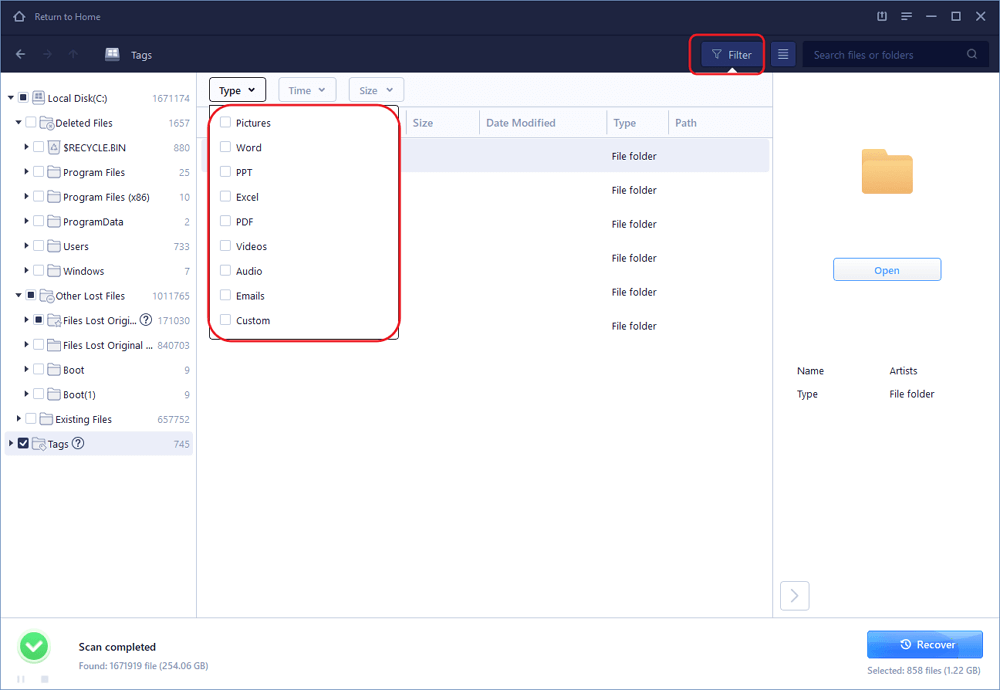
Step 2. Select files to recover.

Wait until the scanning completes. Afterward, choose the files you want to recover. To locate the data faster, use the search bar or filter to search for specific files. To check a file, double-click the item to preview its content.

Choose files to recover


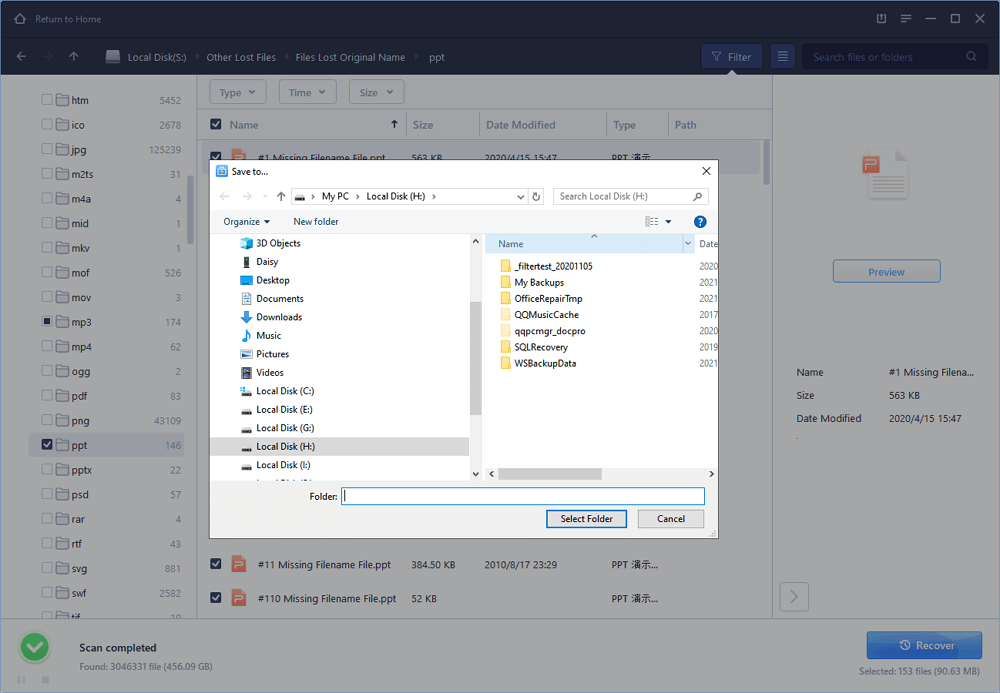
Step 3. Recover lost data.

Click "Recover" and choose a location on another drive to save the files.

Recover lost data


The found files are displayed as a list. If needed, you can switch to the Thumbnail View mode and they'll be displayed as thumbnails. For each file, you can see its name, size, file type, modification time, creation time, last access date, attribute, and state. And, of course, what you can see is what you may actually get if you are a registered user. Registration lets you unlock the ability to recover an unlimited amount of files and save them to the location of your choice.

As you can see, file recovery using Data Recovery Wizard is super easy, and it doesn't require any special skills or technical knowledge. Should you stumble upon some difficulties, you can resort to the Help system, which can be accessed by clicking "Help" on top of the interface. We used a simple situation as an example here. But with the same simplicity, you could recover files even in more severe situations, for example, when the partition was formatted and you want to
Bağlantıları görmek için lütfen Giriş Yap
.
 
Eclipse Team Developer
Seçkin Üye
Katılım
2 Nis 2019
Mesajlar
305
Çözümler
7
Tepki puanı
39
Ödüller
7
7 HİZMET YILI
Temiz kurulum yapman en sağlıklısı olur bir format usbsi oluşturup sıfırdan temiz kurulum yap
 
Clash Of Clans Professional Player
Seçkin Üye
Katılım
4 Şub 2020
Mesajlar
358
Çözümler
1
Tepki puanı
121
Ödüller
1
Yaş
31
6 HİZMET YILI
Youtube de var bununla ilgili milyonlarca video
 
Luxury life is not my style I love mud
Uzman Üye
Katılım
22 Şub 2019
Mesajlar
160
Çözümler
2
Tepki puanı
10
Ödüller
4
Yaş
28
7 HİZMET YILI
merhaba öncelikle direkt sıfırlamak istiyorsan önce 1 usb ye windows 10 vs. yüklemen lazım bunu bilgisayarcılarda yapabilirsin.
ondan sonra bu usbyi pc ye takıp boot tuşunu spamlaman lazım pc açılırken
sonra boot menu de usbyi seçip windows u yüklemen lazım
biraz zahmetli iş yani.
 
Onaylı Üye
Katılım
15 Nis 2020
Mesajlar
57
Tepki puanı
1
Ödüller
5
Yaş
26
6 HİZMET YILI
Tamamen Sıfırlıyacaksan Bir İso Dosyası Yapıp USB ile yapabilirsin nasıl yapıcagını ise youtubeye bakarak yapabilirsin
 
Durum
Üzgünüz bu konu cevaplar için kapatılmıştır...
Üst