Üye
bunu denıyen odu mu ban atıyorum mu


It's working but blease start the cheat and after that start gameloopam i the guy who tried this or am i banning
bende hata veriyor
Ekli dosyayı görüntüle 69797
Last Update: 19.11.2021
Status: Undetected
Version: v0.1
Credits: forexample MemoryHackers
Tested Systems:
Windows 11 x64
Windows 10 x64 1607-21H1
Windows 8.1 x64
Windows 8 x64
Access: Member+
En: Make sure you have updated gameloop.
All versions
Tr: gameloopu güncellediğinizden emin olun.
Sürüm fark etmiyo.
Features:
~ Customizable Item Esp
~ Bone Esp
~ 3D Box Esp
~ Name Esp
~ Car Esp
~ Healthbar Esp
~ Distance Esp
~ Line Esp
Ekli dosyayı görüntüle 69792
Ekli dosyayı görüntüle 69793
Ekli dosyayı görüntüle 69794
How To Use [EN]:
First we open the game and enter the amusement park.
Then we come to the exe and run it as administrator
Then the cheat is active
Nasıl Kullanılır [TR]:
Oyunu açıyoruz, eğlence park haritasını indirip giriş yapiyoruz.
Sonra exe gelip sağ tık yapıp yönetici olarak çalıştırıyoruz.
Hile aktfi iyi eğlenceler.
Bağlantıları görmek için lütfen Giriş Yap/Bağlantıları görmek için lütfen Giriş Yap
Bağlantıları görmek için lütfen Giriş Yap
Please explain what error and maybe we can help youbende hata veriyor

Şuanlık sıkıntı yokBanlanma riski nedir şuan için biliyorum her hilenin ban riski mevcut ancak ban atan var atmiyan var
Please, stop asking these kind of questions. The cheast is undetected. You won't get banned by pure detection, only by pure mass reportsdid anyone get banned?

It may be bigger, but you can at least know where the head is in refference to the rest of the body. Skeleton is good in my oppinionsorry to say this brother, but esp's skeleton is not good. head position circle is bigger.
''Font file loaded successfully
[+] Connecting to driver ...
FAILED ... Error connecting driver. Run this app as 'Administrator' and disable antivirus
Press any key to continue . . .''
Are you sure windows defender is disabled? disable Temper Protection and disable it from Regedit. You can search on google specific keyI had tried it. I had my antivirus disabled and run it with admin permission. But it still give me error.
The message is like this:
my defender is fully disabled brother. also i regularly use EZpubgm, there is no problem.Are you sure windows defender is disabled? disable Temper Protection and disable it from Regedit. You can search on google specific key
You need to disable "Temper Protection" from settings in Windows Defender, not regedit. After you do that navigate to "HKEY_LOCAL_MACHINE\SOFTWARE\Policies\Microsoft\Windows Defender" and create a New dword 32 bit value key called "DisableAntiSpyware" and put it to 1my defender is fully disabled brother. also i regularly use EZpubgm, there is no problem.
I tried to disable tremper protection from RegEdit but my temperprotection DWORD value is set to 1. It isn't changing to 0.
I think I didn't turnoff the temper protection before disabling the defender. should i turn defender on and then disable temperprotection? and again disable defender???You need to disable "Temper Protection" from settings in Windows Defender, not regedit. After you do that navigate to "HKEY_LOCAL_MACHINE\SOFTWARE\Policies\Microsoft\Windows Defender" and create a New dword 32 bit value key called "DisableAntiSpyware" and put it to 1
After that restart your PC. Now you should have disabled Windows Defender
Temper protection and realtime protectin are 2 separate things. First turn off temper protection (don't restart your PC) then do the regedit thing i said in my last post, then restart your PC. Your Windows Defender will be disabled by your "group policy"I think I didn't turnoff the temper protection before disabling the defender. should i turn defender on and then disable temperprotection? and again disable defender???
And i have that regedit dword that you said. Disableantispywarte.... it's already there
I checked, my temperprotection was already turned off. you the DisableAntiSpyware you can see this screenshot:Temper protection and realtime protectin are 2 separate things. First turn off temper protection (don't restart your PC) then do the regedit thing i said in my last post, then restart your PC. Your Windows Defender will be disabled by your "group policy"
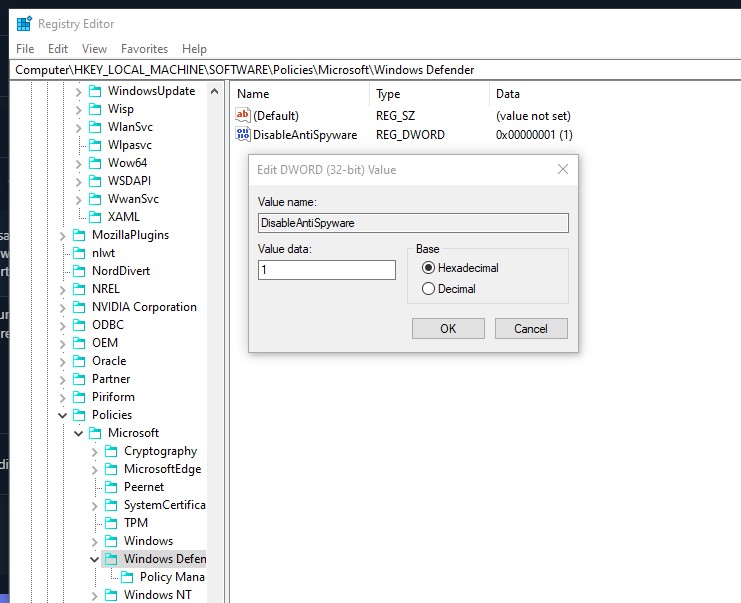
If you put the key now, restart your PC. Then when you check Windows Defender it will show this:I checked, my temperprotection was already turned off. you the DisableAntiSpyware you can see this screenshot:
This is my Defender window. same as yours:If you put the key now, restart your PC. Then when you check Windows Defender it will show this: Ekli dosyayı görüntüle 70214
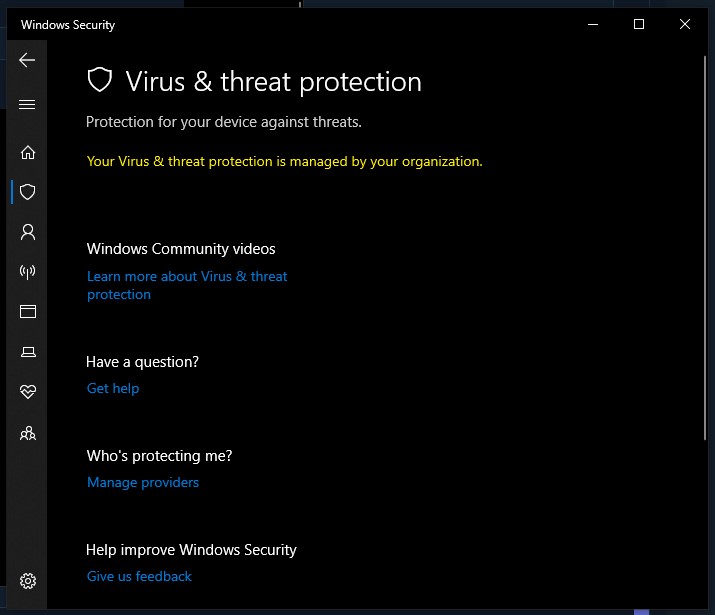
Then you already have disabled it. Are you using any other antiviruses? Like AVG or Bitdefender? Are you sure you are starting it with Administrator privileges?This is my Defender window. same as yours:
