How to Enable VT-x In Windows 10?

Durum
Üzgünüz bu konu cevaplar için kapatılmıştır...
Onaylı Üye
Katılım
17 Mar 2020
Mesajlar
86
Çözümler
2
Tepki puanı
10
Ödüller
7
Yaş
24
6 HİZMET YILI
I am struggling with Enable VT-X Cause my PUBG Mobile on gamelop lagging alot.
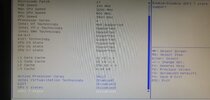
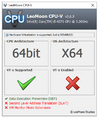
As we can see VTx is enabled in BIOS but LeoMoon CPU-V is showing that VT-x is not enabled. Is there any thing i am missing or can someone Help me Setting Up Gameloop and My PC for PUBG Mobile Smooth Gameplay.
My PC Specs are:
CPU: Intel COre i5-4570
Hard Drive: SSD
Ram: 8 GB
GPU: R9 270x 4 GB (OC Edition)
Thanks!
 

Ekli dosyalar

  • Capture.PNG
    Capture.PNG
    12.9 KB · Görüntüleme: 56
  • WhatsApp Image 2024-02-13 at 17.36.09_e358b9a3.jpg
    WhatsApp Image 2024-02-13 at 17.36.09_e358b9a3.jpg
    104.5 KB · Görüntüleme: 68
Onaylı Üye
Katılım
4 Mar 2023
Mesajlar
70
Tepki puanı
8
Ödüller
3
Yaş
32
3 HİZMET YILI
search on youtube you will get the solution
 
Süper Üye
Katılım
19 Haz 2021
Mesajlar
937
Çözümler
1
Tepki puanı
158
Ödüller
4
Yaş
28
4 HİZMET YILI
Instead of check here turn pc on and search system information and check there if that is on or off if it is on there too then try installing other emulators like LD player or Bluestack just to check if its problem with your current emulator or with something else because sometime some different error become cause of different services termination which leads to different errors
1707834242676.png
 
Yuki
Seçkin Üye
Katılım
3 Haz 2020
Mesajlar
303
Tepki puanı
35
Ödüller
5
Sosyal
6 HİZMET YILI
you typically need to access the BIOS or UEFI firmware settings of your computer, in the BIOS or UEFI settings, look for options related to virtualization. This might be labeled as "Virtualization Technology," "VT-x," "Intel Virtualization Technology," or something similar
 
Üye
Katılım
10 Tem 2022
Mesajlar
4
Tepki puanı
0
Ödüller
1
Yaş
23
3 HİZMET YILI
What is Vt

u have to change ur gameloop settings

just contact with me i'll help u with settings
 
Süper Üye
Katılım
19 Haz 2021
Mesajlar
937
Çözümler
1
Tepki puanı
158
Ödüller
4
Yaş
28
4 HİZMET YILI
Instead of check here turn pc on and search system information and check there if that is on or off if it is on there too then try installing other emulators like LD player or Bluestack just to check if its problem with your current emulator or with something else because sometime some different error become cause of different services
stop copy pasting it will lead you to ban
 
Onaylı Üye
Katılım
17 Mar 2020
Mesajlar
86
Çözümler
2
Tepki puanı
10
Ödüller
7
Yaş
24
6 HİZMET YILI
you typically need to access the BIOS or UEFI firmware settings of your computer, in the BIOS or UEFI settings, look for options related to virtualization. This might be labeled as "Virtualization Technology," "VT-x," "Intel Virtualization Technology," or something similar
I have Enabled in Bios Settings But it was showing Disabled in LeoMoon CPU-V.

What is Vt

u have to change ur gameloop settings

just contact with me i'll help u with settings
Ok
 
Onaylı Üye
Katılım
4 Şub 2024
Mesajlar
51
Tepki puanı
3
Yaş
32
2 HİZMET YILI
  1. Restart your computer.
  2. Access BIOS/UEFI settings: Press the key (F2, F12, ESC, or DEL) during boot.
  3. Find Virtualization setting: Look for "Virtualization Technology" or similar in CPU settings.
  4. Enable Virtualization: Switch from "Disabled" to "Enabled."
  5. Save and exit: Confirm changes and exit BIOS/UEFI settings.
  6. Restart your computer.
  7. Verify Virtualization: Check in Windows Task Manager under "Performance" > "CPU" for "Virtualization: Enabled."
 
Onaylı Üye
Katılım
18 Ocak 2022
Mesajlar
63
Tepki puanı
7
Ödüller
3
Yaş
32
4 HİZMET YILI
search on youtube you will get the solution
 
Onaylı Üye
Katılım
11 Şub 2022
Mesajlar
57
Tepki puanı
1
Ödüller
2
Yaş
30
4 HİZMET YILI
its a mother bord bios setting . mother bord model search on youtube..ok....
 
Durum
Üzgünüz bu konu cevaplar için kapatılmıştır...
Üst