
Üye
[font=Hind, sans-serif]Google sitemizi eklemek için ilk önce google hesabımızın olması gerekiyor.Google hesabı nasıl alınır ve site nasıl kaydedilir onu anlatacağım.[/FONT]
[font=Hind, sans-serif]1-)[/FONT][font=Hind, sans-serif] İlk olarak aşağıdaki link'e tıklıyarak kayıt işlemini başlatıyoruz.[/FONT]
[font=Hind, sans-serif]Kod:
[/FONT]
[font=Hind, sans-serif]Kod:[/FONT]
[font=Hind, sans-serif]2-)[/FONT][font=Hind, sans-serif] Link'e tıkladıktan sonra karşımıza böyle bir sayfa geliyor.[/FONT]
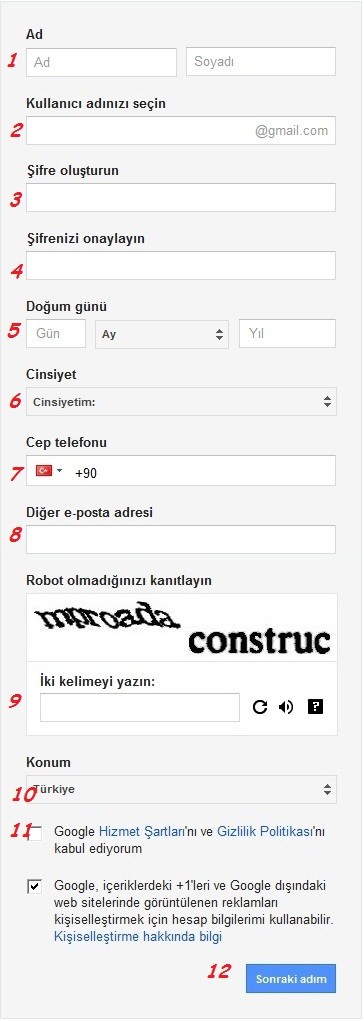
[font=Hind, sans-serif]1-)[/FONT][font=Hind, sans-serif] [/FONT][font=Hind, sans-serif]Adınız[/FONT][font=Hind, sans-serif] ve [/FONT][font=Hind, sans-serif]Soyadınızı[/FONT][font=Hind, sans-serif] yazınız.[/FONT]
[font=Hind, sans-serif]2-)[/FONT][font=Hind, sans-serif] Kullanmak istediğiniz [/FONT][font=Hind, sans-serif]kullanıcı adını [/FONT][font=Hind, sans-serif]yazınız.[/FONT]
[font=Hind, sans-serif]3-)[/FONT][font=Hind, sans-serif] [/FONT][font=Hind, sans-serif]Şifrenizi[/FONT][font=Hind, sans-serif] oluşturun.[/FONT]
[font=Hind, sans-serif]4-)[/FONT][font=Hind, sans-serif] Şifrenizi [/FONT][font=Hind, sans-serif]doğrulayın.[/FONT]
[font=Hind, sans-serif]5-)[/FONT][font=Hind, sans-serif] [/FONT][font=Hind, sans-serif]Doğum Tarihinizi[/FONT][font=Hind, sans-serif] yazın.[/FONT]
[font=Hind, sans-serif]6-)[/FONT][font=Hind, sans-serif] [/FONT][font=Hind, sans-serif]Cinsiyetinizi[/FONT][font=Hind, sans-serif] seçiniz.[/FONT]
[font=Hind, sans-serif]7-)[/FONT][font=Hind, sans-serif] [/FONT][font=Hind, sans-serif]Cep telefonunuzu[/FONT][font=Hind, sans-serif] yazınız.([/FONT][font=Hind, sans-serif]Not:[/FONT][font=Hind, sans-serif] Kendi cep telefonu numaranızı yazın , çünkü telefonunuza onay kodu gelicek , o gelmediği sürece mailiniz onaylanmaz.)[/FONT]
[font=Hind, sans-serif] [/FONT][font=Hind, sans-serif] Varsa [/FONT][font=Hind, sans-serif]diğer e-posta[/FONT][font=Hind, sans-serif] adresinizi yazınız.[/FONT]
[font=Hind, sans-serif]9-)[/FONT][font=Hind, sans-serif] [/FONT][font=Hind, sans-serif]Resimde gördüklerinizi [/FONT][font=Hind, sans-serif]yazınız.[/FONT]
[font=Hind, sans-serif]10-)[/FONT][font=Hind, sans-serif] [/FONT][font=Hind, sans-serif]Konumunuzu [/FONT][font=Hind, sans-serif]seçiniz.[/FONT]
[font=Hind, sans-serif]11-)[/FONT][font=Hind, sans-serif] Kutucuğa [/FONT][font=Hind, sans-serif]tik [/FONT][font=Hind, sans-serif]atınız.[/FONT]
[font=Hind, sans-serif]12-)[/FONT][font=Hind, sans-serif] [/FONT][font=Hind, sans-serif]Sonraki Adım[/FONT][font=Hind, sans-serif]'a tıklayınız.[/FONT]
[font=Hind, sans-serif]3-)[/FONT][font=Hind, sans-serif] Cep telefonunuza onay kodu gelip , maili onaylatıyorsunuz.[/FONT]
[font=Hind, sans-serif]4-)[/FONT][font=Hind, sans-serif] Şimdi sırada sitemizi google ekleme var bunun için ilk olarak google hesabımıza girip aşağıdaki link'e giriyoruz.[/FONT]
[font=Hind, sans-serif]Kod:
[/FONT]
[font=Hind, sans-serif]Kod:[/FONT]
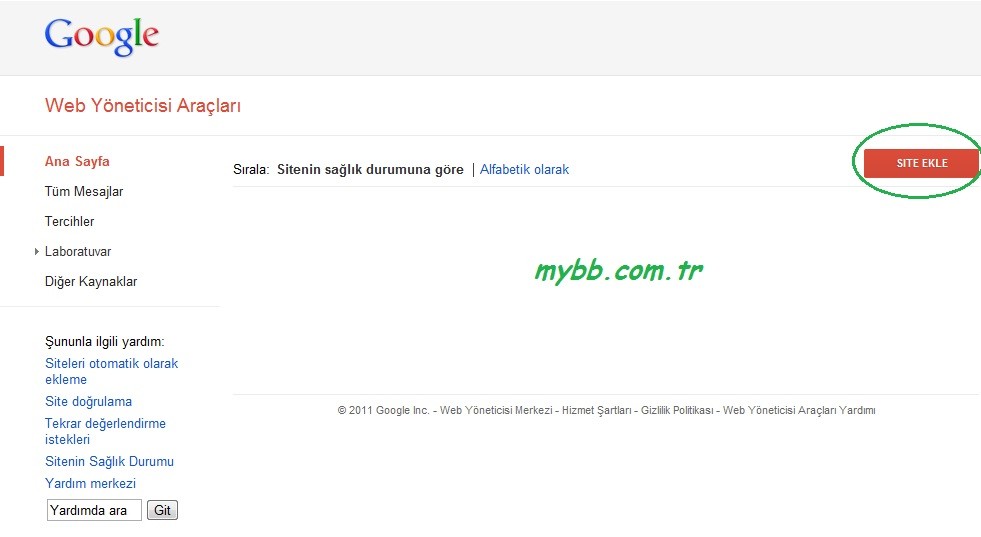
[font=Hind, sans-serif]5-)[/FONT][font=Hind, sans-serif] Link'e girdikten sonra sol kısımdaki [/FONT][font=Hind, sans-serif]Site Ekle[/FONT][font=Hind, sans-serif]'ye tıklıyoruz.[/FONT]
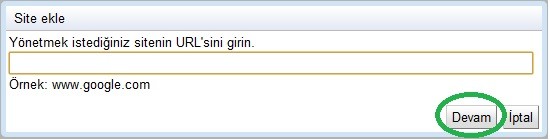
[font=Hind, sans-serif]6-)[/FONT][font=Hind, sans-serif] Boşluğa [/FONT][font=Hind, sans-serif]site adresinizi[/FONT][font=Hind, sans-serif] yazıp , [/FONT][font=Hind, sans-serif]devam[/FONT][font=Hind, sans-serif]'a tıklayınız.[/FONT]
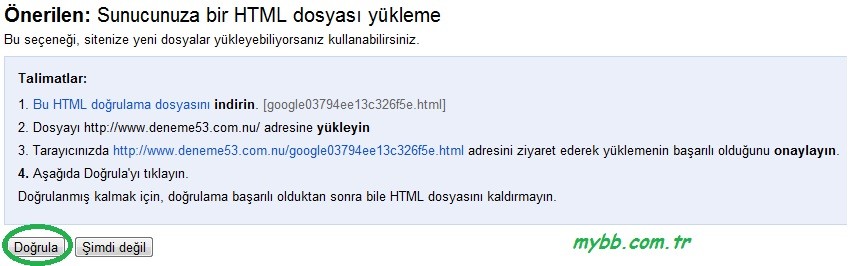
[font=Hind, sans-serif]7-)[/FONT][font=Hind, sans-serif] Bu aşamada siteyi google onaylatıyoruz.Bunu 2 şekilde yapabiliriz.[/FONT]
[font=Hind, sans-serif]1.Yol:[/FONT][font=Hind, sans-serif] Html dosyasını indirip , ftp'de ana dizine atınız.Attıktan sonra resimdeki [/FONT][font=Hind, sans-serif]3. Maddeyi[/FONT][font=Hind, sans-serif] uygulayınız.Uyguladıktan sonra [/FONT][font=Hind, sans-serif]Doğrula[/FONT][font=Hind, sans-serif]'ya basınız.[/FONT]
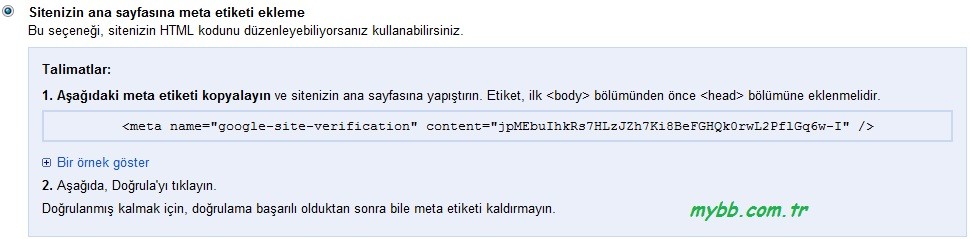
[font=Hind, sans-serif]2.Yol:[/FONT][font=Hind, sans-serif] Google size vermiş olduğu [/FONT][font=Hind, sans-serif]meta etiketi[/FONT][font=Hind, sans-serif] [/FONT][font=Hind, sans-serif]index [/FONT][font=Hind, sans-serif]şablonunuza yapıştırıp , [/FONT][font=Hind, sans-serif]Doğrula[/FONT][font=Hind, sans-serif]'ya basınız.[/FONT]
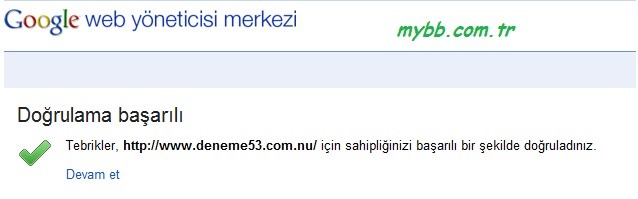
[font=Hind, sans-serif][/FONT][font=Hind, sans-serif] Tebrikler siteniz başarıyla doğrulanmıştır , devam et diyerek sitenizi kontrol edebilirsiniz.[/FONT]
[font=Hind, sans-serif]1-)[/FONT][font=Hind, sans-serif] İlk olarak aşağıdaki link'e tıklıyarak kayıt işlemini başlatıyoruz.[/FONT]
[font=Hind, sans-serif]Kod:
[/FONT]
[font=Hind, sans-serif]Kod:[/FONT]
Kod:
https://accounts.google.com/SignUp?service=mail&continue=http%3A%2F%2Fmail.google.com%2Fmail%2F%3Fhl%3Dtr<mpl=default&hl=tr[font=Hind, sans-serif]2-)[/FONT][font=Hind, sans-serif] Link'e tıkladıktan sonra karşımıza böyle bir sayfa geliyor.[/FONT]
[font=Hind, sans-serif]1-)[/FONT][font=Hind, sans-serif] [/FONT][font=Hind, sans-serif]Adınız[/FONT][font=Hind, sans-serif] ve [/FONT][font=Hind, sans-serif]Soyadınızı[/FONT][font=Hind, sans-serif] yazınız.[/FONT]
[font=Hind, sans-serif]2-)[/FONT][font=Hind, sans-serif] Kullanmak istediğiniz [/FONT][font=Hind, sans-serif]kullanıcı adını [/FONT][font=Hind, sans-serif]yazınız.[/FONT]
[font=Hind, sans-serif]3-)[/FONT][font=Hind, sans-serif] [/FONT][font=Hind, sans-serif]Şifrenizi[/FONT][font=Hind, sans-serif] oluşturun.[/FONT]
[font=Hind, sans-serif]4-)[/FONT][font=Hind, sans-serif] Şifrenizi [/FONT][font=Hind, sans-serif]doğrulayın.[/FONT]
[font=Hind, sans-serif]5-)[/FONT][font=Hind, sans-serif] [/FONT][font=Hind, sans-serif]Doğum Tarihinizi[/FONT][font=Hind, sans-serif] yazın.[/FONT]
[font=Hind, sans-serif]6-)[/FONT][font=Hind, sans-serif] [/FONT][font=Hind, sans-serif]Cinsiyetinizi[/FONT][font=Hind, sans-serif] seçiniz.[/FONT]
[font=Hind, sans-serif]7-)[/FONT][font=Hind, sans-serif] [/FONT][font=Hind, sans-serif]Cep telefonunuzu[/FONT][font=Hind, sans-serif] yazınız.([/FONT][font=Hind, sans-serif]Not:[/FONT][font=Hind, sans-serif] Kendi cep telefonu numaranızı yazın , çünkü telefonunuza onay kodu gelicek , o gelmediği sürece mailiniz onaylanmaz.)[/FONT]
[font=Hind, sans-serif]
[/FONT][font=Hind, sans-serif] Varsa [/FONT][font=Hind, sans-serif]diğer e-posta[/FONT][font=Hind, sans-serif] adresinizi yazınız.[/FONT][font=Hind, sans-serif]9-)[/FONT][font=Hind, sans-serif] [/FONT][font=Hind, sans-serif]Resimde gördüklerinizi [/FONT][font=Hind, sans-serif]yazınız.[/FONT]
[font=Hind, sans-serif]10-)[/FONT][font=Hind, sans-serif] [/FONT][font=Hind, sans-serif]Konumunuzu [/FONT][font=Hind, sans-serif]seçiniz.[/FONT]
[font=Hind, sans-serif]11-)[/FONT][font=Hind, sans-serif] Kutucuğa [/FONT][font=Hind, sans-serif]tik [/FONT][font=Hind, sans-serif]atınız.[/FONT]
[font=Hind, sans-serif]12-)[/FONT][font=Hind, sans-serif] [/FONT][font=Hind, sans-serif]Sonraki Adım[/FONT][font=Hind, sans-serif]'a tıklayınız.[/FONT]
[font=Hind, sans-serif]3-)[/FONT][font=Hind, sans-serif] Cep telefonunuza onay kodu gelip , maili onaylatıyorsunuz.[/FONT]
[font=Hind, sans-serif]4-)[/FONT][font=Hind, sans-serif] Şimdi sırada sitemizi google ekleme var bunun için ilk olarak google hesabımıza girip aşağıdaki link'e giriyoruz.[/FONT]
[font=Hind, sans-serif]Kod:
[/FONT]
[font=Hind, sans-serif]Kod:[/FONT]
Kod:
https://www.google.com/webmasters/tools/home?hl=tr[font=Hind, sans-serif]5-)[/FONT][font=Hind, sans-serif] Link'e girdikten sonra sol kısımdaki [/FONT][font=Hind, sans-serif]Site Ekle[/FONT][font=Hind, sans-serif]'ye tıklıyoruz.[/FONT]
[font=Hind, sans-serif]6-)[/FONT][font=Hind, sans-serif] Boşluğa [/FONT][font=Hind, sans-serif]site adresinizi[/FONT][font=Hind, sans-serif] yazıp , [/FONT][font=Hind, sans-serif]devam[/FONT][font=Hind, sans-serif]'a tıklayınız.[/FONT]
[font=Hind, sans-serif]7-)[/FONT][font=Hind, sans-serif] Bu aşamada siteyi google onaylatıyoruz.Bunu 2 şekilde yapabiliriz.[/FONT]
[font=Hind, sans-serif]1.Yol:[/FONT][font=Hind, sans-serif] Html dosyasını indirip , ftp'de ana dizine atınız.Attıktan sonra resimdeki [/FONT][font=Hind, sans-serif]3. Maddeyi[/FONT][font=Hind, sans-serif] uygulayınız.Uyguladıktan sonra [/FONT][font=Hind, sans-serif]Doğrula[/FONT][font=Hind, sans-serif]'ya basınız.[/FONT]
[font=Hind, sans-serif]2.Yol:[/FONT][font=Hind, sans-serif] Google size vermiş olduğu [/FONT][font=Hind, sans-serif]meta etiketi[/FONT][font=Hind, sans-serif] [/FONT][font=Hind, sans-serif]index [/FONT][font=Hind, sans-serif]şablonunuza yapıştırıp , [/FONT][font=Hind, sans-serif]Doğrula[/FONT][font=Hind, sans-serif]'ya basınız.[/FONT]
[font=Hind, sans-serif]
[/FONT][font=Hind, sans-serif] Tebrikler siteniz başarıyla doğrulanmıştır , devam et diyerek sitenizi kontrol edebilirsiniz.[/FONT]

