sabala
Onaylı Üye
EN: Hi guys! I came to bring a very basic tutorial on how I did to automate the extraction and execution of WSReborn with simple command lines through the Windows CMD. The only thing we will need besides CMD is 7zip, 7zip is an alternative client to extract compressed files, just like Winrar. VIDEO TUTORIAL:
TR: Merhaba arkadaşlar! Basit komutlarla ve Windows CMD aracılığıyla WSReborn'un çıkarılmasını ve çalıştırılmasını nasıl otomatikleştirdiğime dair bir öğretici hazırladım. CMD'nin yanı sıra ihtiyacımız olacak tek şey: 7Zip. 7Zip, tıpkı Winrar gibi sıkıştırılmış dosyaları çıkarmaya yarayan bir program. Öğretici Video:
EN:
TR:
EN: In order for there to be a prefix recognized by the CMD, we need to add it to the PATH of the User Environment. Open the CMD then type the following lines separately
TR: CMD tarafından tanınması için onu kullanıcı yoluna eklememiz gerekir. CMD'yi açın ve ardından aşağıdaki satırları ayrı ayrı yazın:
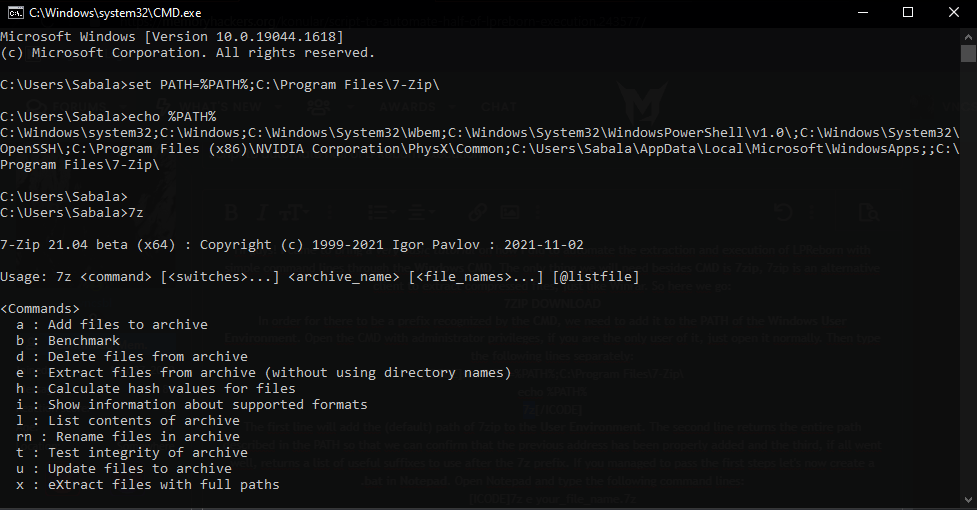
EN: Print of how the answers given by the CMD will be after introducing these lines individually.
TR: Bu, satırları ayrı ayrı yazdıktan sonra CMD ekranında göreceğiniz cevaptır.
EN: After this, open Notepad and type the following command lines
TR: Daha sonra, Not Defterini açın ve aşağıdaki komut satırlarını yazın
EN: Don't forget to change your_file_name by the name that is present in the zip and inside it. In addition you will also need to remove the password from the original zip downloaded here from the forum. For that, you can simply extract it the first time using the password and then add it again to a new zip without password.
TR: your_file_name kısmını, Zip'in adıyla ve Zip'in içindeki dosyanın adıyla değiştirmeyi unutmayın. Ek olarak, forumdan indirdiğiniz orijinal Zip'teki şifreyi de kaldırmanız gerekecektir. Bunun için, ilk önce Zip'teki dosyayı çıkarıp şifresiz yeni bir Zip'e tekrar ekleyebilirsiniz.
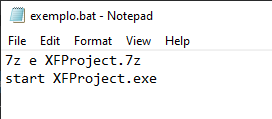
EN: On my computer, the file is renamed XFProject, as in the original.
TR: Benim bilgisayarımda dosyanın adı, orijinalinde olduğu gibi XFProject.
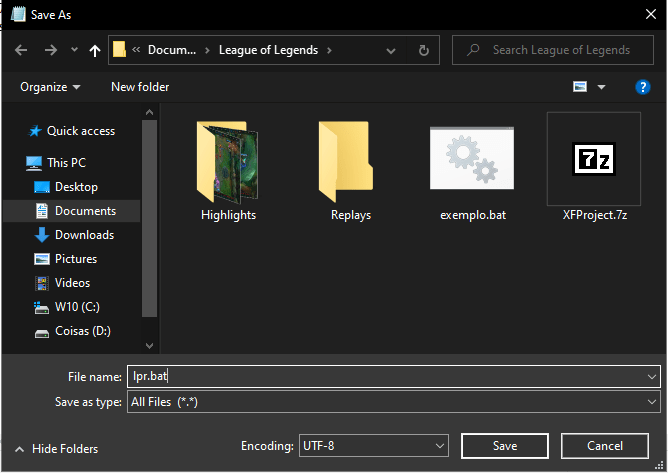
EN: Save with a suggestive name (or not) and with the .bat extension.
TR: İstediğiniz bir adla ve .bat uzantısıyla kaydedin.
EN: Finally, you'll have a .bat file that will do all the work for you, so you can add it to your desktop and change its name and icon so that it visually matches the rest of your computer.
TR: onuç olarak, tüm işi sizin yerinize yapacak bir .bat dosyasına sahip olacaksınız. Böylece onu masaüstünüze ekleyebilir ve görsel olarak bilgisayarınızın geri kalanıyla eşleşecek şekilde adını ve simgesini değiştirebilirsiniz.
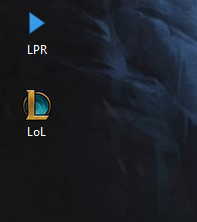
EN: WSR is my script executable on my desktop, so I just need to inject the cheat at https://memoryhackers.org/cheats/lol-script-dword-wsreborn-2023.27/
TR: WSR benim masaüstümde çalıştırılabilir script dosyam. O yüzden şimdi sadece https://memoryhackers.org/cheats/lol-script-dword-wsreborn-2023.27/ adresinden hileyi inject etmem yeterli.
Thanks @Pudding for turkish translation.
TR: Merhaba arkadaşlar! Basit komutlarla ve Windows CMD aracılığıyla WSReborn'un çıkarılmasını ve çalıştırılmasını nasıl otomatikleştirdiğime dair bir öğretici hazırladım. CMD'nin yanı sıra ihtiyacımız olacak tek şey: 7Zip. 7Zip, tıpkı Winrar gibi sıkıştırılmış dosyaları çıkarmaya yarayan bir program. Öğretici Video:
EN:
Bağlantıları görmek için lütfen
Giriş Yap
TR:
Bağlantıları görmek için lütfen
Giriş Yap
EN: In order for there to be a prefix recognized by the CMD, we need to add it to the PATH of the User Environment. Open the CMD then type the following lines separately
TR: CMD tarafından tanınması için onu kullanıcı yoluna eklememiz gerekir. CMD'yi açın ve ardından aşağıdaki satırları ayrı ayrı yazın:
set PATH=%PATH%;C:\Program Files\7-Zip\
echo %PATH%
7z
EN: Print of how the answers given by the CMD will be after introducing these lines individually.
TR: Bu, satırları ayrı ayrı yazdıktan sonra CMD ekranında göreceğiniz cevaptır.
EN: After this, open Notepad and type the following command lines
TR: Daha sonra, Not Defterini açın ve aşağıdaki komut satırlarını yazın
7z e your_file_name.7z
start your_file_name.exe
EN: Don't forget to change your_file_name by the name that is present in the zip and inside it. In addition you will also need to remove the password from the original zip downloaded here from the forum. For that, you can simply extract it the first time using the password and then add it again to a new zip without password.
TR: your_file_name kısmını, Zip'in adıyla ve Zip'in içindeki dosyanın adıyla değiştirmeyi unutmayın. Ek olarak, forumdan indirdiğiniz orijinal Zip'teki şifreyi de kaldırmanız gerekecektir. Bunun için, ilk önce Zip'teki dosyayı çıkarıp şifresiz yeni bir Zip'e tekrar ekleyebilirsiniz.
EN: On my computer, the file is renamed XFProject, as in the original.
TR: Benim bilgisayarımda dosyanın adı, orijinalinde olduğu gibi XFProject.
EN: Save with a suggestive name (or not) and with the .bat extension.
TR: İstediğiniz bir adla ve .bat uzantısıyla kaydedin.
EN: Finally, you'll have a .bat file that will do all the work for you, so you can add it to your desktop and change its name and icon so that it visually matches the rest of your computer.
TR: onuç olarak, tüm işi sizin yerinize yapacak bir .bat dosyasına sahip olacaksınız. Böylece onu masaüstünüze ekleyebilir ve görsel olarak bilgisayarınızın geri kalanıyla eşleşecek şekilde adını ve simgesini değiştirebilirsiniz.
EN: WSR is my script executable on my desktop, so I just need to inject the cheat at https://memoryhackers.org/cheats/lol-script-dword-wsreborn-2023.27/
TR: WSR benim masaüstümde çalıştırılabilir script dosyam. O yüzden şimdi sadece https://memoryhackers.org/cheats/lol-script-dword-wsreborn-2023.27/ adresinden hileyi inject etmem yeterli.
Thanks @Pudding for turkish translation.
Son düzenleme: