
Süper Üye
Rockstar destek ekibinden Kurt isimli bir kişiyle yaklaşık 45dk-1 saat süren bir konuşmamız oldu. Sorunumu söyledim o yardım etti vs.(konuşmalardan anlarsınız zaten, okumaya üşenmezseniz.)
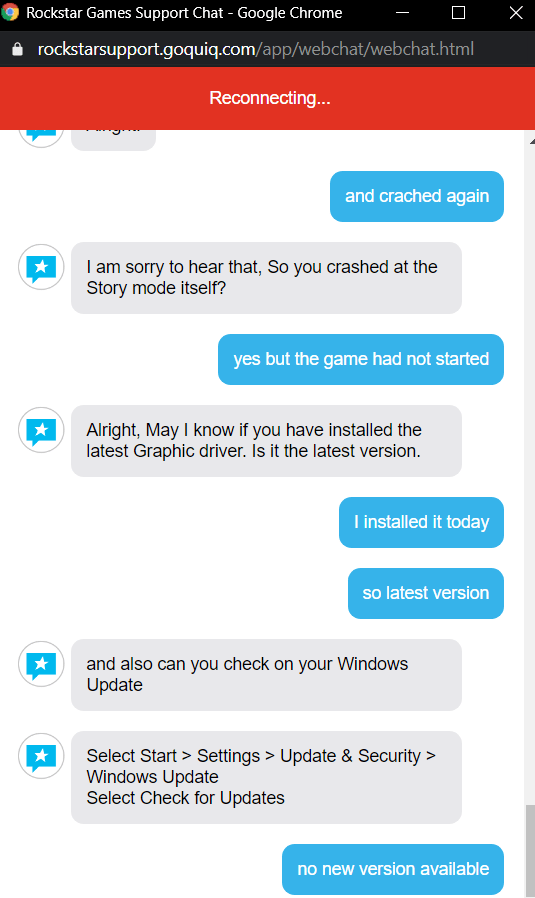
Kısaca hatamı söyledim bana çözüm olarak bir şeyler yapmamı söyledi yaptım ve hata çözülmedi son olarak ekran kartımın ve windows'un güncel olup olmadığını sordu ben de ikisinin de güncel olduğununu söyledim, söylediğim gibi bağlantım kesildi. Yani çözemedikleri için bağlantımı kestiler.
Şu teknik desteklerin bir halta yaradığını göremeyeceğim sanırım.
Bu kadar konuşmadan sonra sorununuzu çözemedik demek çok mu zordu lan.
Tam da şey yazacaktım "Steam üzerinden oyunu ssd den harddiske geçirdim oyunu bununla alakalı bir hata olabilir mi?" yazacaktım bağlantımı kestiler inanılmaz.
Bu arada aldığım hatayı teknik desteğe konu olarak açacağım.
//Evet ingilizcem kötü.
+I can't play Gta V. I go to the Rockstar game launcher and click play, Gta V opens. I choose "story mode" and I'm waiting to load the screen, but After 5-6 minutes, the Rockstar launcher gives a "grand theft auto v exited unexpectedly ..." error. what should I do?
-Hello, thank you for contacting Rockstar Support, my name is Kurt. I see that you need help with Crash, is this correct?
+yeah, its correct. nice to meet you
-Alright,
I will be glad to assist you with it. May I know when are you getting this error. Is it during the launch or during the game play?
+Get story mode on installation screen.
-Alright,
Can I have the following files. DXDiag file: Press Windows Key + R Type dxdiag and press Enter Wait for the progress bar to finish loading Press the Save All Information button at the bottom of the screen Save the file as 'dxdiag.txt' somewhere you can easily find it, such as your desktop Press the Exit button to quit this application MSInfo file: Press Windows Key + R Type msinfo32 and press Enter This will open the System Information window Click on File in the top toolbar and select Export Save the file as 'msinfo.txt' somewhere you can easily find it, such as your desktop Wait for the progress bar to finish, this can take a few minutes Close the System Information window
(dosyayı gönerdim)
-Thank you
+msinfo is not upload his saying me "Unsopperted file type"
-May I know in which format that you saved the msinfo files.
+.txt
-Alright, That's fine form now. Could you please go ahead and remove all the external device connected to your PC and keep only your mouse and keyboard. Remove all the USB and controllers if connected.
+okay, i did
-Great, Now disable antivirus and firewall. Let me know once you have done that.
+okay, was already disabled
-Alright, Now Load Steam From the Library section, right-click on the game and select Properties from the menu. Select the Local files tab and click the "Verify integrity of game files" option. Steam will verify the game's cache file. This process may take several minutes. Once the process is completed, the Check Window will automatically exit.
+I've done this many times. but I can do it again if you want
-Yes please do it again.
+okay is verifing
-Alright.
+1 file is unverified and downloading
downloaded what should I do ?
-Alright, can you type the following command. At the command prompt, type the following command, and then press ENTER sfc /scannow
+is verifing again
-Sure let me know once its done and let me know if all the files are verified or not.
+alright
-Let me know once its over.
+okay its over.
-Alright. Great. Now can you run the Steam as admin. And also the Rockstar Game launcher.
+should i turn off steam? because its still working okay, i did
-Alright, now try loading the game.
+okay loading
-Alright.
+i am in the main menu
-let me know how it goes.
+story mode is loading..
-Alright.
+and crached again
-I am sorry to hear that, So you crashed at the Story mode itself?
+yes but the game had not started
-Alright, May I know if you have installed the latest Graphic driver. Is it the latest version.
+I installed it today so latest version
-and also can you check on your Windows Update Select Start > Settings > Update & Security > Windows Update Select Check for Updates
+no new version available
bunu yazdıktan sonra bağlantı kesildi diyor fakat benim internetimde sorun yok, ayrıca bir daha da gelmiyor.
+I can't play Gta V. I go to the Rockstar game launcher and click play, Gta V opens. I choose "story mode" and I'm waiting to load the screen, but After 5-6 minutes, the Rockstar launcher gives a "grand theft auto v exited unexpectedly ..." error. what should I do?
-Hello, thank you for contacting Rockstar Support, my name is Kurt. I see that you need help with Crash, is this correct?
+yeah, its correct. nice to meet you
-Alright,
I will be glad to assist you with it. May I know when are you getting this error. Is it during the launch or during the game play?
+Get story mode on installation screen.
-Alright,
Can I have the following files. DXDiag file: Press Windows Key + R Type dxdiag and press Enter Wait for the progress bar to finish loading Press the Save All Information button at the bottom of the screen Save the file as 'dxdiag.txt' somewhere you can easily find it, such as your desktop Press the Exit button to quit this application MSInfo file: Press Windows Key + R Type msinfo32 and press Enter This will open the System Information window Click on File in the top toolbar and select Export Save the file as 'msinfo.txt' somewhere you can easily find it, such as your desktop Wait for the progress bar to finish, this can take a few minutes Close the System Information window
(dosyayı gönerdim)
-Thank you
+msinfo is not upload his saying me "Unsopperted file type"
-May I know in which format that you saved the msinfo files.
+.txt
-Alright, That's fine form now. Could you please go ahead and remove all the external device connected to your PC and keep only your mouse and keyboard. Remove all the USB and controllers if connected.
+okay, i did
-Great, Now disable antivirus and firewall. Let me know once you have done that.
+okay, was already disabled
-Alright, Now Load Steam From the Library section, right-click on the game and select Properties from the menu. Select the Local files tab and click the "Verify integrity of game files" option. Steam will verify the game's cache file. This process may take several minutes. Once the process is completed, the Check Window will automatically exit.
+I've done this many times. but I can do it again if you want
-Yes please do it again.
+okay is verifing
-Alright.
+1 file is unverified and downloading
downloaded what should I do ?
-Alright, can you type the following command. At the command prompt, type the following command, and then press ENTER sfc /scannow
+is verifing again
-Sure let me know once its done and let me know if all the files are verified or not.
+alright
-Let me know once its over.
+okay its over.
-Alright. Great. Now can you run the Steam as admin. And also the Rockstar Game launcher.
+should i turn off steam? because its still working okay, i did
-Alright, now try loading the game.
+okay loading
-Alright.
+i am in the main menu
-let me know how it goes.
+story mode is loading..
-Alright.
+and crached again
-I am sorry to hear that, So you crashed at the Story mode itself?
+yes but the game had not started
-Alright, May I know if you have installed the latest Graphic driver. Is it the latest version.
+I installed it today so latest version
-and also can you check on your Windows Update Select Start > Settings > Update & Security > Windows Update Select Check for Updates
+no new version available
bunu yazdıktan sonra bağlantı kesildi diyor fakat benim internetimde sorun yok, ayrıca bir daha da gelmiyor.
Şu teknik desteklerin bir halta yaradığını göremeyeceğim sanırım.
Bu kadar konuşmadan sonra sorununuzu çözemedik demek çok mu zordu lan.
Tam da şey yazacaktım "Steam üzerinden oyunu ssd den harddiske geçirdim oyunu bununla alakalı bir hata olabilir mi?" yazacaktım bağlantımı kestiler inanılmaz.
Bu arada aldığım hatayı teknik desteğe konu olarak açacağım.

 Yani elimdeki KEY'i kaybettiğim için bir çözüm yolu bulamadım.Belki C: 'ye tekrar taşırsam açılır diye düşünüyorum ama hiç denemedim.