
Çözüldü What is this error?

Durum
Üzgünüz bu konu cevaplar için kapatılmıştır...
Uzman Üye
Katılım
23 Eki 2020
Mesajlar
155
Tepki puanı
6
Ödüller
4
5 HİZMET YILI
Can anyone tell me why I'm getting this error after used valorant dword private hack just for 4 match.
Today tried to log in but can't play.
Am I got banned? or something else wrong.
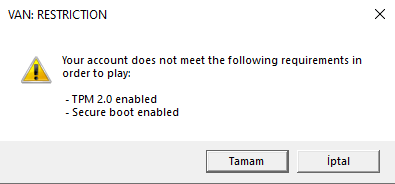

ss.png
 
Çözüm
My windows is win 10 pro.
If your processor supports TPM 2.0 and you find this option in UEFI/BIOS, simply enable it by clicking “On”, “Enabled” or “Firmware TPM” depending on the manufacturer's UEFI/BIOS version.

Go to Windows Settings.
Go to the Update and Recovery tab.
Click Security.
Click Restart Now.
On the next screen, click Troubleshoot.
Then click Advanced Options -> UEFI Firmware Settings -> UEFI Firmware Settings -> Restart.

If your system processor does not support TPM 2.0, you can solve this problem with a processor that supports TPM 2.0.
Süper Üye
Katılım
22 Kas 2021
Mesajlar
1,440
Çözümler
353
Tepki puanı
364
Ödüller
8
4 HİZMET YILI
Hello

Trusted Platform Module (TPM) and Secure Boot are security technologies that enable Windows 11 to make programs boot with a higher security standard. Vanguard requires these two features to be turned on in order to determine the reliability of the system.

Step 1 : You can follow the method below to activate TPM 2.0.

Settings > Update & Security > Recovery > Restart now.

On the next screen, select UEFI Firmware Settings > > Advanced options > Restart to make changes. These settings are sometimes located in a submenu in the UEFI BIOS labeled Advanced, Security, or Trusted Computing. The option to enable TPM may be labeled as Security Appliance, Security Appliance Support, TPM Status, AMD fTPM switch, AMD PSP fTPM, Intel PTT, or Intel Platform Trust Technology.


Step 2 : You can follow the method below to activate Secure Boot.

You can often access this menu by pressing a key while your PC is booting, such as F1, F2, F12, or Esc.
Or​
From Windows, hold the Shift key while selecting Restart. Go to Troubleshoot > Advanced Options: UEFI Firmware Settings.
Find the Secure Boot setting, and if possible, set it to Enabled. This option is usually in either the Security tab, the Boot tab, or the Authentication tab.
On some PCs, select Custom, and then load the Secure Boot keys that are built into the PC.
If the PC doesn't allow you to enable Secure Boot, try resetting the BIOS back to the factory settings. Save changes and exit. The PC reboots.
 
Son düzenleme:
Uzman Üye
Katılım
23 Eki 2020
Mesajlar
155
Tepki puanı
6
Ödüller
4
5 HİZMET YILI
Secure Boot is worked but the tpm I can't find it.I did some search and I think it's not compatible with my pc.
It just shows TPM 2.0 enabled.Secure Boot is gone
 
Son düzenleme:
Süper Üye
Katılım
22 Kas 2021
Mesajlar
1,440
Çözümler
353
Tepki puanı
364
Ödüller
8
4 HİZMET YILI
You can purchase a system with TPM 2.0 and Secure Boot feature.

Open Run using the Windows + R shortcut.
Type ‘tpm.msc’ in the ‘Open:’ section and press Enter.

In the window that opens, check the section called 'Status'. If TPM hardware is available, the statement 'Ready to use TPM' should appear.
Make sure your TPM hardware is 2.0 by checking the 'Specification Version' in the 'TPM Manufacturer Information' section.
 
Son düzenleme:
Uzman Üye
Katılım
23 Eki 2020
Mesajlar
155
Tepki puanı
6
Ödüller
4
5 HİZMET YILI
But before using this dword didn't get any error like this.
That means I gotta change my system just cuz I used this cheat?
 
Süper Üye
Katılım
22 Kas 2021
Mesajlar
1,440
Çözümler
353
Tepki puanı
364
Ödüller
8
4 HİZMET YILI
My windows is win 10 pro.
If your processor supports TPM 2.0 and you find this option in UEFI/BIOS, simply enable it by clicking “On”, “Enabled” or “Firmware TPM” depending on the manufacturer's UEFI/BIOS version.

Go to Windows Settings.
Go to the Update and Recovery tab.
Click Security.
Click Restart Now.
On the next screen, click Troubleshoot.
Then click Advanced Options -> UEFI Firmware Settings -> UEFI Firmware Settings -> Restart.

If your system processor does not support TPM 2.0, you can solve this problem with a processor that supports TPM 2.0.
 
Çözüm
Uzman Üye
Katılım
23 Eki 2020
Mesajlar
155
Tepki puanı
6
Ödüller
4
5 HİZMET YILI
I searched alot I did everything on internet.. Still TPM doesnt work even format my pc. Nothing worked.
 
Durum
Üzgünüz bu konu cevaplar için kapatılmıştır...
Üst