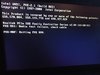
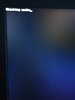
i have problem in my laptop

Durum
Üzgünüz bu konu cevaplar için kapatılmıştır...
Anubis is the god of death in ancient egpypt
Seçkin Üye
Katılım
27 Ocak 2020
Mesajlar
341
Tepki puanı
18
Ödüller
3
6 HİZMET YILI
i want solve " checking media " error when i open my laptop i see checking media then restart restart restart .. . . .....
 

Ekli dosyalar

  • received_562328491100279.jpeg
    received_562328491100279.jpeg
    360.1 KB · Görüntüleme: 12
  • received_277555526841796.jpeg
    received_277555526841796.jpeg
    133.3 KB · Görüntüleme: 12
Onaylı Üye
Katılım
27 Kas 2016
Mesajlar
51
Tepki puanı
4
Ödüller
5
9 HİZMET YILI
delete windows and boot your hdd or ssd then flash new windows with rufus
 
Üye
Katılım
30 Haz 2020
Mesajlar
25
Tepki puanı
8
5 HİZMET YILI
it actually looks like your boot order has been misconfigured or the system is not detecting the hard drive... By default on HP and DELL laptops, the next boot is PXE . which you can Try on the very first post. pressing f12 and seeing if you see the HDD as a boot option. OR f8/
if I had to take a guess that is a dell Inspiron model. Or a Compaq
Checking media . is telling me you MAY have external media. such as a Media card Plugged in. and its NOT an MBR partition table so it's gonna just sit on that screen
Or your hard drive took a dump
 
Onaylı Üye
Katılım
11 Tem 2020
Mesajlar
54
Tepki puanı
0
Ödüller
4
Yaş
27
5 HİZMET YILI
post. pressing f12 and seeing if you see the HDD as a boot option. OR f8/
if I had to take a guess that is a dell Inspiron model. Or a Compaq
Checking media . is telling me you MAY have external media. such as a Media card Plugged in. and its NOT an MBR partition table so it's gonna just sit on that screen
Or your hard drive took a dump
 
Onaylı Üye
Katılım
2 Tem 2020
Mesajlar
52
Tepki puanı
4
Yaş
27
5 HİZMET YILI
delete windows and reboot ist funcional
Post automatically merged:

reboot in your windows probably
 
Son düzenleme:
Seçkin Üye
Katılım
16 Tem 2020
Mesajlar
304
Çözümler
1
Tepki puanı
19
Ödüller
6
Yaş
27
5 HİZMET YILI
pressing f12 and seeing if you see the HDD as a boot option.
 
Onaylı Üye
Katılım
12 Haz 2020
Mesajlar
58
Çözümler
1
Tepki puanı
1
Ödüller
5
Yaş
32
5 HİZMET YILI
you can find way to fix on google and youtube sir
 
Vileblood
Süper Üye
Katılım
8 Ağu 2016
Mesajlar
603
Çözümler
6
Tepki puanı
75
Ödüller
9
9 HİZMET YILI
I'd try booting into BIOS first (F12 or F8) and if nothing, re-installing the OS. But that could be futile and the problem could be with your hardware.
 
Onaylı Üye
Katılım
12 Tem 2020
Mesajlar
60
Tepki puanı
5
Yaş
31
5 HİZMET YILI
it is likely to be your source, change, and then restore your pc.
 
Onaylı Üye
Katılım
3 Tem 2020
Mesajlar
52
Tepki puanı
1
Yaş
24
5 HİZMET YILI
You need to reboot your system,instal the windows 10 .iso in a pendrive,and reboot. It's very simple,if you have any doubt search for a tutorial on google or youtube,good luck.
 
Onaylı Üye
Katılım
20 Tem 2020
Mesajlar
60
Tepki puanı
2
Ödüller
4
Yaş
36
5 HİZMET YILI
set the boot priority on hdd or boot option number 1
 
Onaylı Üye
Katılım
21 Haz 2020
Mesajlar
55
Tepki puanı
0
Yaş
29
5 HİZMET YILI
try to update new windows with rufus, this should solve
 
Durum
Üzgünüz bu konu cevaplar için kapatılmıştır...
Üst