LoL Script Settings Config

Durum
Üzgünüz bu konu cevaplar için kapatılmıştır...
Seçkin Üye
Katılım
10 May 2020
Mesajlar
325
Çözümler
13
Tepki puanı
37
Ödüller
4
Yaş
29
6 HİZMET YILI
Does anyone know how to edit the script config without starting the game? I cannot turn my overlays off in time before it crashes saying "System Error." I have been trying to turn the overlay off with F5 but as soon as the script starts, everything crashes and it does not let me turn anything off. Any way to edit the script config externally? Without being in game.

Thank you
 
Uzman Üye
Katılım
27 Haz 2018
Mesajlar
239
Tepki puanı
9
Ödüller
5
Yaş
35
7 HİZMET YILI
Seninle aynı şeyi yaşıyorum arkadaşım çizimleri veya F5'i devre dışı bırakamıyorum
Tembel kullanmak için deliyim
 
Uzman Üye
Katılım
27 Haz 2018
Mesajlar
239
Tepki puanı
9
Ödüller
5
Yaş
35
7 HİZMET YILI
Tembelliğe başladığımda F5 kullandım ama oyun kötüye gidiyor
 
Onaylı Üye
Katılım
2 Ağu 2020
Mesajlar
63
Tepki puanı
3
Ödüller
4
Yaş
27
5 HİZMET YILI
Does anyone know how to edit the script config without starting the game? I cannot turn my overlays off in time before it crashes saying "System Error." I have been trying to turn the overlay off with F5 but as soon as the script starts, everything crashes and it does not let me turn anything off. Any way to edit the script config externally? Without being in game.

Thank you
Yes, you can disable these lines outside the game.

#Go to folder C:> BogaRipper> config and open the AutoLoLs file with Notepad;
[DrawingCore]
Drawing all (F5) = False
ControlWard - Blue Farsight tracker = True
Gank tracker = True
Recall tracker = True
Enemy Q-W-E-R cooldown tracker = True
Ally Q-W-E-R cooldown tracker = True
Enemy D-F cooldown tracker = True
Draw Q range = False
Draw Line to Ally = False
Ally D-F cooldown tracker = True
Draw Mini Map Tracker = True

#look for that part in your config
this drawingcore
delete it and paste this there
 
Seçkin Üye
Katılım
10 May 2020
Mesajlar
325
Çözümler
13
Tepki puanı
37
Ödüller
4
Yaş
29
6 HİZMET YILI
Yes, you can disable these lines outside the game.

#Go to folder C:> BogaRipper> config and open the AutoLoLs file with Notepad;
[DrawingCore]
Drawing all (F5) = False
ControlWard - Blue Farsight tracker = True
Gank tracker = True
Recall tracker = True
Enemy Q-W-E-R cooldown tracker = True
Ally Q-W-E-R cooldown tracker = True
Enemy D-F cooldown tracker = True
Draw Q range = False
Draw Line to Ally = False
Ally D-F cooldown tracker = True
Draw Mini Map Tracker = True

#look for that part in your config
this drawingcore
delete it and paste this there

you are a legend. I will give this a try!
 
Banlı Üye
Katılım
2 Ağu 2020
Mesajlar
62
Tepki puanı
4
Yaş
26
5 HİZMET YILI
Does anyone know how to edit the script config without starting the game? I cannot turn my overlays off in time before it crashes saying "System Error." I have been trying to turn the overlay off with F5 but as soon as the script starts, everything crashes and it does not let me turn anything off. Any way to edit the script config externally? Without being in game.

Thank you
you have to tinker with the script's internal files, there is a notepad file that is within all the settings
 
Seçkin Üye
Katılım
10 May 2020
Mesajlar
325
Çözümler
13
Tepki puanı
37
Ödüller
4
Yaş
29
6 HİZMET YILI
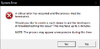
See attached picture. Still crashing even after changing all drawings in AutoLoLs file to false. Any ideas?

Updated DrawingCore to:
[DrawingCore]
Drawing all (F5) = False
ControlWard - Blue Farsight tracker = False
Gank tracker = False
Recall tracker = False
Enemy Q-W-E-R cooldown tracker = False
Ally Q-W-E-R cooldown tracker = False
Enemy D-F cooldown tracker = False
Draw Q range = False
Draw Line to Ally = False
Ally D-F cooldown tracker = False
Draw Mini Map Tracker = False

and also searched through the file for any other drawings and set them to "False" as well.
 

Ekli dosyalar

  • LoLCrash.PNG
    LoLCrash.PNG
    5 KB · Görüntüleme: 24
Son düzenleme:
Onaylı Üye
Katılım
28 Tem 2020
Mesajlar
61
Tepki puanı
0
Ödüller
3
Yaş
29
5 HİZMET YILI
Press F5 or edit the file in the BogaRipper folder
 
Onaylı Üye
Katılım
29 Haz 2020
Mesajlar
64
Çözümler
2
Tepki puanı
5
Ödüller
5
Yaş
22
5 HİZMET YILI
Yes, you can disable these lines outside the game.

#Go to folder C:> BogaRipper> config and open the AutoLoLs file with Notepad;
[DrawingCore]
Drawing all (F5) = False
ControlWard - Blue Farsight tracker = True
Gank tracker = True
Recall tracker = True
Enemy Q-W-E-R cooldown tracker = True
Ally Q-W-E-R cooldown tracker = True
Enemy D-F cooldown tracker = True
Draw Q range = False
Draw Line to Ally = False
Ally D-F cooldown tracker = True
Draw Mini Map Tracker = True

#look for that part in your config
this drawingcore
delete it and paste this there
i tried it too it didnt work
can you come on discord and help me?
 
Onaylı Üye
Katılım
31 Tem 2020
Mesajlar
50
Çözümler
1
Tepki puanı
0
Ödüller
1
Yaş
43
5 HİZMET YILI
Ayrıca nasıl olduğunu bilmek istedim
 
Uzman Üye
Katılım
27 Haz 2018
Mesajlar
239
Tepki puanı
9
Ödüller
5
Yaş
35
7 HİZMET YILI
[QUOTE = "Brkingviki2020, postagem: 2932761, membro: 2241239"]
Minha discórdia é El_Black # 7141
[/CITAR]
Bana da yardım edebilirsen seni de ekledim lütfen
 
Onaylı Üye
Katılım
21 Tem 2020
Mesajlar
53
Tepki puanı
2
Yaş
25
5 HİZMET YILI
Yes, you can disable these lines outside the game.

#Go to folder C:> BogaRipper> config and open the AutoLoLs file with Notepad;
[DrawingCore]
Drawing all (F5) = False
ControlWard - Blue Farsight tracker = True
Gank tracker = True
Recall tracker = True
Enemy Q-W-E-R cooldown tracker = True
Ally Q-W-E-R cooldown tracker = True
Enemy D-F cooldown tracker = True
Draw Q range = False
Draw Line to Ally = False
Ally D-F cooldown tracker = True
Draw Mini Map Tracker = True

#look for that part in your config
this drawingcore
delete it and paste this there
But I have other inscriptions ..

- [User Information]
Username = LazySharp
[ToolsCore]
## Language = 0

[NewEvade]
Enable NewEvade = False
Dodge Only Dangerous = False
Dodge FOW SkillShots = False
Dodge Circular SkillShots = False
[OrbCore]
Enemies Auto-Attack Range = False
Auto-Attack Range = False
Last Hit helper = False
No LastHit = False
Prioritize Farm = False
Auto attack ward / trap ... = False
Auto attack gangplank barrel = False
Focus minions over objectives = False
[ez.Aphelios]
Only Draw Skills When Ready = False
[TSCore]
ForceFocusSelected = False
 
Durum
Üzgünüz bu konu cevaplar için kapatılmıştır...
Üst