Guide to setup "Ez" cheats.
"Ez" cheats kurma kılavuzu.
Hello everyone, today I will teach you how to inject the cheats of the Ez category
(APB Reloaded, Apex Legends,...) without errors and in an effective way.
Herkese merhaba, bugün size Ez kategorisindeki hilelerin (APB Reloaded, Apex Legends, ...)
hatasız ve etkili bir şekilde nasıl enjekte edileceğini öğreteceğim.
Make sure you're on the required version of the cheat (WIN+R, type "winver" and check "Version")
Hilenin gerekli sürümünde olduğunuzdan emin olun (WIN + R, "winver" yazın ve "version" ü kontrol edin)
Also, disable any kind of protection or antivirus you've got enabled on your PC
(Windows Defender, Avast Antivirus, Tamper/Exploit protection, Secure Boot in BIOS, Firewall,...)
Ayrıca, bilgisayarınızda etkinleştirdiğiniz her türlü korumayı veya virüsten koruma yazılımını devre dışı bırakın
(Windows Defender, Avast Antivirus, Tamper Protection, BIOS'ta Güvenli Önyükleme....)
Also, it would be advisable to close programs such as Vanguard, Face-It anticheats
or screen capture tools (since it can affect the operation of the cheat) & have all drivers (DirectX,..) up-to-date & installed.
Ayrıca, Vanguard, Faceit anti hile veya ekran yakalama araçları gibi programların
kapatılması tavsiye edilir (çünkü hilenin çalışmasını etkileyebilir) & tüm sürücülerin (DirectX,...) güncel ve yüklü olmasını sağlayın.
Well let's get started!
Peki başlayalım!
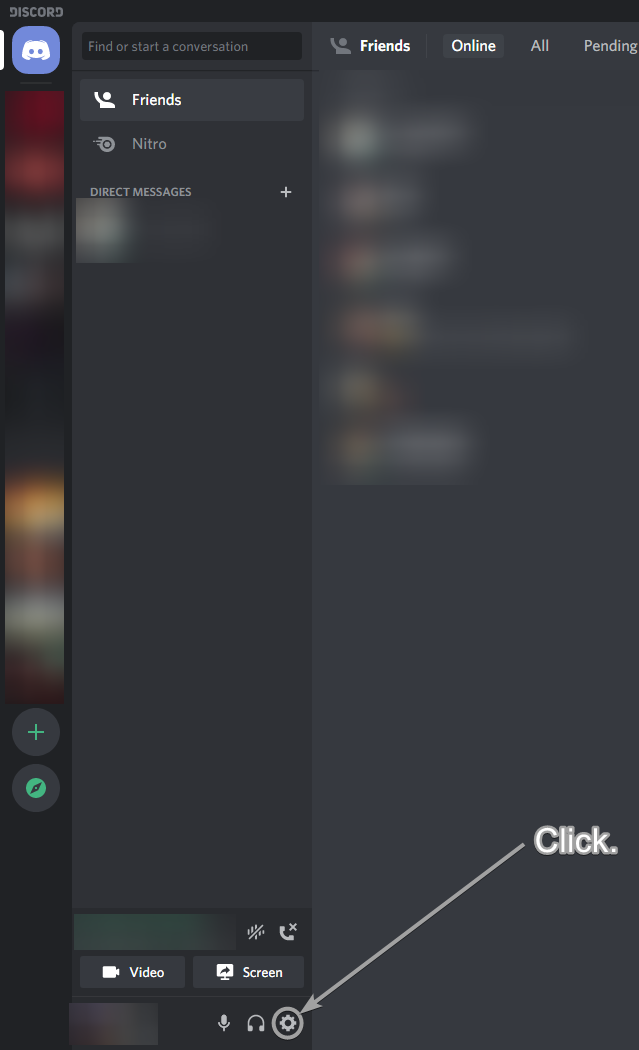
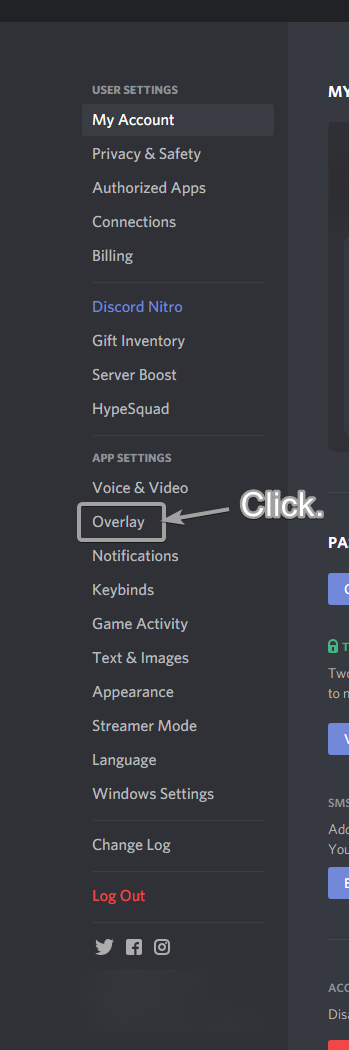
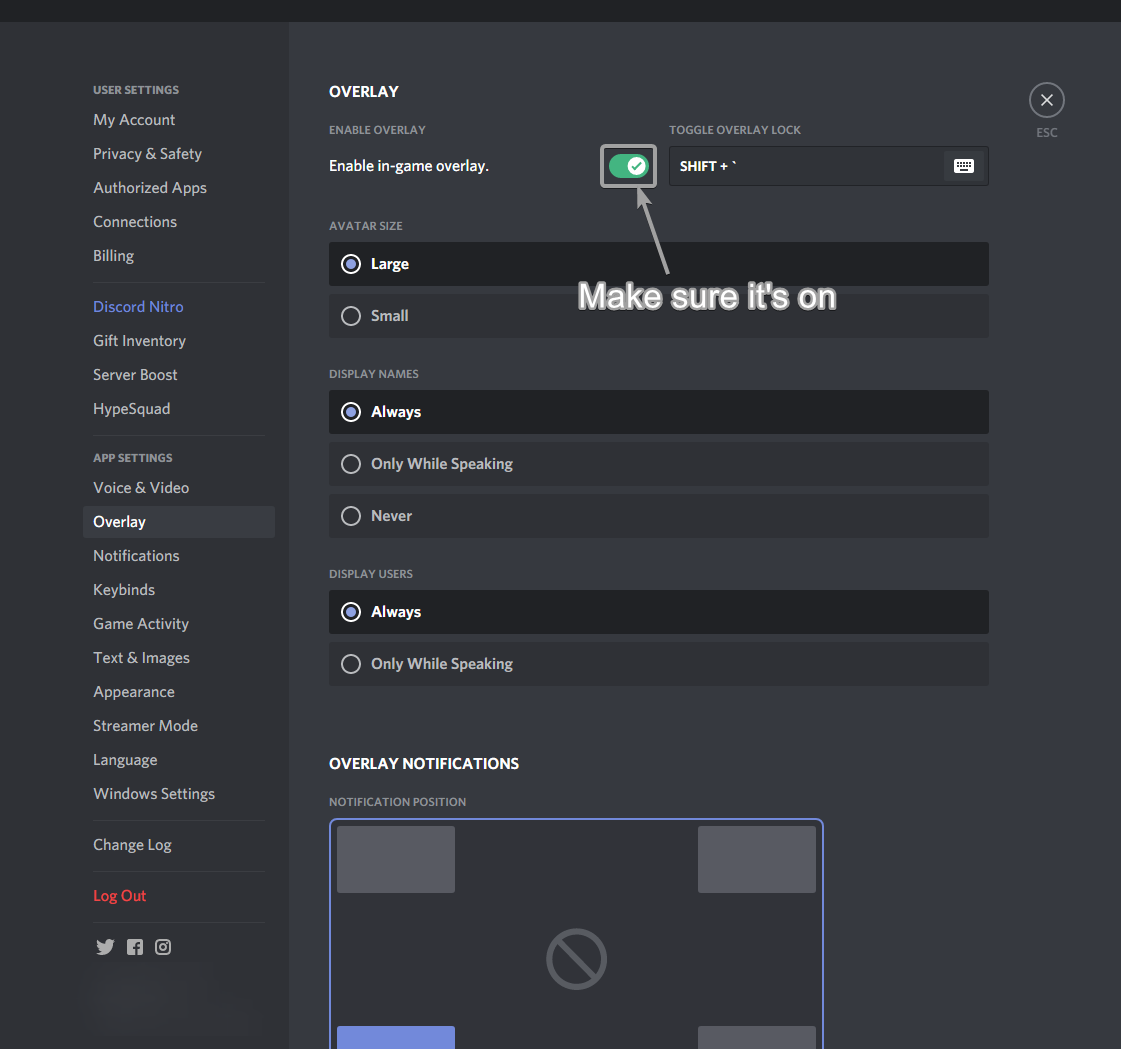
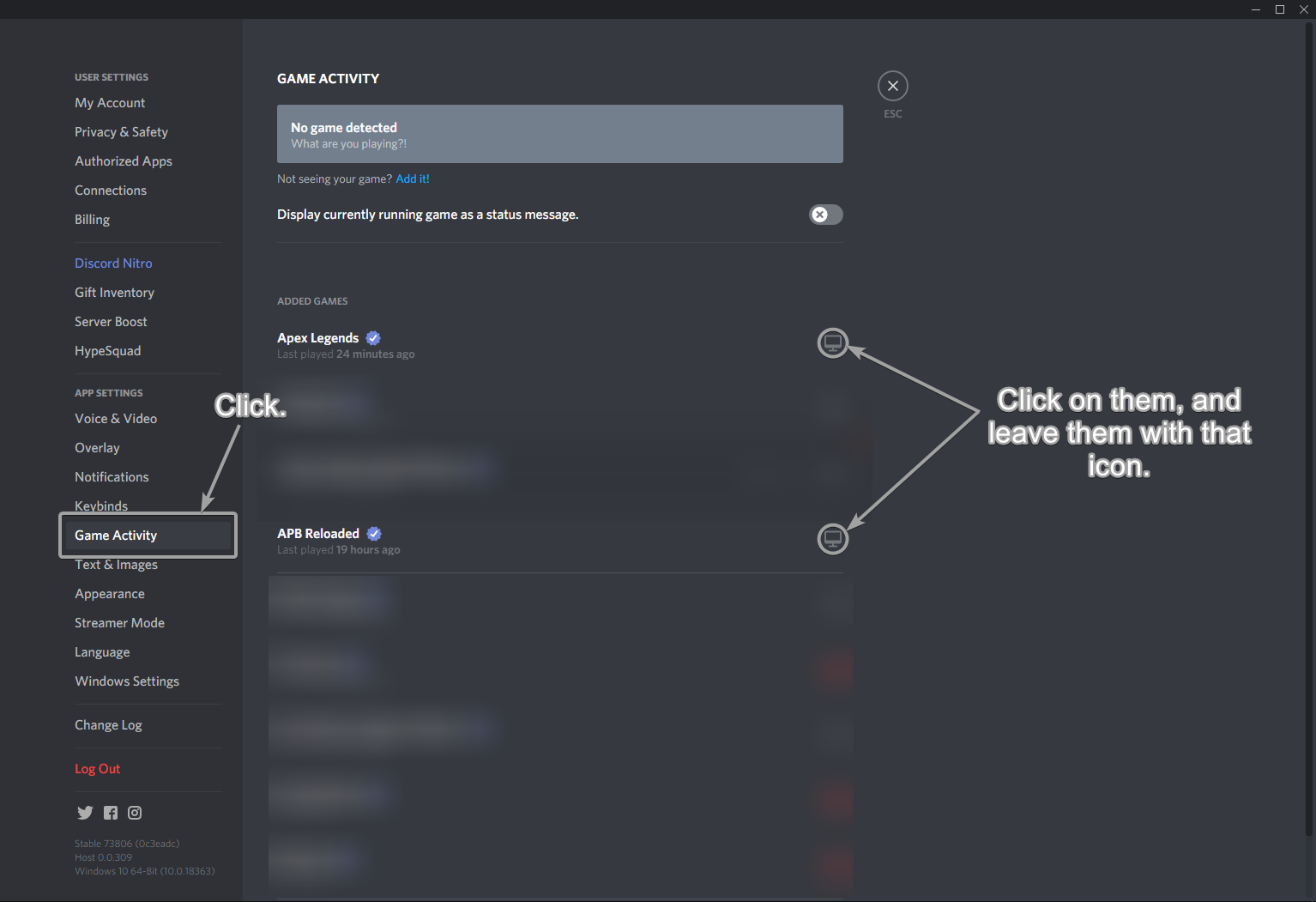
1. Enable Discord In-Game Overlay (in the correct way)
1. Discord Oyun İçi Yerleşimi Etkinleştirin (doğru şekilde)
2. Download & setup the loader.
2. Yükleyiciyi indirin ve kurun.
Part 1: (Bölüm 1)
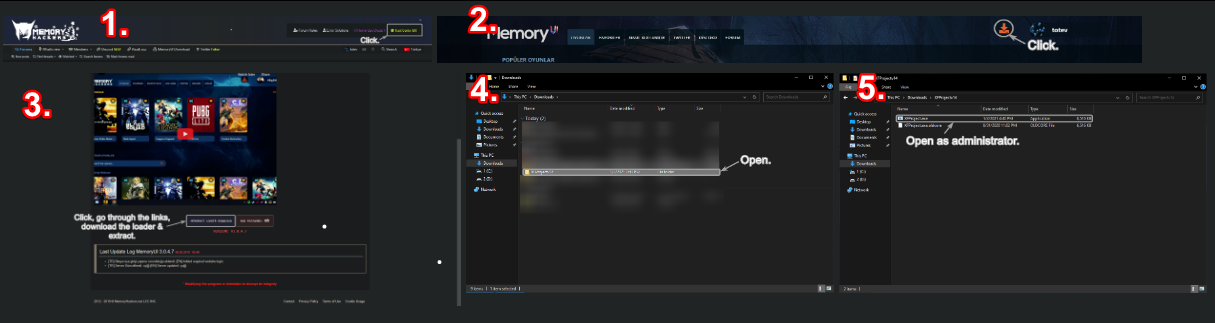
https://memoryhackers.org/konular/how-the-cheat-using-system-works.184950/
Part 2: (Bölüm 2)
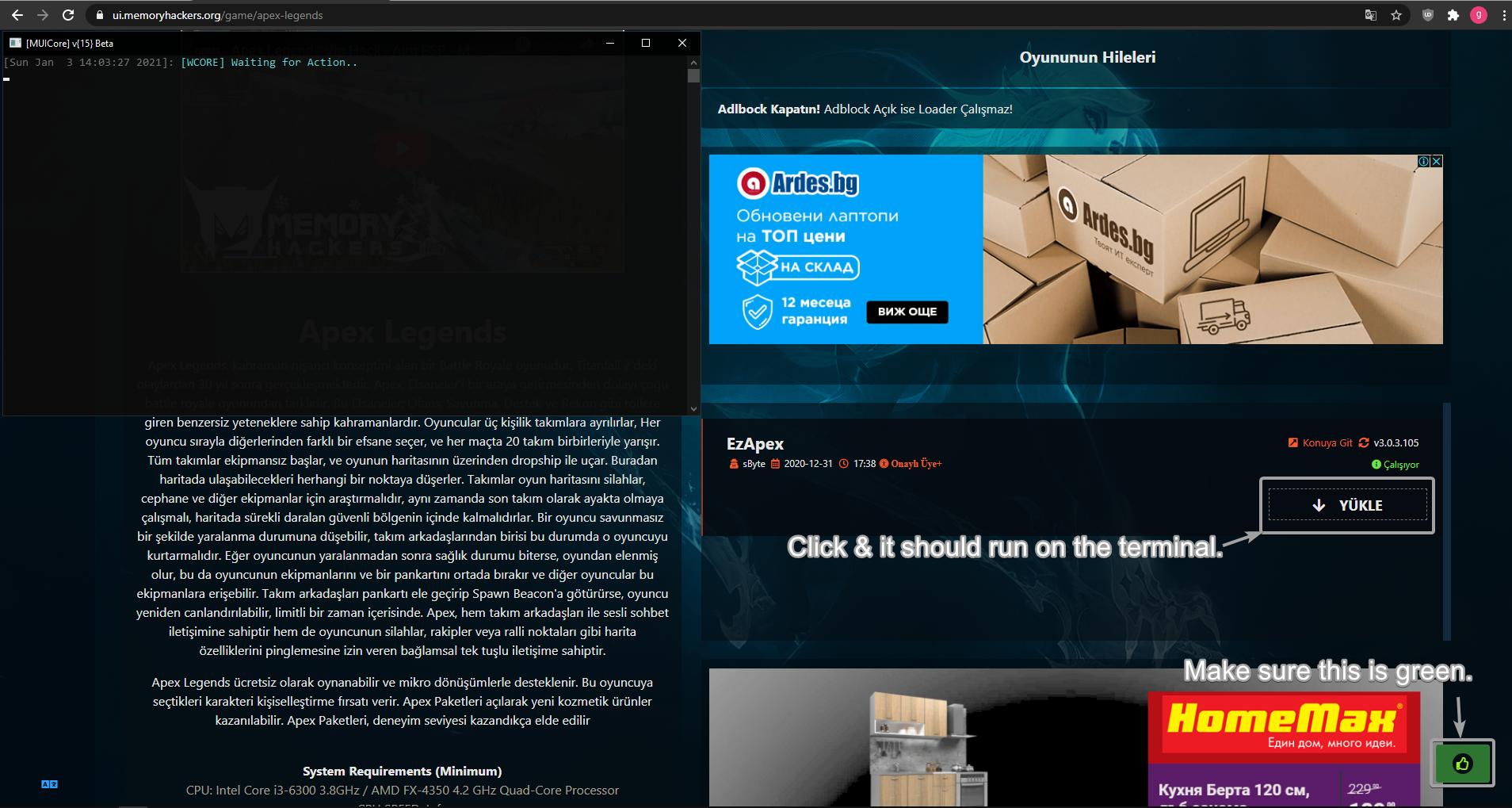
In case of an issue when trying to execute the cheat to the loader,
check this link: https://memoryhackers.org/konular/errors-and-solutions-for-loader.184952/
Yükleyiciye hile yapmaya çalışırken bir sorun olması durumunda,
bu bağlantıyı kontrol edin: https://memoryhackers.org/konular/errors-and-solutions-for-loader.184952/
If it asks you for a key (for Apex, it's "memoryhackers"; in the case of APB Reloaded you can type random stuff).
If it tells you to restart your computer, do it. If not, wait for it to load & close, and launch the game.
The menu will appear, and you can control it with "Insert" button.
Sizden bir anahtar isterse (Apex için, "memoryhackers"; APB Reloaded durumunda rastgele şeyler yazabilirsiniz).
Bilgisayarınızı yeniden başlatmanızı söylerse, yapın. Değilse, yüklenip kapanmasını bekleyin ve oyunu başlatın.
Menü görünecektir ve "Insert" butonu ile kontrol edebilirsiniz.
WARNING! - IF THE MENU DOESN'T APPEAR, DO NOT TRY RELAUNCHING THE CHEAT AND THE GAME IT WILL END IN BLUE SCREEN.
ALSO, DO NOT PRESS INSERT WHEN STARTING THE GAME MULTIPLE TIMES, IT ALSO GIVES BLUE SCREEN.
UYARI! - MENÜ GÖRÜNMÜYORSA, CHEAT'I YENİDEN ÇIKARMAYI DENEMEYİN VE OYUN MAVİ EKRANDA BİTİR.
AYRICA, OYUNA ÇOK KEZ BAŞLATIRKEN EKLE BASTIRMAYIN, AYRICA MAVİ EKRAN VERİR.
P.S: For better experience & less problems, play on fullscreen or borderless fullscreen.
Not: Daha iyi bir deneyim ve daha az sorun için tam ekranda veya kenarlıksız tam ekranda oynayın.
I hope it worked for you, and if you want me to add something else to this guide, make sure to write in this thread. Have a great day!
Umarım sizin için çalışmıştır ve bu rehbere başka bir şey eklememi istiyorsanız, bu konuya yazdığınızdan emin olun. İyi günler!
"Ez" cheats kurma kılavuzu.
Hello everyone, today I will teach you how to inject the cheats of the Ez category
(APB Reloaded, Apex Legends,...) without errors and in an effective way.
Herkese merhaba, bugün size Ez kategorisindeki hilelerin (APB Reloaded, Apex Legends, ...)
hatasız ve etkili bir şekilde nasıl enjekte edileceğini öğreteceğim.
Make sure you're on the required version of the cheat (WIN+R, type "winver" and check "Version")
Hilenin gerekli sürümünde olduğunuzdan emin olun (WIN + R, "winver" yazın ve "version" ü kontrol edin)
Also, disable any kind of protection or antivirus you've got enabled on your PC
(Windows Defender, Avast Antivirus, Tamper/Exploit protection, Secure Boot in BIOS, Firewall,...)
Ayrıca, bilgisayarınızda etkinleştirdiğiniz her türlü korumayı veya virüsten koruma yazılımını devre dışı bırakın
(Windows Defender, Avast Antivirus, Tamper Protection, BIOS'ta Güvenli Önyükleme....)
Also, it would be advisable to close programs such as Vanguard, Face-It anticheats
or screen capture tools (since it can affect the operation of the cheat) & have all drivers (DirectX,..) up-to-date & installed.
Ayrıca, Vanguard, Faceit anti hile veya ekran yakalama araçları gibi programların
kapatılması tavsiye edilir (çünkü hilenin çalışmasını etkileyebilir) & tüm sürücülerin (DirectX,...) güncel ve yüklü olmasını sağlayın.
Well let's get started!
Peki başlayalım!
1. Enable Discord In-Game Overlay (in the correct way)
1. Discord Oyun İçi Yerleşimi Etkinleştirin (doğru şekilde)
2. Download & setup the loader.
2. Yükleyiciyi indirin ve kurun.
Part 1: (Bölüm 1)
https://memoryhackers.org/konular/how-the-cheat-using-system-works.184950/
Part 2: (Bölüm 2)
In case of an issue when trying to execute the cheat to the loader,
check this link: https://memoryhackers.org/konular/errors-and-solutions-for-loader.184952/
Yükleyiciye hile yapmaya çalışırken bir sorun olması durumunda,
bu bağlantıyı kontrol edin: https://memoryhackers.org/konular/errors-and-solutions-for-loader.184952/
If it asks you for a key (for Apex, it's "memoryhackers"; in the case of APB Reloaded you can type random stuff).
If it tells you to restart your computer, do it. If not, wait for it to load & close, and launch the game.
The menu will appear, and you can control it with "Insert" button.
Sizden bir anahtar isterse (Apex için, "memoryhackers"; APB Reloaded durumunda rastgele şeyler yazabilirsiniz).
Bilgisayarınızı yeniden başlatmanızı söylerse, yapın. Değilse, yüklenip kapanmasını bekleyin ve oyunu başlatın.
Menü görünecektir ve "Insert" butonu ile kontrol edebilirsiniz.
WARNING! - IF THE MENU DOESN'T APPEAR, DO NOT TRY RELAUNCHING THE CHEAT AND THE GAME IT WILL END IN BLUE SCREEN.
ALSO, DO NOT PRESS INSERT WHEN STARTING THE GAME MULTIPLE TIMES, IT ALSO GIVES BLUE SCREEN.
UYARI! - MENÜ GÖRÜNMÜYORSA, CHEAT'I YENİDEN ÇIKARMAYI DENEMEYİN VE OYUN MAVİ EKRANDA BİTİR.
AYRICA, OYUNA ÇOK KEZ BAŞLATIRKEN EKLE BASTIRMAYIN, AYRICA MAVİ EKRAN VERİR.
P.S: For better experience & less problems, play on fullscreen or borderless fullscreen.
Not: Daha iyi bir deneyim ve daha az sorun için tam ekranda veya kenarlıksız tam ekranda oynayın.
I hope it worked for you, and if you want me to add something else to this guide, make sure to write in this thread. Have a great day!
Umarım sizin için çalışmıştır ve bu rehbere başka bir şey eklememi istiyorsanız, bu konuya yazdığınızdan emin olun. İyi günler!
Son düzenleme: