Lütfen USB sürücüsüne bir disk yerleştirin hatası

Durum
Üzgünüz bu konu cevaplar için kapatılmıştır...
Seçkin Üye
Katılım
7 Kas 2016
Mesajlar
500
Çözümler
2
Tepki puanı
101
Ödüller
10
9 HİZMET YILI
elimde 32 gb bir usbdisk var aşşağıdaki fotolardaki gibi bir hata var biçimlendir dediğimde sürücüde bir disk yok disk takıp tekrar deneyin diyor

Ekran Alıntısı.PNG

yukardaki ss'dede gizli öğeleri açtığımda gözüküyor flashdisk yani gizliye alınmış gibi saçma birşey bi türlü çözemedim biçimlendirilmiyorda
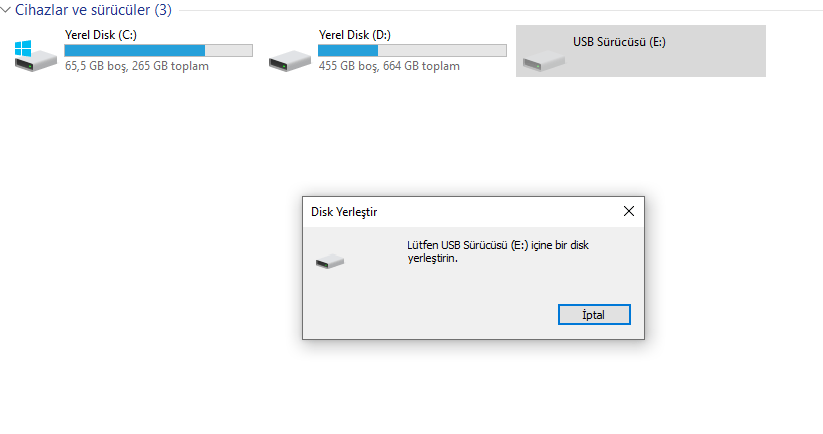
Ekran Alıntısı2.PNG
 
Moderatörün son düzenlenenleri:
Ey yüce yaradan bana fantastik bir hayat yaşattın.
Emektar Üye
Katılım
2 Ocak 2016
Mesajlar
4,595
Çözümler
1,842
Tepki puanı
2,297
Ödüller
18
10 HİZMET YILI
USB Sürücüsü E: sizin flash belleğiniz değil flash belleğinizi taktığınızda windowstan bir ses geliyor mu?

Flash belleğinizi taktığınızda Yerel Disk C: gibi aktif halde gözükür başka slota takıp dener misiniz?
 
Seçkin Üye
Katılım
7 Kas 2016
Mesajlar
500
Çözümler
2
Tepki puanı
101
Ödüller
10
9 HİZMET YILI
USB Sürücüsü E: sizin flash belleğiniz değil flash belleğinizi taktığınızda windowstan bir ses geliyor mu?

Flash belleğinizi taktığınızda Yerel Disk C: gibi aktif halde gözükür başka slota takıp dener misiniz?
geliyor ses bütün slotları denedim usp 2.0 denedim 3.0 denedim deisen birşey yok
 
Uzman Üye
Katılım
25 Ara 2018
Mesajlar
298
Çözümler
1
Tepki puanı
5
Ödüller
4
Yaş
30
7 HİZMET YILI
1. After confirming that the USB flash drive is not affected by external factors, format the USB flash drive, and then use a professional hard disk partitioning tool (such as Disk Genius partition tool) to partition the USB flash drive. If the USB flash drive is exposed to water or dropped, the situation of "Please insert the disk into drive H:." may appear!

2. After formatting the USB disk, if the USB disk still cannot be opened, then we need to find out the reason step by step. First, insert the USB flash drive into the usb view point of the computer (it is recommended to insert it into the usb socket on the back of the host). If the indicator light of the USB flash drive does not flash, it means it is the cause of the USB flash drive itself; if the indicator light of the USB flash drive flashes, open "My Computer (Computer)" to see if there is a "removable disk", if not, The explanation is caused by the poor connection of the computer's USB socket. Try another usb.
 
Durum
Üzgünüz bu konu cevaplar için kapatılmıştır...
Üst