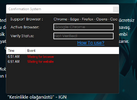
Çözüldü MemoryUI Probem: Waiting for browser, Waiting for website

Durum
Üzgünüz bu konu cevaplar için kapatılmıştır...
Onaylı Üye
Katılım
30 Haz 2019
Mesajlar
69
Tepki puanı
5
Ödüller
4
Yaş
25
6 HİZMET YILI
I still don't know to to fix this problem. Sometimes memoryUI works fine and sometimes I have this problem. I keep on restarting my PC, reset my Chrome browser and clear its browsing history, and still nothing. What is the main solution of this problem?
Post automatically merged:

I still don't know to to fix this problem. Sometimes memoryUI works fine and sometimes I have this problem. I keep on restarting my PC, reset my Chrome browser and clear its browsing history, and still nothing. What is the main solution of this problem?
Does anyone also experience this problem?
 

Ekli dosyalar

  • Screenshot 2022-07-16 065146.png
    Screenshot 2022-07-16 065146.png
    18 KB · Görüntüleme: 96
Son düzenleme:
Çözüm
I still don't know to to fix this problem. Sometimes memoryUI works fine and sometimes I have this problem. I keep on restarting my PC, reset my Chrome browser and clear its browsing history, and still nothing. What is the main solution of this problem?
Post automatically merged:


Does anyone also experience this problem?
* first load cheat when its show waiting for browser. then go to UI website, press CTRL+F5 on the website
* Second load cheat again when its show waiting for browser. then open browser other like opera. Microsoft Edge / chrome / then open website memory hacker check its working
if it's not working, close the original browser. change it internet explore / Microsoft Edge try
ERROR PROBLEM FIXER
Support
Katılım
25 Eyl 2018
Mesajlar
5,366
Çözümler
1,450
Tepki puanı
2,351
Ödüller
20
Sosyal
7 HİZMET YILI
I still don't know to to fix this problem. Sometimes memoryUI works fine and sometimes I have this problem. I keep on restarting my PC, reset my Chrome browser and clear its browsing history, and still nothing. What is the main solution of this problem?
Post automatically merged:


Does anyone also experience this problem?
* first load cheat when its show waiting for browser. then go to UI website, press CTRL+F5 on the website
* Second load cheat again when its show waiting for browser. then open browser other like opera. Microsoft Edge / chrome / then open website memory hacker check its working
if it's not working, close the original browser. change it internet explore / Microsoft Edge try
 
Çözüm
Ultra Üye
Katılım
4 Haz 2022
Mesajlar
1,559
Çözümler
40
Tepki puanı
220
Ödüller
4
4 HİZMET YILI
1_) Close your anti-virus
2_) add firewall xfproject
3-) Clean your browser cookies.
4-) Open xjproject

note: dont forget close u adblockers
 
Onaylı Üye
Katılım
18 Tem 2022
Mesajlar
56
Tepki puanı
3
Ödüller
1
Yaş
23
3 HİZMET YILI
man disble de win antivirus, open browser put your ip roter in de bar search and on page roter clean de cookies
 
Onaylı Üye
Katılım
30 Haz 2019
Mesajlar
69
Tepki puanı
5
Ödüller
4
Yaş
25
6 HİZMET YILI
Today, memoryUI is working fine again. I will try these solutions next. Thanks, I appreciate it.
 
Durum
Üzgünüz bu konu cevaplar için kapatılmıştır...
Üst