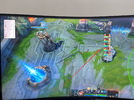
13 Nis 2023 #1 mt8327 M Onaylı Üye Katılım 9 Nis 2023 Mesajlar 56 Tepki puanı 2 Ödüller 1 Yaş 27 3 HİZMET YILI I couldn't find where to turn this off or change the position because it was very affecting my field of vision in the center of the screen Ekli dosyalar QQ图片20230413192255.png 1 MB · Görüntüleme: 51
I couldn't find where to turn this off or change the position because it was very affecting my field of vision in the center of the screen
Çözüm #Adc Main 13 Nis 2023 Hold down shift and go to the HUD section in awareness find the "enable" option and uncheck it this way you will have turned it off
Hold down shift and go to the HUD section in awareness find the "enable" option and uncheck it this way you will have turned it off
13 Nis 2023 Moderatör #2 #Adc Main Admin Katılım 9 Eki 2017 Mesajlar 13,585 Çözümler 1,061 Tepki puanı 3,402 Ödüller 22 8 HİZMET YILI Hold down shift and go to the HUD section in awareness find the "enable" option and uncheck it this way you will have turned it off Oyla 1 Olumsuz oyla Çözüm
Hold down shift and go to the HUD section in awareness find the "enable" option and uncheck it this way you will have turned it off
13 Nis 2023 Konuyu başlatan #3 mt8327 M Onaylı Üye Katılım 9 Nis 2023 Mesajlar 56 Tepki puanı 2 Ödüller 1 Yaş 27 3 HİZMET YILI Adc Main' Alıntı: Hold down shift and go to the HUD section in awareness find the "enable" option and uncheck it this way you will have turned it off Genişletmek için tıklayın ... Thank you very much, I have found it Oyla 0 Olumsuz oyla
Adc Main' Alıntı: Hold down shift and go to the HUD section in awareness find the "enable" option and uncheck it this way you will have turned it off Genişletmek için tıklayın ... Thank you very much, I have found it