Game loop 32 bit PUBG mobile crash fix

Onaylı Üye
Katılım
15 Ara 2021
Mesajlar
56
Tepki puanı
6
Ödüller
4
Yaş
28
4 HİZMET YILI
Hello everyone. I've recently updated the PUBG mobile to 3.7 update and when I open it it says that you need to download 64 bit gameloop otherwise game will face crashes and yes while on loading screen game crashed every time. I've searched in YouTube and found that everyone is facing the same problem. I've downloaded the 64 bit gameloop now. The crashes issue is fixed but the game in 64 bit gameloop is sooo laggy and freezes every 10 to 20 seconds later. I want to get to 32 bit gameloop. If someone have made the fix for 32 bit gameloop then tell me how to fix crashes on 32 bit gameloop.
My PC specs are: core i7 4th gen, SSD, GTX 1060Ti GPU, 20GB DDR3 ram. HP ProDesk 6 tower.
Thank you 😊 ❤️ 💕
 
Üye
Katılım
9 Mar 2025
Mesajlar
7
Tepki puanı
0
Yaş
25
1 HİZMET YILI
I had a similar issue on the 32-bit version before. The 64-bit version crashes less, but it’s heavier on the system. Have you tried lowering your graphics settings and updating your GPU drivers? Sometimes that helps reduce lag or crashes significantly.
 
Onaylı Üye
Katılım
15 Ara 2021
Mesajlar
56
Tepki puanı
6
Ödüller
4
Yaş
28
4 HİZMET YILI
I had a similar issue on the 32-bit version before. The 64-bit version crashes less, but it’s heavier on the system. Have you tried lowering your graphics settings and updating your GPU drivers? Sometimes that helps reduce lag or crashes significantly.
Hello. I've found a solution. You know the game crashes on loading screen. But before loading screen start, You just need to swipe down the screen and go to android settings and wait for 15 to 20 seconds there then press back to get back to the game. You'll see that the loading screen is bypassed and you are in the lobby. You need to this step every time when ever you restart the game. Soon gameloop will fix the crash problem officially...
 
Uzman Üye
Katılım
29 Ağu 2022
Mesajlar
150
Tepki puanı
22
Ödüller
2
Yaş
23
3 HİZMET YILI
customizing graphics might help in 64 bit since u have good specs
 
Üye
Katılım
30 Nis 2023
Mesajlar
34
Tepki puanı
2
Ödüller
2
Yaş
25
3 HİZMET YILI
do you know good settings for gtx 1060 3gb I5 6th gen
 
Onaylı Üye
Katılım
15 Ara 2021
Mesajlar
56
Tepki puanı
6
Ödüller
4
Yaş
28
4 HİZMET YILI
do you know good settings for gtx 1060 3gb I5 6th gen
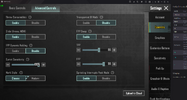
Hey, If you are asking for gameloop settings then I'll suggest you to use only 32 bit gameloop and do not change the default settings.... But if you are asking for game settings than please use sensitivity High, HD Extreme Graphics and 137 birghtness. TPP +5, FPP +6, Sprint sensitivity Max, attached screenshot
 

Ekli dosyalar

  • untitled.PNG
    untitled.PNG
    314.1 KB · Görüntüleme: 38
Üye
Katılım
30 Ağu 2020
Mesajlar
44
Tepki puanı
2
Ödüller
4
Yaş
27
5 HİZMET YILI
it is working now again download it from the website

may i know what the issue you are facing
 
PUBG
Onaylı Üye
Katılım
19 Ocak 2023
Mesajlar
97
Tepki puanı
5
Ödüller
2
Sosyal
3 HİZMET YILI
all problems are solved now of emulator
 
Üye
Katılım
14 Ocak 2024
Mesajlar
40
Tepki puanı
0
Ödüller
1
Yaş
34
2 HİZMET YILI
I am also facing this same problem but when i reinstall gameloop then it fix.
 
Lovelak
Uzman Üye
Katılım
14 Şub 2022
Mesajlar
169
Tepki puanı
5
Ödüller
4
Yaş
23
Sosyal
4 HİZMET YILI
the fix was released it should be fixed now !! 32 bit is now perfectly working
 
Üye
Katılım
12 Kas 2024
Mesajlar
1
Tepki puanı
0
Ödüller
1
Yaş
24
1 HİZMET YILI
Hey, If you are asking for gameloop settings then I'll suggest you to use only 32 bit gameloop and do not change the default settings.... But if you are asking for game settings than please use sensitivity High, HD Extreme Graphics and 137 birghtness. TPP +5, FPP +6, Sprint sensitivity Max, attached screenshot
bro gameloop crased and bug report problem plz help
 
Onaylı Üye
Katılım
4 Nis 2026
Mesajlar
51
Tepki puanı
3
Yaş
26
I had a similar issue on the 32-bit version before. The 64-bit version crashes less, but it’s heavier on the system. Have you tried lowering your graphics settings and updating your GPU drivers? Sometimes that helps reduce lag or crashes significantly.
 
Üst