Wolftü Hack Hata İletisi

Durum
Üzgünüz bu konu cevaplar için kapatılmıştır...
Süper Üye
Katılım
1 Tem 2018
Mesajlar
617
Çözümler
18
Tepki puanı
39
Ödüller
7
Yaş
26
7 HİZMET YILI
Merhaba wolftüdeki hilemde bir uyarı çıkıyor ve bu her odadan çıktığınızda veya oyunu kazandığınızda kaybettiğinizde geliyor.Peki nasıl çözebilirim?
Hata iletisi şu şekilde.Bu arada continue tuşuna basılınca hile devam ediyor ve çalışıyor.Lakin ben o uyarının gelmemesini istiyorum.
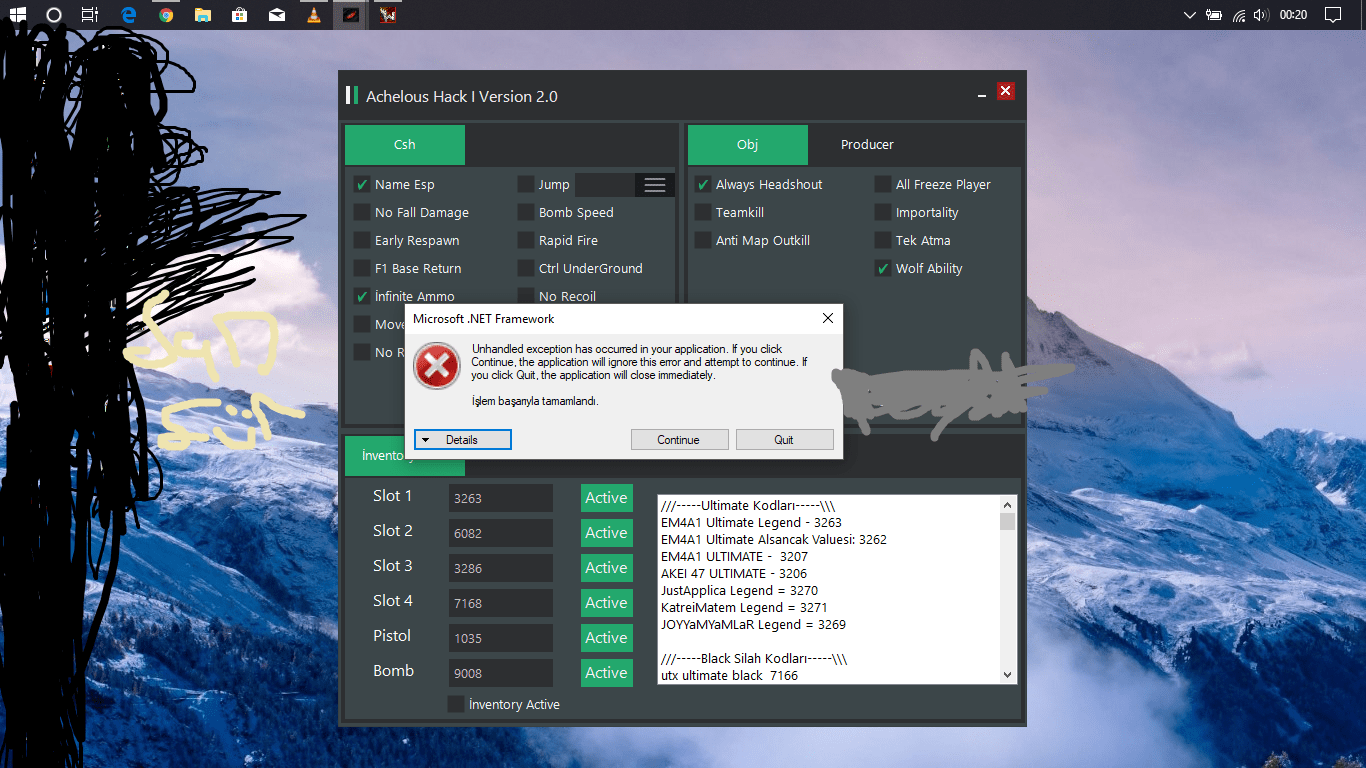
Untitled.png
 
Son düzenleme:
Onaylı Üye
Katılım
20 Ara 2016
Mesajlar
61
Tepki puanı
4
Ödüller
8
9 HİZMET YILI
On Error Resume Next
hatanın nerde verdiğini bul ve bu kodu onun üstüne yerleştirip bu kodu kullanabilirsin.Bu hileyi senmi kodladın
 
Banlı Üye
Katılım
20 Ara 2015
Mesajlar
754
Tepki puanı
116
10 HİZMET YILI
obj yüzünden veriyor oyun sonu obj kapatır o yüzden
 
Süper Üye
Katılım
1 Tem 2018
Mesajlar
617
Çözümler
18
Tepki puanı
39
Ödüller
7
Yaş
26
7 HİZMET YILI
Onaylı Üye
Katılım
20 Ara 2016
Mesajlar
61
Tepki puanı
4
Ödüller
8
9 HİZMET YILI
onun üstüne yapıştırıp bi deneyebilirmisin?
 
Süper Üye
Katılım
1 Tem 2018
Mesajlar
617
Çözümler
18
Tepki puanı
39
Ödüller
7
Yaş
26
7 HİZMET YILI
senin hatan nerde veriyordu
Bak bu hata değil.Okumuyormusun iletiyi?Diyori işlem başarıyla tamamlandı devam etmek istiyor musunuz ve bu her oyun bitiminde geliyor.Ben ise bunun gelmemesini istiyorum.Anlatabildiysem ne mutlu bana
 
Uzman Üye
Katılım
15 May 2018
Mesajlar
273
Çözümler
1
Tepki puanı
21
Ödüller
9
8 HİZMET YILI
kardeşim aynısı bende de çıkıyor ama ne yapsam gitmedi
 
Ultra Üye
Katılım
28 Ağu 2015
Mesajlar
1,054
Çözümler
1
Tepki puanı
245
10 HİZMET YILI
On Error Resume Next yaz
Pointlerin üstüne obj base çek
 
Süper Üye
Katılım
1 Tem 2018
Mesajlar
617
Çözümler
18
Tepki puanı
39
Ödüller
7
Yaş
26
7 HİZMET YILI
Öyle yaptım zaten.Ama obj base çek derken?Anlamadım
 
aka panic.rs
Kurucu
Katılım
18 Haz 2015
Mesajlar
3,379
Çözümler
50
Tepki puanı
13,156
Ödüller
22
Sosyal
10 HİZMET YILI
try catch tarzı bişey varmı vb.nette bilmiyorm ama varsa öyle çözülebilir
 
Süper Üye
Katılım
1 Tem 2018
Mesajlar
617
Çözümler
18
Tepki puanı
39
Ödüller
7
Yaş
26
7 HİZMET YILI
İletinin ayrıntıları:

See the end of this message for details on invoking
just-in-time (JIT) debugging instead of this dialog box.

************** Exception Text **************
System.ComponentModel.Win32Exception (0x80004005): İşlem başarıyla tamamlandı
at System.Diagnostics.NtProcessManager.GetModuleInfos(Int32 processId, Boolean firstModuleOnly)
at System.Diagnostics.ProcessManager.GetModuleInfos(Int32 processId)
at System.Diagnostics.Process.get_Modules()
at Achelous_Hack.Form1.Bypass_Tick(Object sender, EventArgs e) in C:\Users\Admin\Desktop\Projeler\Achelous Hack\Achelous Hack\Form1.vb:line 45
at System.Windows.Forms.Timer.OnTick(EventArgs e)
at System.Windows.Forms.Timer.TimerNativeWindow.WndProc(Message& m)
at System.Windows.Forms.NativeWindow.Callback(IntPtr hWnd, Int32 msg, IntPtr wparam, IntPtr lparam)


************** Loaded Assemblies **************
mscorlib
Assembly Version: 4.0.0.0
Win32 Version: 4.7.3120.0 built by: NET472REL1LAST
CodeBase: file:///C:/Windows/Microsoft.NET/Framework/v4.0.30319/mscorlib.dll
----------------------------------------
Achelous Hack
Assembly Version: 1.0.0.0
Win32 Version: 1.0.0.0
CodeBase: file:///C:/Users/Eray/Desktop/Achelous%20Hack/Achelous%20Hack/bin/Debug/Achelous%20Hack.exe
----------------------------------------
Microsoft.VisualBasic
Assembly Version: 10.0.0.0
Win32 Version: 14.7.3056.0 built by: NET472REL1
CodeBase: file:///C:/WINDOWS/Microsoft.Net/assembly/GAC_MSIL/Microsoft.VisualBasic/v4.0_10.0.0.0__b03f5f7f11d50a3a/Microsoft.VisualBasic.dll
----------------------------------------
System
Assembly Version: 4.0.0.0
Win32 Version: 4.7.3056.0 built by: NET472REL1
CodeBase: file:///C:/WINDOWS/Microsoft.Net/assembly/GAC_MSIL/System/v4.0_4.0.0.0__b77a5c561934e089/System.dll
----------------------------------------
System.Core
Assembly Version: 4.0.0.0
Win32 Version: 4.7.3110.0 built by: NET472REL1LAST_C
CodeBase: file:///C:/WINDOWS/Microsoft.Net/assembly/GAC_MSIL/System.Core/v4.0_4.0.0.0__b77a5c561934e089/System.Core.dll
----------------------------------------
System.Windows.Forms
Assembly Version: 4.0.0.0
Win32 Version: 4.7.3056.0 built by: NET472REL1
CodeBase: file:///C:/WINDOWS/Microsoft.Net/assembly/GAC_MSIL/System.Windows.Forms/v4.0_4.0.0.0__b77a5c561934e089/System.Windows.Forms.dll
----------------------------------------
System.Drawing
Assembly Version: 4.0.0.0
Win32 Version: 4.7.3056.0 built by: NET472REL1
 
Onaylı Üye
Katılım
26 Ocak 2016
Mesajlar
57
Tepki puanı
7
Yaş
34
Sosyal
10 HİZMET YILI
ReadWrittingMemory.vb dosyasını düzenlersen bu sorun kalkar. Eğer bilmiyorsan al bu düzenlenmiş ReadWrittingMemory.vb
Yukarıda obj base ne demek diye sormuşsun. obj base = obj çektiğin adres
Kod:
Dim p As Process = Process.GetProcessesByName("wolftü.bin")(0)

        For Each moz As System.Diagnostics.ProcessModule In p.Modules

            If moz.FileName.IndexOf("obj") <> -1 Then

                obj.Text = moz.BaseAddress.ToString


            End If

        Next


Kod:
Module ReadWritingMemory
    Private Declare Function OpenProcess Lib "kernel32" (ByVal dwDesiredAccess As Integer, ByVal bInheritHandle As Integer, ByVal dwProcessId As Integer) As Integer

    Private Declare Function WriteProcessMemory1 Lib "kernel32" Alias "WriteProcessMemory" (ByVal hProcess As Integer, ByVal lpBaseAddress As Integer, ByRef lpBuffer As Integer, ByVal nSize As Integer, ByRef lpNumberOfBytesWritten As Integer) As Integer
    Private Declare Function WriteProcessMemory2 Lib "kernel32" Alias "WriteProcessMemory" (ByVal hProcess As Integer, ByVal lpBaseAddress As Integer, ByRef lpBuffer As Single, ByVal nSize As Integer, ByRef lpNumberOfBytesWritten As Integer) As Single
    Private Declare Function WriteProcessMemory3 Lib "kernel32" Alias "WriteProcessMemory" (ByVal hProcess As Integer, ByVal lpBaseAddress As Integer, ByRef lpBuffer As Long, ByVal nSize As Integer, ByRef lpNumberOfBytesWritten As Integer) As Long

    Private Declare Function ReadProcessMemory1 Lib "kernel32" Alias "ReadProcessMemory" (ByVal hProcess As Integer, ByVal lpBaseAddress As Integer, ByRef lpBuffer As Integer, ByVal nSize As Integer, ByRef lpNumberOfBytesWritten As Integer) As Integer
    Private Declare Function ReadProcessMemory2 Lib "kernel32" Alias "ReadProcessMemory" (ByVal hProcess As Integer, ByVal lpBaseAddress As Integer, ByRef lpBuffer As Single, ByVal nSize As Integer, ByRef lpNumberOfBytesWritten As Integer) As Single
    Private Declare Function ReadProcessMemory3 Lib "kernel32" Alias "ReadProcessMemory" (ByVal hProcess As Integer, ByVal lpBaseAddress As Integer, ByRef lpBuffer As Long, ByVal nSize As Integer, ByRef lpNumberOfBytesWritten As Integer) As Long

    Const PROCESS_ALL_ACCESS = &H1F0FF

    Public Function WriteDMAInteger(ByVal Process As String, ByVal Address As Integer, ByVal Offsets As Integer(), ByVal Value As Integer, ByVal Level As Integer, Optional ByVal nsize As Integer = 4) As Boolean
        Try
            Dim lvl As Integer = Address
            For i As Integer = 1 To Level
                lvl = ReadInteger(Process, lvl, nsize) + Offsets(i - 1)
            Next
            WriteInteger(Process, lvl, Value, nsize)
            Return True
        Catch ex As Exception
            Return False
        End Try
    End Function

    Public Function ReadDMAInteger(ByVal Process As String, ByVal Address As Integer, ByVal Offsets As Integer(), ByVal Level As Integer, Optional ByVal nsize As Integer = 4) As Integer
        Try
            Dim lvl As Integer = Address
            For i As Integer = 1 To Level
                lvl = ReadInteger(Process, lvl, nsize) + Offsets(i - 1)
            Next
            Dim vBuffer As Integer
            vBuffer = ReadInteger(Process, lvl, nsize)
            Return vBuffer
        Catch ex As Exception

        End Try
    End Function

    Public Function WriteDMAFloat(ByVal Process As String, ByVal Address As Integer, ByVal Offsets As Integer(), ByVal Value As Single, ByVal Level As Integer, Optional ByVal nsize As Integer = 4) As Boolean
        Try
            Dim lvl As Integer = Address
            For i As Integer = 1 To Level
                lvl = ReadFloat(Process, lvl, nsize) + Offsets(i - 1)
            Next
            WriteFloat(Process, lvl, Value, nsize)
            Return True
        Catch ex As Exception
            Return False
        End Try
    End Function

    Public Function ReadDMAFloat(ByVal Process As String, ByVal Address As Integer, ByVal Offsets As Integer(), ByVal Level As Integer, Optional ByVal nsize As Integer = 4) As Single
        Try
            Dim lvl As Integer = Address
            For i As Integer = 1 To Level
                lvl = ReadFloat(Process, lvl, nsize) + Offsets(i - 1)
            Next
            Dim vBuffer As Single
            vBuffer = ReadFloat(Process, lvl, nsize)
            Return vBuffer
        Catch ex As Exception

        End Try
    End Function

    Public Function WriteDMALong(ByVal Process As String, ByVal Address As Integer, ByVal Offsets As Integer(), ByVal Value As Long, ByVal Level As Integer, Optional ByVal nsize As Integer = 4) As Boolean
        Try
            Dim lvl As Integer = Address
            For i As Integer = 1 To Level
                lvl = ReadLong(Process, lvl, nsize) + Offsets(i - 1)
            Next
            WriteLong(Process, lvl, Value, nsize)
            Return True
        Catch ex As Exception
            Return False
        End Try
    End Function

    Public Function ReadDMALong(ByVal Process As String, ByVal Address As Integer, ByVal Offsets As Integer(), ByVal Level As Integer, Optional ByVal nsize As Integer = 4) As Long
        Try
            Dim lvl As Integer = Address
            For i As Integer = 1 To Level
                lvl = ReadLong(Process, lvl, nsize) + Offsets(i - 1)
            Next
            Dim vBuffer As Long
            vBuffer = ReadLong(Process, lvl, nsize)
            Return vBuffer
        Catch ex As Exception

        End Try
    End Function

    Public Sub WriteNOPs(ByVal ProcessName As String, ByVal Address As Long, ByVal NOPNum As Integer)
        Dim C As Integer
        Dim B As Integer
        If ProcessName.EndsWith(".exe") Then
            ProcessName = ProcessName.Replace(".exe", "")
        End If
        Dim MyP As Process() = Process.GetProcessesByName(ProcessName)
        If MyP.Length = 0 Then

            Exit Sub
        End If
        Dim hProcess As IntPtr = OpenProcess(PROCESS_ALL_ACCESS, 0, MyP(0).Id)
        If hProcess = IntPtr.Zero Then

            Exit Sub
        End If

        B = 0
        For C = 1 To NOPNum
            Call WriteProcessMemory1(hProcess, Address + B, &H90, 1, 0&)
            B = B + 1
        Next C
    End Sub

    Public Sub WriteXBytes(ByVal ProcessName As String, ByVal Address As Long, ByVal Value As String)
        If ProcessName.EndsWith(".exe") Then
            ProcessName = ProcessName.Replace(".exe", "")
        End If
        Dim MyP As Process() = Process.GetProcessesByName(ProcessName)
        If MyP.Length = 0 Then

            Exit Sub
        End If
        Dim hProcess As IntPtr = OpenProcess(PROCESS_ALL_ACCESS, 0, MyP(0).Id)
        If hProcess = IntPtr.Zero Then

            Exit Sub
        End If

        Dim C As Integer
        Dim B As Integer
        Dim D As Integer
        Dim V As Byte

        B = 0
        D = 1
        For C = 1 To Math.Round((Len(Value) / 2))
            V = Val("&H" & Mid$(Value, D, 2))
            Call WriteProcessMemory1(hProcess, Address + B, V, 1, 0&)
            B = B + 1
            D = D + 2
        Next C

    End Sub

    Public Sub WriteInteger(ByVal ProcessName As String, ByVal Address As Integer, ByVal Value As Integer, Optional ByVal nsize As Integer = 4)
        If ProcessName.EndsWith(".exe") Then
            ProcessName = ProcessName.Replace(".exe", "")
        End If
        Dim MyP As Process() = Process.GetProcessesByName(ProcessName)
        If MyP.Length = 0 Then

            Exit Sub
        End If
        Dim hProcess As IntPtr = OpenProcess(PROCESS_ALL_ACCESS, 0, MyP(0).Id)
        If hProcess = IntPtr.Zero Then

            Exit Sub
        End If

        Dim hAddress, vBuffer As Integer
        hAddress = Address
        vBuffer = Value
        WriteProcessMemory1(hProcess, hAddress, CInt(vBuffer), nsize, 0)
    End Sub

    Public Sub WriteFloat(ByVal ProcessName As String, ByVal Address As Integer, ByVal Value As Single, Optional ByVal nsize As Integer = 4)
        If ProcessName.EndsWith(".exe") Then
            ProcessName = ProcessName.Replace(".exe", "")
        End If
        Dim MyP As Process() = Process.GetProcessesByName(ProcessName)
        If MyP.Length = 0 Then

            Exit Sub
        End If
        Dim hProcess As IntPtr = OpenProcess(PROCESS_ALL_ACCESS, 0, MyP(0).Id)
        If hProcess = IntPtr.Zero Then

            Exit Sub
        End If

        Dim hAddress As Integer
        Dim vBuffer As Single

        hAddress = Address
        vBuffer = Value
        WriteProcessMemory2(hProcess, hAddress, vBuffer, nsize, 0)
    End Sub

    Public Sub WriteLong(ByVal ProcessName As String, ByVal Address As Integer, ByVal Value As Long, Optional ByVal nsize As Integer = 4)
        If ProcessName.EndsWith(".exe") Then
            ProcessName = ProcessName.Replace(".exe", "")
        End If
        Dim MyP As Process() = Process.GetProcessesByName(ProcessName)
        If MyP.Length = 0 Then

            Exit Sub
        End If
        Dim hProcess As IntPtr = OpenProcess(PROCESS_ALL_ACCESS, 0, MyP(0).Id)
        If hProcess = IntPtr.Zero Then

            Exit Sub
        End If

        Dim hAddress As Integer
        Dim vBuffer As Long

        hAddress = Address
        vBuffer = Value
        WriteProcessMemory3(hProcess, hAddress, vBuffer, nsize, 0)
    End Sub

    Public Function ReadInteger(ByVal ProcessName As String, ByVal Address As Integer, Optional ByVal nsize As Integer = 4) As Integer
        If ProcessName.EndsWith(".exe") Then
            ProcessName = ProcessName.Replace(".exe", "")
        End If
        Dim MyP As Process() = Process.GetProcessesByName(ProcessName)
        If MyP.Length = 0 Then

            Exit Function
        End If
        Dim hProcess As IntPtr = OpenProcess(PROCESS_ALL_ACCESS, 0, MyP(0).Id)
        If hProcess = IntPtr.Zero Then

            Exit Function
        End If

        Dim hAddress, vBuffer As Integer
        hAddress = Address
        ReadProcessMemory1(hProcess, hAddress, vBuffer, nsize, 0)
        Return vBuffer
    End Function

    Public Function ReadFloat(ByVal ProcessName As String, ByVal Address As Integer, Optional ByVal nsize As Integer = 4) As Single
        If ProcessName.EndsWith(".exe") Then
            ProcessName = ProcessName.Replace(".exe", "")
        End If
        Dim MyP As Process() = Process.GetProcessesByName(ProcessName)
        If MyP.Length = 0 Then

            Exit Function
        End If
        Dim hProcess As IntPtr = OpenProcess(PROCESS_ALL_ACCESS, 0, MyP(0).Id)
        If hProcess = IntPtr.Zero Then

            Exit Function
        End If

        Dim hAddress As Integer
        Dim vBuffer As Single

        hAddress = Address
        ReadProcessMemory2(hProcess, hAddress, vBuffer, nsize, 0)
        Return vBuffer
    End Function

    Public Function ReadLong(ByVal ProcessName As String, ByVal Address As Integer, Optional ByVal nsize As Integer = 4) As Long
        If ProcessName.EndsWith(".exe") Then
            ProcessName = ProcessName.Replace(".exe", "")
        End If
        Dim MyP As Process() = Process.GetProcessesByName(ProcessName)
        If MyP.Length = 0 Then

            Exit Function
        End If
        Dim hProcess As IntPtr = OpenProcess(PROCESS_ALL_ACCESS, 0, MyP(0).Id)
        If hProcess = IntPtr.Zero Then

            Exit Function
        End If

        Dim hAddress As Integer
        Dim vBuffer As Long

        hAddress = Address
        ReadProcessMemory3(hProcess, hAddress, vBuffer, nsize, 0)
        Return vBuffer
    End Function

End Module
 
Durum
Üzgünüz bu konu cevaplar için kapatılmıştır...
Üst