

Game Đeveloper
Seçkin Üye
Welcome to the GoS External Script help topic.
[EU] Please download and install these:
[TR] Lütfen şunları indirin ve yükleyin:
Download
Bağlantıları görmek için lütfen
Giriş Yap
Download
Bağlantıları görmek için lütfen
Giriş Yap
Download
Bağlantıları görmek için lütfen
Giriş Yap
Download
Bağlantıları görmek için lütfen
Giriş Yap
GAME SETTINGS
[EU] To use a script, your game settings must be;
[TR] Scripti Kullanmak için Oyun Ayarlarınızın şöyle olması gereklidir;
[EU] Turn off the 3 features in the picture. (Lobby Game Settings)
[TR] Resimde ki 3 özelliği kapatın. (Lobide ki Oyun Ayarlarından)
[EU] Use Windowed or frameless mode. (Can be set from within the game.)
[TR] Pencereli veya Çerçevesiz modu kullanın. (Oyun içinden ayarlanabilir.)
[EU] Follow steps 3 in the picture. (Can be set from within the game.)
[TR] Resimde ki 3 adımı izleyin. (Oyun içinden ayarlanabilir.)
[EU] Close the selected area of the image. (Can be set from within the game.)
[TR] Resimde ki seçili alanı kapatın. (Oyun içinden ayarlanabilir.)
COMPUTER SETTINGS
[EU] To use a script, your computer settings must be;
[TR] Scripti kullanmak için Bilgisayar Ayarlarınızın şöyle olması gereklidir;
[EU] Enter computer > Right Click > Properties and follow the steps above.
[TR] Bilgisayar > Sağ Tıklama > Özellikler girin ve yukarıda ki adımları uygulayın.
[EU] Desktop > Right Click > Personalize and select an aero theme.
[TR] Masaüstü > Sağ Tıklama > Kişiselleştir girin ve bir aero teması seçin.
[EU]
They should be disabled;
Windows Defender
Windows Firewall
and anti-virus programs
[TR]
Şunlar devre dışı olmalıdır;
Windows Defender
Windows Güvenlik Duvarı
ve anti virüs programları
CHEAT SETTINGS
[EU]
1-) Open the game. (Wait in the lobby.)
2-) Open the Memory Loader (Open it in the lobby.) (Just open it one time.)
3-) Select and Open the GOS - Cracked (Open it in the lobby.)
4-) Login the GoS Loader.exe ID and PW. (id: MemoryHackers pw: Random)
5-) and the cheat loader is on.
[TR]
1-) Oyunu aç. (Lobide bekle.)
2-) Önce Memory Loaderi açın. (Lobide bekle.) (Sadece 1 kere açacaksın.)
3-) GOS - Crackedi seçin ve açın. (Lobide bekle.)
4-) GoS Loader.exe ye ID ve PW ile giriş yap. (id: MemoryHackers pw: Rastgele)
5-) ve hile istemcisi açılacak.
[EU]
Never select "Remember me" when logging in.
[TR]
Giriş yaparken "Beni Hatırla" asla seçmeyin.
[EU]
Open the cheat from Memory Loader!
[TR]
Hileyi Memory Loader'dan açın!
[EU] A place like the picture above will open. Select External and press download.
[TR] Yukarıda ki resim gibi bir yer açılacaktır. External seçin ve Download'a basın.
After Downloading/İndirdikten Sonra
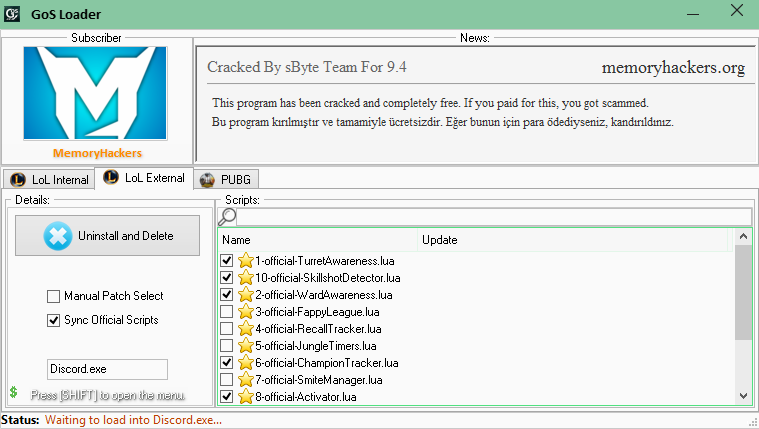
[EU]
Select the ones selected in the image from the .lua files.
1-official-TurretAwareness.lua
10-official-SkillshotDetector.lua
2-official-WardAwarness.lua
6-official-ChampionTracker.lua
8-official-Activator.lua
These are scripts I use. He doesn't force the computer, and there's nothing unnecessary.
[TR]
Resimde seçili olan .lua dosyalarını seçin.
1-official-TurretAwareness.lua
10-official-SkillshotDetector.lua
2-official-WardAwarness.lua
6-official-ChampionTracker.lua
8-official-Activator.lua
Bunlar benim kullandığım scriptler. Bilgisayarı zorlamıyor ve gereksiz bir şey yok.
To inject into the game/Oyuna enjekte etmek
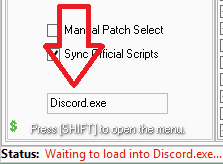
[EU] At the bottom left is YourProcess32bit.exe. Type a 32-bit program that runs in the background there.
(Example: Discord.exe)
[EU] Run the 32-bit program. (if you selected a running program, you don't have to do anything.)
[EU] Accept the incoming warning. (OK)
[EU] and the cheat was injected.
[TR] Sol altta yazan YourProcess32bit.exe kısmına arka planda çalışan bir programın ismini yazın.
(Örnek: Discord.exe)
[TR] 32 Bit Programı çalıştırın. (Çalışan bir programı yazdıysanız birşey yapmanıza gerek yoktur.)
[TR] Gelen uyarıyı kabul edin. (OK)
[TR] ve hile injekt edildi.
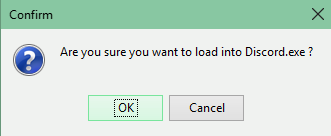
Will ask that question when injecting:
Are you sure you want to load into Discord.exe ? (OK)
Enjekte ederken bu soruyu soracaktır:
Discord.exe'nin içine injekte etmek istediğinizden emin misiniz? (OK)
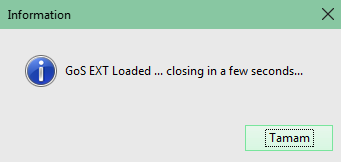
Click OK and it will say:
GoS EXT Loaded ... closing in a few seconds...
OK'a tıkladıktan sonra şunu diyecektir;
GoS EXT Yüklendi ... 5 saniye içinde kapanacak...
Question / Answer
+ How do I learn 32-bit programs that work on my computer ?
- From The Task Manager. At the end of the programs written in the processes section .exe *32 author.
+ For Example, Discord.exe if I close the program I write will the trick be closed ?
- Yep. For example, you typed in loader.exe if you close discord.exe, the cheat closes.
+ Every time I open the injected program, will the cheat be opened ?
- No.
+ How do I resolve the HTTP error ?
- Open the Start menu. Type AppData instead of calling. Enter the Roaming folder. Delete the G*****O*S******* folder.
and use the cheat only by opening it from Memory Loader.
(You will understand when you enter the star-censored article in the folder.) [GOS]
Soru / Cevap
+ Bilgisayarımda çalışan 32 bit programları nasıl öğrenirim ?
- Görev Yöneticisinden. İşlemler kısmında yazan programların sonunda .exe *32 yazar.
+ Örneğin Discord.exe yazdığım programı kapatırsam hile kapanır mı ?
- Evet. Loader'da yazdığınız örneğin Discord.exe'yi kapatırsanız hilede kapanır.
+ İnjekte ettiğim programı her açtığımda hile injekte edilmiş halde mi olacak ?
- Hayır.
+ HTTP hatasını nasıl çözebilirim ?
- Başlatı açın. Arama yerine AppData yazın. Roaming Klasörüne girin. G*****O*S******* klasörünü silin.
ve hileyi sadece Memory Loader'den açarak kullanın.
(Yıldızla sansürlenmiş yazıyı klasöre girdiğinizde anlayacaksınız.)

(Notes)
[EU] Note that errors may vary. It may not work.
[TR] Hataların değişebileceğini unutmayın. İşe yaramayabilir.
[EU] Most problems arise in Windows 10.
[EU] If you have tried all the solutions here and have never reached a conclusion, don't ask for help.
(Applies to Windows 10 users.)
[TR] Çoğu sorun Windows 10'da ortaya çıkar.
[TR] Burada tüm çözümleri denediyseniz ve bir sonuca varmadıysanız, yardım istemeyin.
(Windows 10 kullanıcıları için geçerlidir.)
This thread was created by youti.
Post automatically merged:
Bir LeakodToir kadar olmasa da bunu kullanmak zorundayız sanırım ^^
Umarım yardımcı olmuşumdur.
Hiçbir soruyu sormaktan çekinmeyin! Vaktim olduğunda cevaplayacağım.
İyi Forumlar
Son düzenleme:


