I did all the following steps:
1- If you have Adblocker, Windows Security, Antivirus programs, Riot Vanguard and FaceIT Anticheat, turn them off.
2- Install the programs from the links I gave you below.
2.1-
2.2-
3- Clean %temp%, temp and prefetch folders.
4- Turn off dx9 mode from the client.
5- Put the game on a frameless screen.
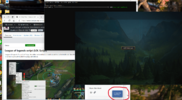
But when I'm at the game loading screen and press enter, my game is dissconected. I think the reason is because on my memoryhackers page it says "FETCHING DATA, PLEASE WAIT..." (which is not memory UI conected like everyone else's).
please help me fix the error
1- If you have Adblocker, Windows Security, Antivirus programs, Riot Vanguard and FaceIT Anticheat, turn them off.
2- Install the programs from the links I gave you below.
2.1-
Bağlantıları görmek için lütfen
Giriş Yap
2.2-
Bağlantıları görmek için lütfen
Giriş Yap
(Unzip it and put it in the folder, then run the install_all.bat script as an administrator.)3- Clean %temp%, temp and prefetch folders.
4- Turn off dx9 mode from the client.
5- Put the game on a frameless screen.
But when I'm at the game loading screen and press enter, my game is dissconected. I think the reason is because on my memoryhackers page it says "FETCHING DATA, PLEASE WAIT..." (which is not memory UI conected like everyone else's).
please help me fix the error