(Help) how to pass facebook 2-factor authentication

Durum
Üzgünüz bu konu cevaplar için kapatılmıştır...
💧💧💧💧💧
Süper Üye
Katılım
23 Eki 2022
Mesajlar
606
Çözümler
6
Tepki puanı
79
Ödüller
3
3 HİZMET YILI
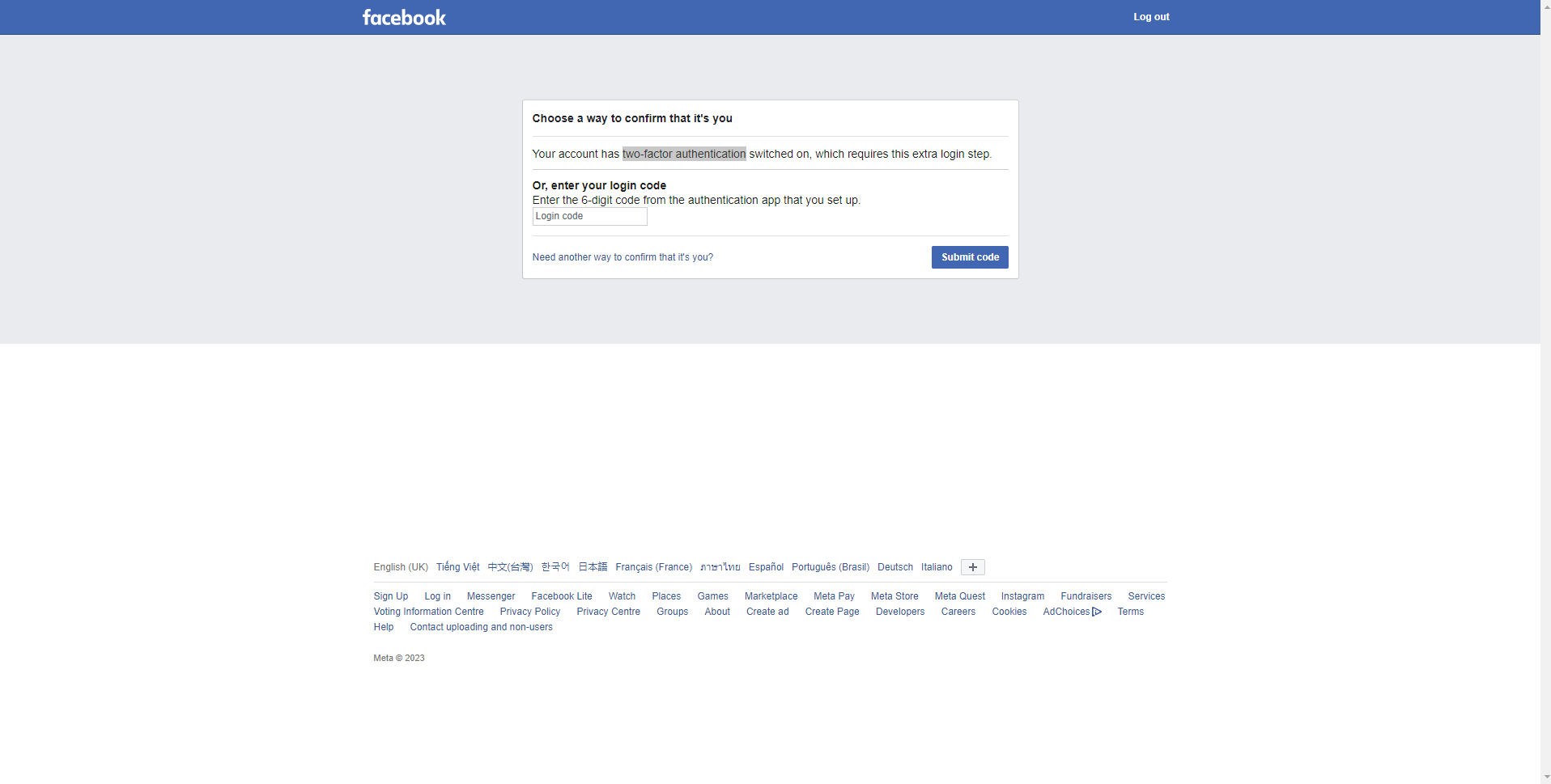
the hacker installed this damn thing on my facebook and deleted all my login history so i no longer have permission to enter the login message on my old device, i'm powerless to send my ID to facebook support but it refuses many times (while the main account is the owner)
Can someone help me, I'm really exhausted
1688791708446.png
 
Seçkin Üye
Katılım
25 Haz 2023
Mesajlar
303
Tepki puanı
11
Ödüller
1
Yaş
28
2 HİZMET YILI
Idk how to fix that, but you should try contacting facebook support
 
miss my old family and my kindest ex
Banlı Üye
Katılım
29 Ara 2022
Mesajlar
308
Tepki puanı
7
Yaş
25
Sosyal
3 HİZMET YILI
If you're trying to access your Facebook account and have enabled 2-factor authentication, you may encounter an error that prevents you from logging in. Here's what you can do to resolve this issue:

1. Check that you're entering the right login information: Make sure that you're entering your username and password correctly. If you're not sure, try the "Forgot your password" feature to reset your password.
2. Check your 2-factor authentication status: If you've enabled 2-factor authentication, you may be prompted to enter a verification code that is sent to your phone or email. Check that you're entering the correct code.
3. Try a different device or browser: If you're unable to access your Facebook account on one device, try accessing it from another device or a different web browser. Sometimes, this can resolve the issue.
4. Contact Facebook Support: If you've tried the above steps and are still unable to access your Facebook account, you may need to contact Facebook Support for further assistance. They can help you recover your account and address any issues you're experiencing with 2-factor authentication.
 
Onaylı Üye
Katılım
21 Kas 2022
Mesajlar
50
Tepki puanı
3
Ödüller
1
Yaş
23
3 HİZMET YILI
its very easy enter your number conformation will send
 
𝟬𝘅𝟭𝟯𝟯𝟳
Donator
Katılım
25 Nis 2019
Mesajlar
315
Çözümler
14
Tepki puanı
69
Ödüller
9
Yaş
31
7 HİZMET YILI
Uh, could you try a different approach as indicated in the image you shared? I noticed there is a option available there.
 
Süper Üye
Katılım
4 Nis 2022
Mesajlar
1,183
Çözümler
12
Tepki puanı
230
Ödüller
4
Yaş
30
4 HİZMET YILI
if your number email is changed then there is no way to get without Facebook staff. go to contact and help button and my account is hacked.
 
Onaylı Üye
Katılım
3 Mar 2022
Mesajlar
53
Tepki puanı
4
Ödüller
2
Yaş
26
4 HİZMET YILI
Hope you got your answer..fb don't have any support that sad
 
Onaylı Üye
Katılım
20 Kas 2021
Mesajlar
94
Tepki puanı
2
Ödüller
5
Yaş
32
4 HİZMET YILI
a pass will hit your mobile number. put it in facebbok.
 
Onaylı Üye
Katılım
24 Şub 2018
Mesajlar
94
Tepki puanı
12
Ödüller
6
Yaş
31
8 HİZMET YILI
Just click "Need another way to confirm that it's you?" it will then direct you to a page where it asks something that only you can answer
 
Banlı Üye
Katılım
9 Tem 2023
Mesajlar
50
Tepki puanı
3
Yaş
26
Sosyal
2 HİZMET YILI
If you're having trouble passing Facebook's two-factor authentication, you can follow these steps to reset your account:

1. Log in to your Facebook account using your username and password.
2. Click on the profile icon in the top right corner of the screen.
3. Click on "Settings & privacy."
4. Under "Security and login," click on "Two-factor authentication."
5. Click on "Edit" and follow the prompts to add your phone number or set up a backup method.
6. Once you've successfully added your phone number or set up a backup method, you should receive a code via SMS or call to verify your identity.

If you're still unable to pass the two-factor authentication, you can contact Facebook's support team for further assistance.
 
Onaylı Üye
Katılım
15 Mar 2022
Mesajlar
53
Tepki puanı
3
Ödüller
2
Yaş
26
4 HİZMET YILI
Your best bet is to contact Facebook Support and prove to them that the account is yours and hope for the best.
 
Uzman Üye
Katılım
9 Şub 2022
Mesajlar
271
Tepki puanı
12
Ödüller
4
Yaş
21
4 HİZMET YILI
they sent a number confirmtion on your email or phone number
 
Banlı Üye
Katılım
1 May 2020
Mesajlar
302
Çözümler
1
Tepki puanı
12
Ödüller
3
Yaş
23
6 HİZMET YILI
Facebook 2-factor authentication can be a helpful security feature, but it can also be somewhat clunky and inconvenient. If you're having trouble logging into your Facebook account with 2-factor authentication enabled, here's a step-by-step guide to help you get back in:

1. Go to the Facebook login page.
2. Enter your username and password in the appropriate fields.
3. Click on the "Log In" button.
4. A pop-up will appear asking you to provide a security code. This code is usually sent to your mobile phone in the form of a text message or a phone call, so make sure you have your phone on you.
5. If you receive the code via SMS or phone call, enter it in the textbox on the pop-up and click "Continue."
6. If you don't receive a code, or if it's not working, scroll down to the bottom of the pop-up and click "Use another method."
7. Facebook will give you a few options for alternative methods, including having a trusted friend on Facebook verify your identity. You may also have the option to have Facebook send you a one-time code via email or upload a valid ID. Choose the option that works best for you.
 
Sky
Süper Üye
Katılım
6 Nis 2018
Mesajlar
808
Tepki puanı
26
Ödüller
7
8 HİZMET YILI
The simple answer is you can't. If you have a gmail then it might be best to use that but I doubt it considering that you use number. The best way os to contact fb support service but they'd take weeks to reply lol
 
Süper Üye
Katılım
26 Haz 2023
Mesajlar
887
Tepki puanı
43
Yaş
25
Sosyal
2 HİZMET YILI
If that Facebook had linked in gmail then its easy to bring it back or phone number
 
Durum
Üzgünüz bu konu cevaplar için kapatılmıştır...
Üst