Eski bir web tarayıcısı kullanıyorsunuz. Bu veya diğer siteleri görüntülemekte sorunlar yaşayabilirsiniz.. Tarayıcınızı güncellemeli veya alternatif bir tarayıcı kullanmalısınız.
go to you sitting then press on update & security then from left side choose windows security
then first selections security & threat and protection
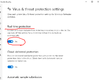
it will open the antivirous then scroll down you find the selection that name ( mange sitting ) press on it
it will open new window, then turn off this one in image below
Hello, I have a web doctor installed at work, it blocks all sites, but I can’t disable the functions because the system administrator did something. Help disable I will be grateful
It depends if you are not an administrator then you can't override the rule but If you also have administrator rights then follow the steps
Select Start > Settings > Update & Security > Windows Security > Virus & threat protection > Manage settings (or Virus & threat protection settings in previous versions of Windows 10).
Switch Real-time protection to Off. Note that scheduled scans will continue to run. However, files that are downloaded or installed will not be scanned.