
Navigasyon
Uygulamayı Yükle
Daha fazla seçenek
Eski bir web tarayıcısı kullanıyorsunuz. Bu veya diğer siteleri görüntülemekte sorunlar yaşayabilirsiniz..
Tarayıcınızı güncellemeli veya alternatif bir tarayıcı kullanmalısınız.
Tarayıcınızı güncellemeli veya alternatif bir tarayıcı kullanmalısınız.
How to fix Pubg Mobile Lag?
- Konuyu başlatan darkside2815
- Başlangıç tarihi
- Durum
- Üzgünüz bu konu cevaplar için kapatılmıştır...
Onaylı Üye
-
Bağlantıları görmek için lütfen Giriş Yap
-
Bağlantıları görmek için lütfen Giriş Yap
-
Bağlantıları görmek için lütfen Giriş Yap
-
Bağlantıları görmek için lütfen Giriş Yap
-
Bağlantıları görmek için lütfen Giriş Yap
-
Bağlantıları görmek için lütfen Giriş Yap
-
Bağlantıları görmek için lütfen Giriş Yap
-
Bağlantıları görmek için lütfen Giriş Yap
-
Bağlantıları görmek için lütfen Giriş Yap
-
Bağlantıları görmek için lütfen Giriş Yap
-
Bağlantıları görmek için lütfen Giriş YapBağlantıları görmek için lütfen Giriş Yap
-
Bağlantıları görmek için lütfen Giriş Yap
-
Bağlantıları görmek için lütfen Giriş Yap
Onaylı Üye
buy a new phone
Sol IT Solution Manager
Seçkin Üye
1-Open Gameloop client
2-Now open “Settings” and select “Graphics” option
3-Change Screen Mode to “Full Screen”
4- Keep the resolution your monitor has for desktop, if you change it to low you can get more FPS
5-FPP Camera FOV should be “70-80” for low-end computers, “80-90” for mid-range computers, and higher for higher-end computers.
6-Below this you can keep everything “Very Low” or “Low”
2-Now open “Settings” and select “Graphics” option
3-Change Screen Mode to “Full Screen”
4- Keep the resolution your monitor has for desktop, if you change it to low you can get more FPS
5-FPP Camera FOV should be “70-80” for low-end computers, “80-90” for mid-range computers, and higher for higher-end computers.
6-Below this you can keep everything “Very Low” or “Low”
Uzman Üye
buy new pc
Onaylı Üye
If your PC low performance:
Use 60fps with 1080 or lower
Make your game graphic to low quality
Clear game cache
Close other programs
Make sure your internet is stable too.
Better way, you should upgrade your Internet and your PC specs or buy new one.
Use 60fps with 1080 or lower
Make your game graphic to low quality
Clear game cache
Close other programs
Make sure your internet is stable too.
Better way, you should upgrade your Internet and your PC specs or buy new one.
Onaylı Üye
use 16 gb ram
Onaylı Üye
Not only depend on Internet, it is also depend on your computer too. If your computer high end is ok just change some setting.
Uzman Üye
root your device
Onaylı Üye
Clear Temp & %temp%
Üye
use 32 bit gameloop

Üye
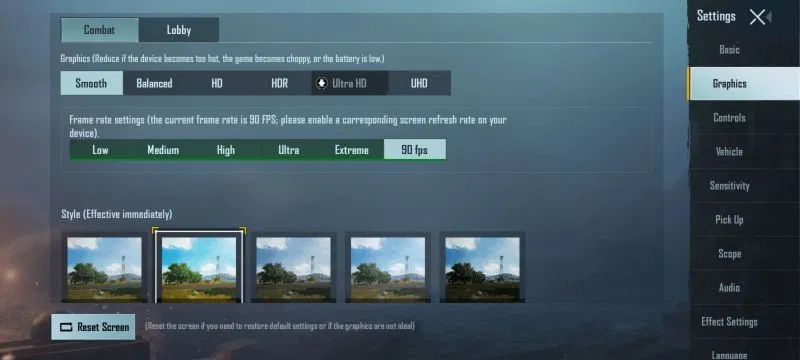
reduce the graphics // remove unwanted apps running at the background // use high specs mobile

Seçkin Üye
play graphics smooth and extream

- Durum
- Üzgünüz bu konu cevaplar için kapatılmıştır...
Benzer Konular
- Cevaplar
- 1
- Görüntüleme
- 59


- Cevaplar
- 0
- Görüntüleme
- 368

- Cevaplar
- 6
- Görüntüleme
- 585

- Cevaplar
- 19
- Görüntüleme
- 1K
- Cevaplar
- 1
- Görüntüleme
- 64