
Naughty But Innocent
Uzman Üye
For Help : -
Friends you can not upload directly your cover photo .. i mean there is no option to browse like that.. you have to use your photo or picture with link ( URL )
So now we learn how to make profile cover here..
Step 1. Click on Username. it is your right hand side corner ..
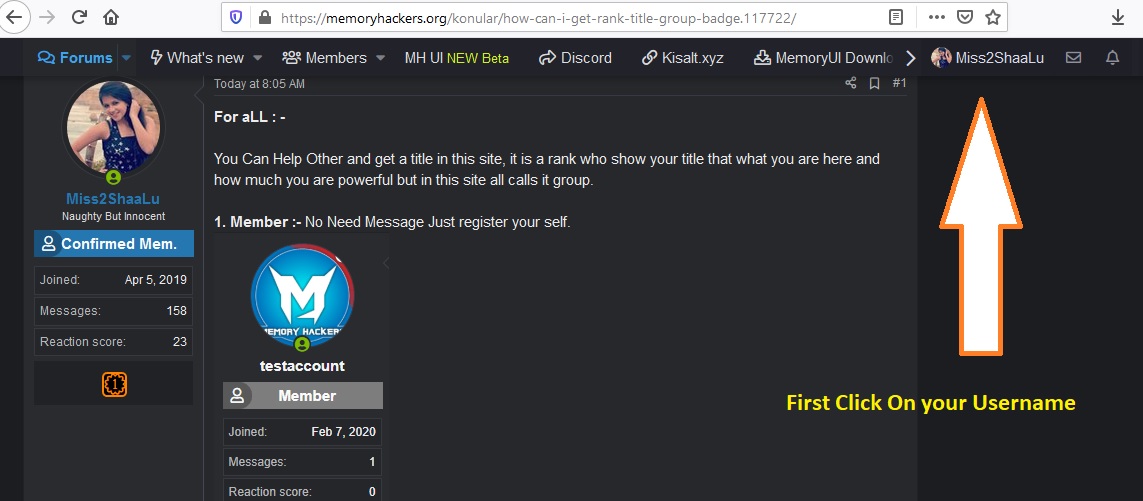
Step 2. Click on account details option.
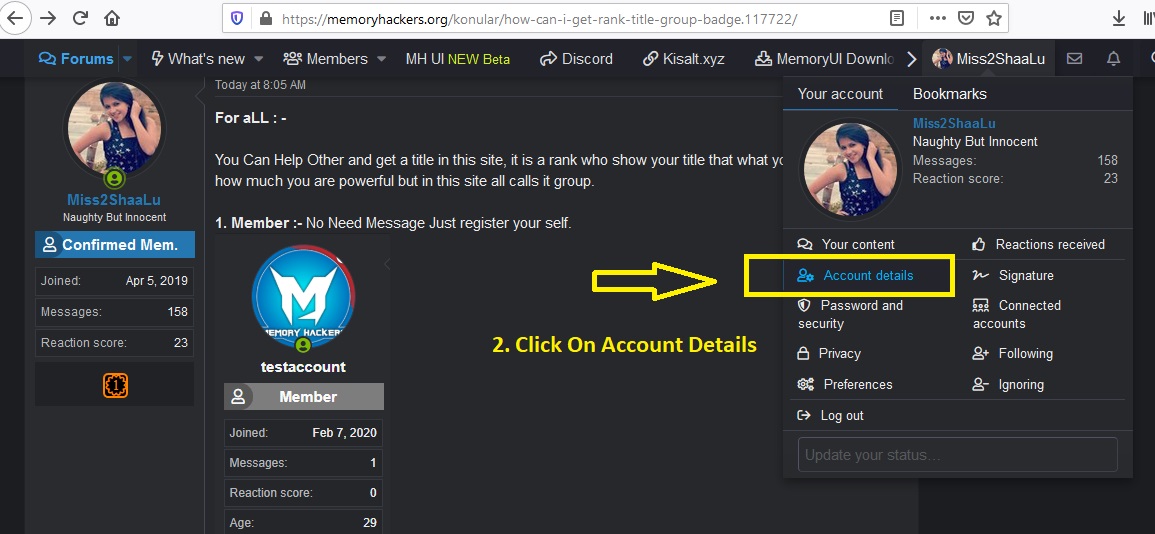
Step 3. Make your Cover URL >>>>>>>>>>> if you don't know how then read my other article >>>>>>>>>>>>>
https://memoryhackers.org/konular/how-to-share-screenshot-or-pictures.117798/
>>>> >>>>>>>>>>> skip it if you know how to make picture URL link in web >>>>>>>>>>>>>>>>>>>>>>>>>>
Step 4. Pest Your URL link here and click on Save.... Done...
I Hope it will help you..
Note : - Only High Rank / Title User Can Use This option , Member , confirmed member like this low user can't use it..
Friends you can not upload directly your cover photo .. i mean there is no option to browse like that.. you have to use your photo or picture with link ( URL )
So now we learn how to make profile cover here..
Step 1. Click on Username. it is your right hand side corner ..
Step 2. Click on account details option.
Step 3. Make your Cover URL >>>>>>>>>>> if you don't know how then read my other article >>>>>>>>>>>>>
https://memoryhackers.org/konular/how-to-share-screenshot-or-pictures.117798/
>>>> >>>>>>>>>>> skip it if you know how to make picture URL link in web >>>>>>>>>>>>>>>>>>>>>>>>>>
Step 4. Pest Your URL link here and click on Save.... Done...
I Hope it will help you..
Note : - Only High Rank / Title User Can Use This option , Member , confirmed member like this low user can't use it..

