
Naughty But Innocent
Uzman Üye
For aLL My Friends Help :
Step 1. Create A Folder In Your Desktop With Name anything.
Step 2. Right click on folder And Go To Properties.
Step 3. Click On Customize Tab then Click On Change Icon..
Step 4. choose Blank Folder type and Apply OK
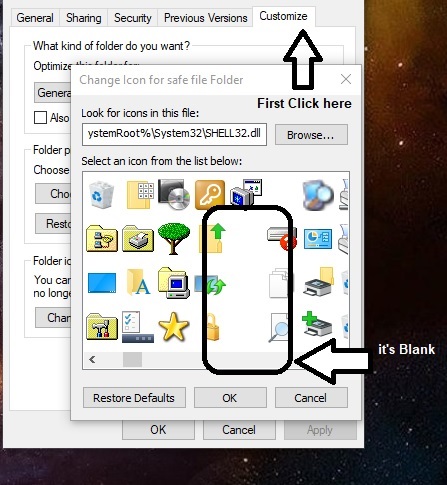
Note : Now you will see your folder Hide but your folder Name Still Showing..
Step 5. Right Click on again folder and go to rename.. and make it " ALT+258"
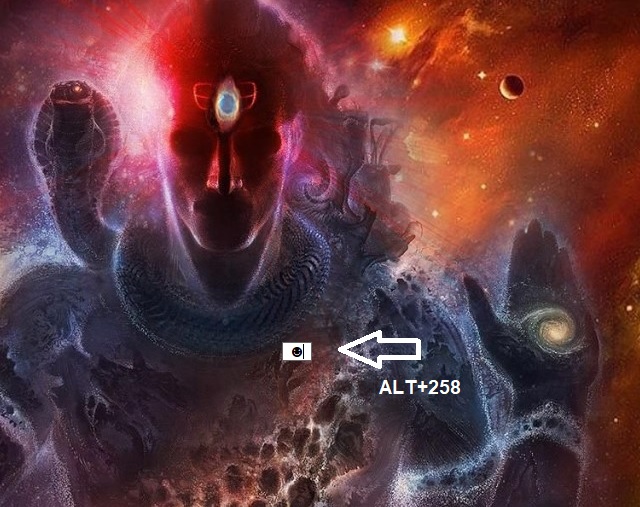
Step 6. It will be White Mini Smiley.. Move It it corner.
>>> Now aLL Done.. Your Friends Can't Guess it that it is your Personal Folder.. it is just a Trick it's not official so you can use it on your home..
i am sure it will work for you in your home.. I Hope It will Work For You..
Step 1. Create A Folder In Your Desktop With Name anything.
Step 2. Right click on folder And Go To Properties.
Step 3. Click On Customize Tab then Click On Change Icon..
Step 4. choose Blank Folder type and Apply OK
Note : Now you will see your folder Hide but your folder Name Still Showing..
Step 5. Right Click on again folder and go to rename.. and make it " ALT+258"
Step 6. It will be White Mini Smiley.. Move It it corner.
>>> Now aLL Done.. Your Friends Can't Guess it that it is your Personal Folder.. it is just a Trick it's not official so you can use it on your home..
i am sure it will work for you in your home.. I Hope It will Work For You..


