Çözüldü How to unistall a Kernel driver?

Durum
Üzgünüz bu konu cevaplar için kapatılmıştır...
Donator
Katılım
17 Kas 2020
Mesajlar
963
Çözümler
55
Tepki puanı
247
Ödüller
9
Yaş
29
5 HİZMET YILI
Im currently infected at kernel level and have no idea how I can remove it from my computer. Can someone show me the way?
I know where the file is located and also have its key on Windows Registry, all that left is a method to remove it.
ı know I can remove it by formating, which I don't wanna do rn.
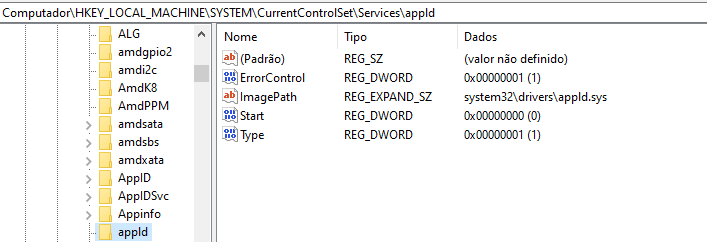
Bağlantıları görmek için lütfen Giriş Yap


1632959003192.png
 
Moderatörün son düzenlenenleri:
Çözüm
As far as I know appld driver is belong to Microsoft. But, they used it on Windows 7. So I guess you're not using windows 7 and your virustotal looks kinda bad. The best solution is like you said "formatting your computer". It is not kinda best solution, it is kinda "safest" one. However, since you said you do not wanna format your computer, here what you can do:
1-Download Process Hacker:
Bağlantıları görmek için lütfen Giriş Yap

2-Run it with administrator rights.
3-Go to services tab.
4-Write its service name.
5- Right click on it, and press "Stop".
6-Lastly, delete it.

If you can not find that driver in services tab, go to processes tab and find "System". Double click on it, go to Modules tab. And you will find...
Słyszę, słyszę letni powiew.
Kurucu
Katılım
20 Haz 2015
Mesajlar
7,666
Çözümler
136
Tepki puanı
20,724
Ödüller
25
10 HİZMET YILI
As far as I know appld driver is belong to Microsoft. But, they used it on Windows 7. So I guess you're not using windows 7 and your virustotal looks kinda bad. The best solution is like you said "formatting your computer". It is not kinda best solution, it is kinda "safest" one. However, since you said you do not wanna format your computer, here what you can do:
1-Download Process Hacker:
Bağlantıları görmek için lütfen Giriş Yap

2-Run it with administrator rights.
3-Go to services tab.
4-Write its service name.
5- Right click on it, and press "Stop".
6-Lastly, delete it.

If you can not find that driver in services tab, go to processes tab and find "System". Double click on it, go to Modules tab. And you will find that infected driver on there if it is running. Right click on it and press "Unload". Finally, delete it from your computer.

However, you can get "bsod". Care.
 
Çözüm
Donator
Katılım
17 Kas 2020
Mesajlar
963
Çözümler
55
Tepki puanı
247
Ödüller
9
Yaş
29
5 HİZMET YILI
As far as I know appld driver is belong to Microsoft. But, they used it on Windows 7. So I guess you're not using windows 7 and your virustotal looks kinda bad. The best solution is like you said "formatting your computer". It is not kinda best solution, it is kinda "safest" one. However, since you said you do not wanna format your computer, here what you can do:
1-Download Process Hacker:
Bağlantıları görmek için lütfen Giriş Yap

2-Run it with administrator rights.
3-Go to services tab.
4-Write its service name.
5- Right click on it, and press "Stop".
6-Lastly, delete it.

If you can not find that driver in services tab, go to processes tab and find "System". Double click on it, go to Modules tab. And you will find that infected driver on there if it is running. Right click on it and press "Unload". Finally, delete it from your computer.

However, you can get "bsod". Care.
Yes, there is inded a legit "AppId" here and this other one "appld" (it is a L, hella dumb). I installed another rootkit called Avast to remove it, then deleted the files/register key and after a restart it was gone.
Also, Thanks.
 
Durum
Üzgünüz bu konu cevaplar için kapatılmıştır...
Üst