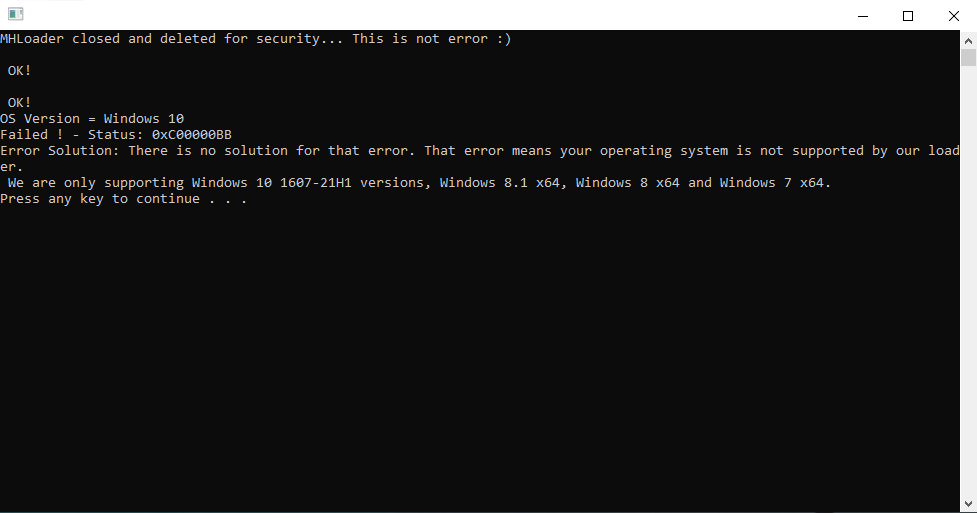
27 Kas 2021 #1 Like a Pro L Üye Katılım 27 Kas 2021 Mesajlar 4 Tepki puanı 1 Yaş 24 4 HİZMET YILI when i try to load hack of pubg. loader show me this eror. what i do?
Çözüm A A aaman331 27 Kas 2021 Open Settings on Windows 10. Click on Update & Security. Click on Windows Update. Click the View update history option. Click the Uninstall updates option. Select the Feature Update to Windows 10 21H2 via Enablement Package (KB50003791) that matches the installation date. Click the Uninstall button. Click the Yes button to...
Open Settings on Windows 10. Click on Update & Security. Click on Windows Update. Click the View update history option. Click the Uninstall updates option. Select the Feature Update to Windows 10 21H2 via Enablement Package (KB50003791) that matches the installation date. Click the Uninstall button. Click the Yes button to...
27 Kas 2021 #2 symond10 S Süper Üye Katılım 17 Kas 2018 Mesajlar 871 Çözümler 10 Tepki puanı 160 Ödüller 6 Yaş 28 7 HİZMET YILI You need windows 10 1607-21H1. What version are you using? If you are using 21H2 you need to downgrade 1909 is the best version . Oyla 0 Olumsuz oyla
You need windows 10 1607-21H1. What version are you using? If you are using 21H2 you need to downgrade 1909 is the best version .
27 Kas 2021 #3 BestOF B Seçkin Üye Katılım 29 Haz 2020 Mesajlar 430 Çözümler 2 Tepki puanı 33 Ödüller 4 Yaş 31 6 HİZMET YILI make your windows 10 updates, if your version is not windows 10, adjust the loader version accordingly Oyla 0 Olumsuz oyla
make your windows 10 updates, if your version is not windows 10, adjust the loader version accordingly
27 Kas 2021 #4 aaman331 A Seçkin Üye Katılım 12 Ağu 2020 Mesajlar 311 Çözümler 7 Tepki puanı 71 Ödüller 4 Yaş 28 5 HİZMET YILI Open Settings on Windows 10. Click on Update & Security. Click on Windows Update. Click the View update history option. Click the Uninstall updates option. Select the Feature Update to Windows 10 21H2 via Enablement Package (KB50003791) that matches the installation date. Click the Uninstall button. Click the Yes button to confirm. Click the Restart now button. Once you complete the steps, the update will be removed, bringing the desktop or laptop back to version 21H1, 20H2, or 2004. 2nd Method You can also downgrade your Window by installing old version Video link: Post automatically merged: 27 Kas 2021 BestOF' Alıntı: make your windows 10 updates, if your version is not windows 10, adjust the loader version accordingly Genişletmek için tıklayın ... Oyla 0 Olumsuz oyla Çözüm
Open Settings on Windows 10. Click on Update & Security. Click on Windows Update. Click the View update history option. Click the Uninstall updates option. Select the Feature Update to Windows 10 21H2 via Enablement Package (KB50003791) that matches the installation date. Click the Uninstall button. Click the Yes button to confirm. Click the Restart now button. Once you complete the steps, the update will be removed, bringing the desktop or laptop back to version 21H1, 20H2, or 2004. 2nd Method You can also downgrade your Window by installing old version Video link: Post automatically merged: 27 Kas 2021 BestOF' Alıntı: make your windows 10 updates, if your version is not windows 10, adjust the loader version accordingly Genişletmek için tıklayın ...
27 Kas 2021 #5 BestOF B Seçkin Üye Katılım 29 Haz 2020 Mesajlar 430 Çözümler 2 Tepki puanı 33 Ödüller 4 Yaş 31 6 HİZMET YILI aaman331' Alıntı: Open Settings on Windows 10. Click on Update & Security. Click on Windows Update. Click the View update history option. Click the Uninstall updates option. Select the Feature Update to Windows 10 21H2 via Enablement Package (KB50003791) that matches the installation date. Click the Uninstall button. Click the Yes button to confirm. Click the Restart now button. Once you complete the steps, the update will be removed, bringing the desktop or laptop back to version 21H1, 20H2, or 2004. 2nd Method You can also downgrade your Window by installing old version Video link: Post automatically merged: 27 Kas 2021 Genişletmek için tıklayın ... Peki ya sen Oyla 0 Olumsuz oyla
aaman331' Alıntı: Open Settings on Windows 10. Click on Update & Security. Click on Windows Update. Click the View update history option. Click the Uninstall updates option. Select the Feature Update to Windows 10 21H2 via Enablement Package (KB50003791) that matches the installation date. Click the Uninstall button. Click the Yes button to confirm. Click the Restart now button. Once you complete the steps, the update will be removed, bringing the desktop or laptop back to version 21H1, 20H2, or 2004. 2nd Method You can also downgrade your Window by installing old version Video link: Post automatically merged: 27 Kas 2021 Genişletmek için tıklayın ... Peki ya sen