

Seçkin Üye
In the past few weeks i was working on bot programing with c++ and i decided to create a bot that can identify objects on image windows screen. The code used openCV3 and i would like to share it to users in need of it.
So the most purpose was to create pubg safe aimbot without pulling memory addresses and i found it impossible . i tried mouse event but its complicated. if you know how to make mouse change direction on screen then the cout << "Central_coodinates: " << mc << '\n'; // get center of blob coordinates code will be so helpful for you.
CODE
FUNCTION
-captures game window
-gets object center x and y coordinates
-displays detected objects color specified.
IMG

IMG

As u can see, the bot only detects specific color values to find objects. u can modify and make it smart to see different objects. i used the below code to get object color. it displays
hmin,smin,vmin,hmax,smax coodinates
This coordinates is then used by the previous code at vector<vector<int>> myColors{ } section .
In the Trackbars move each tabs to get the color that u want. The sections that appears white most is what will be detected by BOT.
IMG
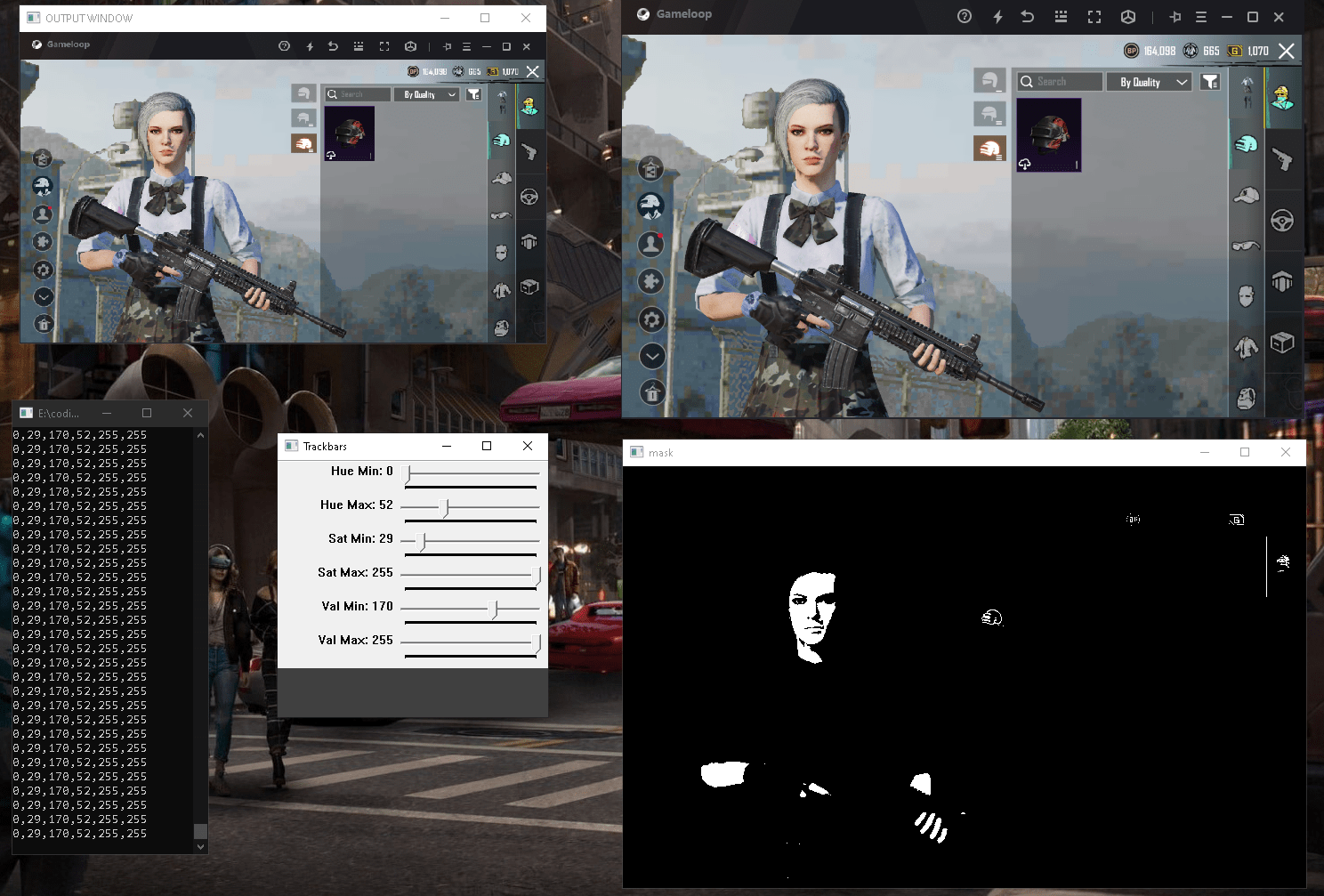
TO COMPILE THIS YOUR NEED OPENCV.
So the most purpose was to create pubg safe aimbot without pulling memory addresses and i found it impossible
. i tried mouse event but its complicated. if you know how to make mouse change direction on screen then the cout << "Central_coodinates: " << mc << '\n'; // get center of blob coordinates code will be so helpful for you.CODE
Kod:
#include "opencv2/imgproc.hpp"
#include "opencv2/highgui.hpp"
#include <Windows.h>
#include <iostream>

using namespace std;
using namespace cv;

HWND hwnd;
Mat src, mask, imgDil, Draw, imgCanny, imgGray;
// get color
vector<vector<int>> myColors{
    {0,31,177,18,127,255}    // detect player colour
 //  {114,165,14,133,255,255} // detect BLUE color
};


void getContours(Mat imgDil) {
    vector<vector<Point>> contours;
    vector<Vec4i> hierarchy;
    string objectType;

    findContours(imgDil, contours, hierarchy, RETR_EXTERNAL, CHAIN_APPROX_SIMPLE, Point(0, 0)); ///

    vector<vector<Point>> conPoly(contours.size());
    vector<Rect> boundRect(contours.size());

    //............................................................................
    // get the moments
    vector<Moments> mu(contours.size());
    vector<Point2f> mc(contours.size());
    for (int i = 0; i < contours.size(); i++)
    {
        mu = moments(contours, false);
    // get the centroid of figures.
        mc = Point2f(mu.m10 / mu.m00, mu.m01 / mu.m00);

    //.............................................................................
        int area = contourArea(contours);
        // draw contours
        if (area > 400) {
            float peri = arcLength(contours, true);//bounding box
            approxPolyDP(contours, conPoly, 0.02 * peri, true);
            boundRect = boundingRect(conPoly); // max area  ;
            drawContours(src, conPoly, i, Scalar(255, 0, 255), 2);
            circle(src, mc, 4, Scalar(167, 151, 0), -1, 8, 0);                              ///
            rectangle(src, boundRect.tl(), boundRect.br(), Scalar(0, 255, 0), 5);
            if (GetAsyncKeyState('M')) {
                cout << "Central_coodinates: " << mc << '\n';  // get center of blob codinates
                cout<< " Area: " << area << '\n';                 // get area of objects
            }
        }
    }
}


//
void findColor(Mat src)
{
    Mat imgHSV;
    cvtColor(src, imgHSV, COLOR_BGR2HSV);

    for (int i = 0; i < myColors.size(); i++) {
        Scalar lower(myColors[0], myColors[1], myColors[2]);
        Scalar upper(myColors[3], myColors[4], myColors[5]);
        inRange(imgHSV, lower, upper, mask);
        imshow(to_string(i), mask);
        getContours(mask);
    }
}

//

Mat hwnd2mat(HWND hwnd)
{
    HDC hwindowDC, hwindowCompatibleDC;

    int height, width, srcheight, srcwidth;
    HBITMAP hbwindow;
    BITMAPINFOHEADER  bi;

    hwindowDC = GetDC(hwnd);
    hwindowCompatibleDC = CreateCompatibleDC(hwindowDC);
    SetStretchBltMode(hwindowCompatibleDC, COLORONCOLOR);

    RECT windowsize;    // get the height and width of the screen
    GetClientRect(hwnd, &windowsize);

    srcheight = windowsize.bottom;
    srcwidth = windowsize.right;
    height = windowsize.bottom / 1;  //change this to whatever size you want to resize to
    width = windowsize.right / 1;

    src.create(height, width, CV_8UC4);

    // create a bitmap
    hbwindow = CreateCompatibleBitmap(hwindowDC, width, height);
    bi.biSize = sizeof(BITMAPINFOHEADER);    //http://msdn.microsoft.com/en-us/library/windows/window/dd183402%28v=vs.85%29.aspx
    bi.biWidth = width;
    bi.biHeight = -height;  //this is the line that makes it draw upside down or not
    bi.biPlanes = 1;
    bi.biBitCount = 32;
    bi.biCompression = BI_RGB;
    bi.biSizeImage = 0;
    bi.biXPelsPerMeter = 0;
    bi.biYPelsPerMeter = 0;
    bi.biClrUsed = 0;
    bi.biClrImportant = 0;

    // use the previously created device context with the bitmap
    SelectObject(hwindowCompatibleDC, hbwindow);
    // copy from the window device context to the bitmap device context
    StretchBlt(hwindowCompatibleDC, 0, 0, width, height, hwindowDC, 0, 0, srcwidth, srcheight, SRCCOPY); //change SRCCOPY to NOTSRCCOPY for wacky colors !
    GetDIBits(hwindowCompatibleDC, hbwindow, 0, height, src.data, (BITMAPINFO*)&bi, DIB_RGB_COLORS);  //copy from hwindowCompatibleDC to hbwindow

    // avoid memory leak
    DeleteObject(hbwindow);
    DeleteDC(hwindowCompatibleDC);
    ReleaseDC(hwnd, hwindowDC);

    return src;
}

int main(int argc, char** argv)
{
    bool I_D = true;
    hwnd = FindWindow(NULL, "Gameloop");      // geting game window

    while (I_D)
    {
    POINT p;
    GetCursorPos(&p);
    ScreenToClient(hwnd, &p);
        src = hwnd2mat(hwnd);
        // you can do some image processing here
        findColor(src);
        cout << "x: " << p.x << " | y: " << p.y << '\n';  // geting mouse position around the window
        imshow("WINDOW COPY", src);
        waitKey(1);                             // you can change wait time
       if (GetAsyncKeyState(VK_SPACE)) {
           I_D = false;
       }
    }
}
FUNCTION
-captures game window
-gets object center x and y coordinates
-displays detected objects color specified.
IMG
IMG
As u can see, the bot only detects specific color values to find objects. u can modify and make it smart to see different objects. i used the below code to get object color. it displays
hmin,smin,vmin,hmax,smax coodinates
This coordinates is then used by the previous code at vector<vector<int>> myColors{ } section .
In the Trackbars move each tabs to get the color that u want. The sections that appears white most is what will be detected by BOT.
Kod:
CODE
#include <opencv2/imgcodecs.hpp>
#include <opencv2/highgui.hpp>
#include <opencv2/imgproc.hpp>
#include <iostream>
#include <Windows.h>

using namespace cv;
using namespace std;

///////////////  Color Detection video //////////////////////

Mat imgHSV, mask;
int hmin = 0, smin = 0, vmin = 0;   // we edit here with the track bar values
int hmax = 179, smax = 255, vmax = 255;  // to get the best hsv value u desire

//


Mat hwnd2mat(HWND hwnd)
{
    HDC hwindowDC, hwindowCompatibleDC;

    int height, width, srcheight, srcwidth;
    HBITMAP hbwindow;
    Mat src;
    BITMAPINFOHEADER  bi;

    hwindowDC = GetDC(hwnd);
    hwindowCompatibleDC = CreateCompatibleDC(hwindowDC);
    SetStretchBltMode(hwindowCompatibleDC, COLORONCOLOR);

    RECT windowsize;    // get the height and width of the screen
    GetClientRect(hwnd, &windowsize);

    srcheight = windowsize.bottom;
    srcwidth = windowsize.right;
    height = windowsize.bottom / 1;  //change this to whatever size you want to resize to
    width = windowsize.right / 1;

    src.create(height, width, CV_8UC4);

    // create a bitmap
    hbwindow = CreateCompatibleBitmap(hwindowDC, width, height);
    bi.biSize = sizeof(BITMAPINFOHEADER);    //http://msdn.microsoft.com/en-us/library/windows/window/dd183402%28v=vs.85%29.aspx
    bi.biWidth = width;
    bi.biHeight = -height;  //this is the line that makes it draw upside down or not
    bi.biPlanes = 1;
    bi.biBitCount = 32;
    bi.biCompression = BI_RGB;
    bi.biSizeImage = 0;
    bi.biXPelsPerMeter = 0;
    bi.biYPelsPerMeter = 0;
    bi.biClrUsed = 0;
    bi.biClrImportant = 0;

    // use the previously created device context with the bitmap
    SelectObject(hwindowCompatibleDC, hbwindow);
    // copy from the window device context to the bitmap device context
    StretchBlt(hwindowCompatibleDC, 0, 0, width, height, hwindowDC, 0, 0, srcwidth, srcheight, SRCCOPY); //change SRCCOPY to NOTSRCCOPY for wacky colors !
    GetDIBits(hwindowCompatibleDC, hbwindow, 0, height, src.data, (BITMAPINFO*)&bi, DIB_RGB_COLORS);  //copy from hwindowCompatibleDC to hbwindow

    // avoid memory leak
    DeleteObject(hbwindow);
    DeleteDC(hwindowCompatibleDC);
    ReleaseDC(hwnd, hwindowDC);

    return src;
}


//


int main() {

    HWND hwnd = FindWindow(NULL, "Gameloop"); // geting game window
     namedWindow("OUTPUT WINDOW", WINDOW_NORMAL);

    //cvtColor(img, imgHSV, COLOR_BGR2HSV);
    namedWindow("Trackbars", (640, 200)); //creat window
    createTrackbar("Hue Min", "Trackbars", &hmin, 179);
    createTrackbar("Hue Max", "Trackbars", &hmax, 179);
    createTrackbar("Sat Min", "Trackbars", &smin, 255);
    createTrackbar("Sat Max", "Trackbars", &smax, 255);
    createTrackbar("Val Min", "Trackbars", &vmin, 255);
    createTrackbar("Val Max", "Trackbars", &vmax, 255);

    while (true) {
        Mat src = hwnd2mat(hwnd);
        cvtColor(src, imgHSV, COLOR_BGR2HSV);

        Scalar lower(hmin, smin, vmin);
        Scalar upper(hmax, smax, vmax);

        inRange(imgHSV, lower, upper, mask);
        cout << hmin << "," << smin << "," << vmin << "," << hmax << "," << smax << "," << vmax << endl;//hmin,smin,vmin,hmax,smax coodinates
        imshow("OUTPUT WINDOW", src);
        imshow("mask", mask);
       waitKey(1);
    }
    return 0;
}
IMG
TO COMPILE THIS YOUR NEED OPENCV.
Moderatörün son düzenlenenleri:


