Çözüldü [Solved] Can't upgrade Win7 to Win10

Durum
Üzgünüz bu konu cevaplar için kapatılmıştır...
Vileblood
Süper Üye
Katılım
8 Ağu 2016
Mesajlar
603
Çözümler
6
Tepki puanı
75
Ödüller
9
9 HİZMET YILI
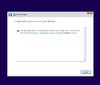
I'm trying to upgrade my Win7 to Win10, but I don't want the version 2004 but only 1903 or 1909. I want to keep my programmes and files from Win7 but every time I try to run the ISO it says that such path isn't possible. What's the problem? Do you know where I could get the official ISO from the Microsoft web page for the versions 1903 or 1909 (they only offer 2004 now)?
 

Ekli dosyalar

  • report.jpg
    report.jpg
    51.4 KB · Görüntüleme: 59
Vileblood
Süper Üye
Katılım
8 Ağu 2016
Mesajlar
603
Çözümler
6
Tepki puanı
75
Ödüller
9
9 HİZMET YILI
Okay guys, I solved the problem (more or less). The thread can be closed.
 
Onaylı Üye
Katılım
22 Tem 2020
Mesajlar
51
Tepki puanı
1
Yaş
28
5 HİZMET YILI
There are two types of licenses to activate Windows 10. On the one hand you have the retail license (or RTL), which is the one you buy in physical stores or directly in the Microsoft store. With these RTL licenses you can install Windows on more than one computer, as long as you do not try to use your license key on more than one computer simultaneously.
 
Onaylı Üye
Katılım
17 Tem 2020
Mesajlar
56
Tepki puanı
1
Ödüller
2
Yaş
26
5 HİZMET YILI
try copying files from windows 7 to your hard drive change windows and transfer windows 7 files there
 
Onaylı Üye
Katılım
22 Tem 2020
Mesajlar
60
Tepki puanı
3
Ödüller
1
Yaş
28
5 HİZMET YILI
dude has a site and BR more will help you a lot
Bağlantıları görmek için lütfen Giriş Yap
enter it choose your Iso's stuff and download the isos it and Microsoft and very good this site te allows you to choose several
Hope this helps!!! site and br more has it all !!!
 
Onaylı Üye
Katılım
24 May 2020
Mesajlar
89
Tepki puanı
4
Ödüller
2
Yaş
26
6 HİZMET YILI
Create a usb installation media by downloading the windows 10 iso from the official website and flashing it using ruffus :0
 
Durum
Üzgünüz bu konu cevaplar için kapatılmıştır...
Üst