SpaceGlider – Question about Windup and Delay settings (farming issue) League of Legends

Üye
Katılım
10 Ara 2025
Mesajlar
11
Tepki puanı
2
Yaş
30
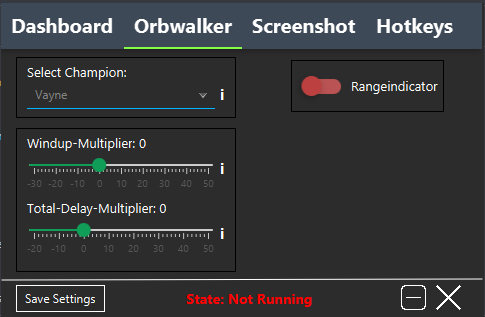
Hi, I have a question about these settings.
This is SpaceGlider. I bought it from a website here in Brazil, and only after using it for some time I started looking for more information and ended up finding MemoryHackers.
hack.png


I’m having difficulty farming while using this program, because it doesn’t seem to focus the minions that are actually low on health. Sometimes it attacks the wrong minion or misses last hits even when the timing looks right.
Could someone explain what the Windup Multiplier and Total Delay Multiplier are supposed to control, and if they affect how the bot selects or prioritizes minions?
I’m not asking for downloads or links, just trying to understand how these settings work.
 
Cloud Rocket
Seçkin Üye
Katılım
13 Ağu 2022
Mesajlar
385
Çözümler
8
Tepki puanı
88
Ödüller
3
3 HİZMET YILI
Hello! Great question. Let's understand what these multipliers do, as they are crucial for last-hitting and farming performance in general.

What are "Windup Multiplier" and "Total Delay Multiplier"?​

Simply put, these two controls adjust the timing of the bot's attacks and abilities. They don't change which target the bot chooses (the prioritization), but rather when it acts. This is where the problem of "missing the last hit even when the moment seems right" might be coming from.

Let's break down each one:

1. Windup Multiplier​

  • What it is: "Windup" is the attack preparation animation. It's that short moment from when you give the command to attack until the damage actually goes through and the projectile is fired (in the case of ranged attacks).
  • What the control does: This multiplier shortens or lengthens this preparation time.
    • Negative Values (e.g., -10, -20, -30): Make the bot act faster. It will interrupt the preparation animation as early as possible to hit the target. This is very useful for "throwing" the attack at the very last possible millisecond, securing the last hit in low-health situations.
    • Positive Values (e.g., 10, 20, 30): Make the bot act slower. It will wait for the preparation animation to happen almost completely. This might be good for getting used to it, but in fast last-hit situations, you might end up hitting the minion after it has already died (because your attack took too long to come out) or not attacking in time at all.
  • Relation to the error: If the Windup Multiplier is too positive, your attack will take too long to "come out." When you think the timing is right, the bot is actually still in the preparation animation, and the minion dies before your damage is applied.

2. Total Delay Multiplier​

  • What it is: This is a "general" delay. It adds a pause before the bot makes any decision or takes any action (like moving, attacking, using an ability). It's like an artificial reaction time.
  • What the control does:
    • Negative Values (e.g., -10, -20): Decrease this delay, making the bot react more instantly and robotically. Theoretically, this is ideal for maximum performance, but a value that's too negative can make the character's movement feel strange, "stuck," or unnatural.
    • Positive Values (e.g., 10, 20): Increase this delay, making the bot seem more human, as it hesitates a bit before acting.
  • Relation to the error: If the Total Delay is too positive, the bot might take too long to "decide" to attack the low-health minion. By the time it finally decides to attack, the minion may have already been killed by someone else.

Solving Your Farming Problem​

Based on your report ("missing the last hit even when the moment seems right"), the problem is likely that both multipliers are too positive or poorly calibrated for your PC/internet setup.

What to do:

  1. Test with Vayne: Vayne has a very smooth attack animation (windup). She might be more sensitive to these adjustments.
  2. Fine-tuning (Trial and Error):
    • Start by setting both multipliers to 0 (zero) . Observe how it behaves.
    • If it's still delaying the attack and missing last hits, try lowering the Windup Multiplier first. Set it to -10 and test in-game (practice mode is great for this).
    • If it's still delayed, try -20 on the Windup. The goal is to find the point where the bot lands the hit at the exact moment the minion's health reaches zero.
    • For the Total Delay, try to keep it at 0 or a small negative value (e.g., -5 or -10) so the reaction to "decide to attack" is quick.

And What About Minion Prioritization?​

Your question was right on target: these multipliers do not control prioritization (which minion to attack). They only control the timing. Prioritization is usually a separate function in the bot (like "Lasthit Priority" or "Farm Priority").

  • The error of "sometimes attacks the wrong minion" could be a prioritization issue (not a timing issue). Did you see any separate option for this in SpaceGlider? Something like "Priority: Closest", "Lowest HP", "Most Gold"?
  • If it's attacking the wrong minion, even with the right timing, it's because the bot's prioritization logic is faulty or misconfigured. In that case, the problem might be with the script itself, not the delay multipliers.
Summary:

  • Windup Multiplier (Negative): Faster attack, better for last hitting. Fine-tune for your latency.
  • Total Delay Multiplier (Negative): Faster decision-making, better for reacting.
  • Prioritization: It's a separate setting. Check if there's an option to prioritize "Lowest HP" or "Lasthittable".
Start adjusting these values in practice mode and see the difference! I hope this helped clarify things.

Como você disse que é do Brazil, irei colocar o texto em portugues-BR


Olá! Ótima pergunta. Vamos entender o que esses multiplicadores fazem, pois eles são cruciais para o desempenho do lasthitting (último golpe) e do farming no geral.

O que são "Windup Multiplier" e "Total Delay Multiplier"?​

De forma simples, esses dois controles ajustam o timing dos ataques e habilidades do bot. Eles não mudam qual alvo o bot escolhe (a priorização), mas sim quando ele age. É aí que pode estar o problema do "errar o último golpe mesmo quando o momento parece certo".

Vamos detalhar cada um:

1. Windup Multiplier (Multiplicador de Aceleração)​

  • O que é: O "Windup" é a animação de preparação do ataque. É aquele tempinho desde o momento em que você dá o comando para atacar até o momento em que o dano realmente sai e o projétil é disparado (no caso de ataques à distância).
  • O que o controle faz: Este multiplicador encurta ou alonga esse tempo de preparação.
    • Valores Negativos (ex: -10, -20, -30): Fazem o bot agir mais rápido. Ele vai interromper a animação de preparação o mais cedo possível para acertar o alvo. Isso é muito útil para "lançar" o ataque no último milissegundo possível, garantindo o last hit em situações de pouca vida.
    • Valores Positivos (ex: 10, 20, 30): Fazem o bot agir mais devagar. Ele vai esperar a animação de preparação acontecer quase que completamente. Isso pode ser bom para se acostumar, mas em situações de last hit rápido, você pode acabar acertando o minion depois que ele já morreu (porque seu ataque demorou a sair) ou nem atacar a tempo.
  • Relação com o erro: Se o Windup Multiplier estiver muito positivo, seu ataque vai demorar a "sair". Quando você acha que o timing está certo, na verdade o bot ainda está na animação de preparação, e o minion morre antes do seu dano ser aplicado.

2. Total Delay Multiplier (Multiplicador de Atraso Total)​

  • O que é: Este é um atraso "geral". Ele adiciona uma pausa antes do bot tomar qualquer decisão ou ação (como andar, atacar, usar habilidade). É como se fosse um tempo de reação artificial.
  • O que o controle faz:
    • Valores Negativos (ex: -10, -20): Diminuem esse atraso, fazendo o bot reagir de forma mais instantânea e robótica. Teoricamente, isso é o ideal para desempenho máximo, mas um valor muito negativo pode deixar o movimento do personagem estranho, "travado" ou pouco natural.
    • Valores Positivos (ex: 10, 20): Aumentam esse atraso, fazendo o bot parecer mais humano, pois ele hesita um pouco antes de agir.
  • Relação com o erro: Se o Total Delay estiver muito positivo, o bot pode demorar para "decidir" atacar o minion que está com pouca vida. Quando ele finalmente decidir atacar, o minion já pode ter morrido para outro.

Resolvendo o seu problema de Farm​

Pelo seu relato ("erra o último golpe mesmo quando o momento parece certo"), o problema provavelmente está nos dois multiplicadores estarem muito positivos ou mal calibrados para a sua configuração de PC/internet.

O que fazer:

  1. Teste com Vayne: Vayne tem uma animação de ataque (windup) muito suave. Ela pode ser mais sensível a esses ajustes.
  2. Ajuste fino (Tentativa e Erro):
    • Comece colocando ambos os multiplicadores em 0 (zero). Observe como ele se comporta.
    • Se ele ainda estiver atrasando o ataque e errando o last hit, tente diminuir o Windup Multiplier primeiro. Coloque em -10 e teste no jogo (modo treino é ótimo para isso).
    • Se ele continuar atrasado, tente -20 no Windup. O objetivo é encontrar o ponto onde o bot acerta o golpe no momento exato em que a vida do minion chega a zero.
    • O Total Delay tente manter em 0 ou um valor negativo pequeno (ex: -5 ou -10) para que a reação de "decidir atacar" seja rápida.

E quanto à priorização dos minions?​

Sua pergunta foi certeira: esses multiplicadores não controlam a priorização (qual minion atacar). Eles só controlam o timing. A priorização geralmente é uma função separada no bot (como "Lasthit Priority" ou "Farm Priority").

  • O erro de "às vezes ataca o minion errado" pode ser um problema de priorização (e não de timing). Você viu alguma opção separada para isso no SpaceGlider? Algo como "Priority: Closest", "Lowest HP", "Most Gold"?
  • Se ele está atacando o minion errado, mesmo com o timing certo, é porque a lógica de priorização do bot está com defeito ou mal configurada. Nesse caso, o problema pode ser no script em si, e não nos multiplicadores de delay.
Resumindo:

  • Windup Multiplier (Negativo): Ataque mais rápido, melhor para last hit. Ajuste fino para sua latência.
  • Total Delay Multiplier (Negativo): Decisão mais rápida, melhor para reagir.
  • Priorização: É uma configuração separada. Verifique se existe uma opção para priorizar "Lowest HP" (Menor Vida) ou "Lasthittable".
Comece ajustando esses valores no modo treino e veja a diferença! Espero ter ajudado a esclarecer.
 
Son düzenleme:
Üst