

The only true death is to never live
Uzman Üye
Greetings from the wolf and the sheep, Summoner! --- Jacky speaks here o/

Greetings dear WindSharp user, all right? Today I'm here with
a super tip, recommended by our best coach: Blitzcrank.
I know that some Summoners use pirated accounts from other Players
who don't even know you are using the account, right. haha.
So today I came across this topic to teach you how to disable
Client / Lobby Chat from League of Legends.
_________________________________________
Follow the steps that can help you:
It is very simple to disable and activate, for this open your CMD as an
administrator:
(Executar como administrador = Execute as administrator)
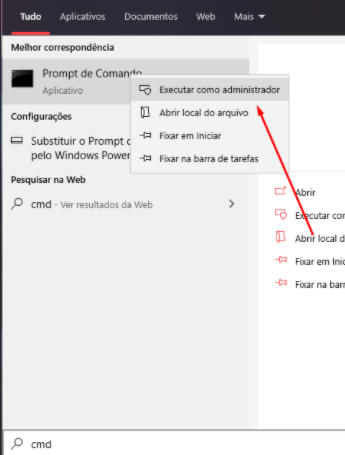
When running, you must paste exactly this command into the Command Prompt:
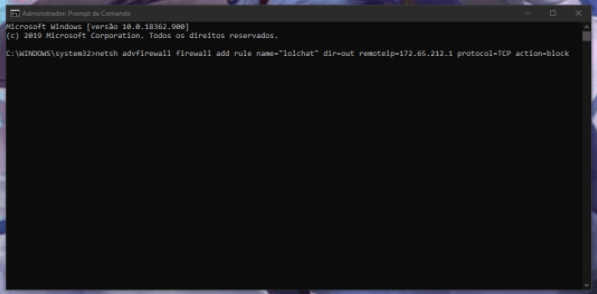
After sending this line of code, "Ok" will appear and your Chat will quickly be unavailable.
_________________________________________
Ready, disabled! Now to reactivate, follow exactly this simple step:
Again open your CMD as Administrator and paste this line of code:
And that's it! Wait about 30 seconds until your chat returns to normal!
_________________________________________

Our technician approved this! Good luck with ranked Summoner.

The weave and weave of destiny guide a ... Huh? What was the poem really like? * - Kindred.

Greetings dear WindSharp user, all right? Today I'm here with
a super tip, recommended by our best coach: Blitzcrank.
I know that some Summoners use pirated accounts from other Players
who don't even know you are using the account, right. haha.
So today I came across this topic to teach you how to disable
Client / Lobby Chat from League of Legends.
_________________________________________
Follow the steps that can help you:
It is very simple to disable and activate, for this open your CMD as an
administrator:
(Executar como administrador = Execute as administrator)
When running, you must paste exactly this command into the Command Prompt:
netsh advfirewall firewall add rule name="lolchat" dir=out remoteip=172.65.212.1 protocol=TCP action=block After sending this line of code, "Ok" will appear and your Chat will quickly be unavailable.
_________________________________________
Ready, disabled! Now to reactivate, follow exactly this simple step:
Again open your CMD as Administrator and paste this line of code:
netsh advfirewall firewall delete rule name="lolchatAnd that's it! Wait about 30 seconds until your chat returns to normal!
_________________________________________
Our technician approved this! Good luck with ranked Summoner.
The weave and weave of destiny guide a ... Huh? What was the poem really like? * - Kindred.


