
Bro i m facing vangard issue from a week... whenever i try to open my riot client for Valorant it asks me to reboot my pc but when i restart my pc it stucks on window loading icon. I m facing this issue alot.

Navigasyon
Uygulamayı Yükle
Daha fazla seçenek
Eski bir web tarayıcısı kullanıyorsunuz. Bu veya diğer siteleri görüntülemekte sorunlar yaşayabilirsiniz..
Tarayıcınızı güncellemeli veya alternatif bir tarayıcı kullanmalısınız.
Tarayıcınızı güncellemeli veya alternatif bir tarayıcı kullanmalısınız.
What causes error code in Valorant Error 43 and how to fix it?
- Durum
- Üzgünüz bu konu cevaplar için kapatılmıştır...
Onaylı Üye
Thanks, it worked for me who had the same problem
Onaylı Üye
omg thanks for your effort.
Thanks,
Post automatically merged:
Thanks,
Süper Üye
This an error to connecting to platform . Restart your game client .
C:\Users\USERNAME\ AppData\Local\Riot Games\Riot Client\Data. In this directory, find and delete the RiotClientSettings.yaml file. After deleting, launch and run Valorant with admin privileges. The client will ask you to sign in with your credentials as you have deleted all the app data.
C:\Users\USERNAME\ AppData\Local\Riot Games\Riot Client\Data. In this directory, find and delete the RiotClientSettings.yaml file. After deleting, launch and run Valorant with admin privileges. The client will ask you to sign in with your credentials as you have deleted all the app data.
Onaylı Üye
do not use now....wait for next update
Onaylı Üye
you made my day bro , thank you for help us with thisAs the game is growing exponentially, There are some errors occuring with the game.
The new error which has occured recently due to server load is the VAL 43 error.
There is no specific way to fix as there are several methods going around that promises to work 100%.
I’am not willing here to promise that this method will work 100% but it has worked for me.
There are two methods, if and else, as one is simple and other must be followed carefully.
METHOD 1 -
If after clicking on Valorant icon you are viewing below image then you are good. If you have signed in and had clicked on stay signed in then you must follow METHOD 2.
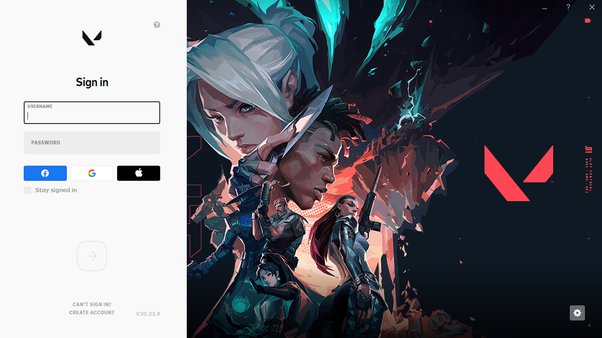
- In this you must sign in several times, Like for 4–5 times because due to some heavy loads at beginning after the update, You must see the VAL 43 error and you are been requested to restart the game client.
- If not then upgrade your account. You can see on the white side valorant symbol. Beside it there is a question mark. After moving the cursor you can see Upgrade Your Account like below image.
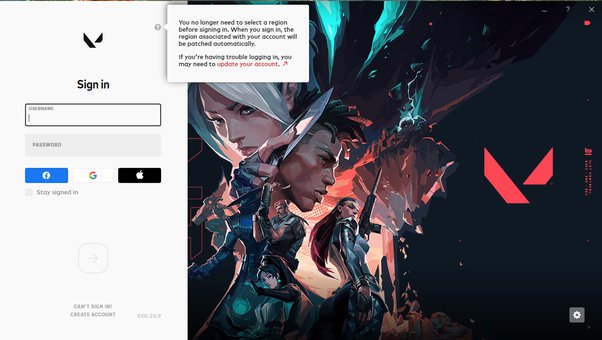
Then after upgrading you can login few times till you can enter the game. It can take several times as mentioned above.
METHOD 2 -
Now if you have already loged in and clicked the check where Stay signed in is written then you have to go back to Riot client login page to start from the beginning. These steps are the only way to go to the beginning by deleting RiotClientPrivacySettings.
STEP 1 -
In the homepage click windows button + r, and write %AppData% and hit enter.
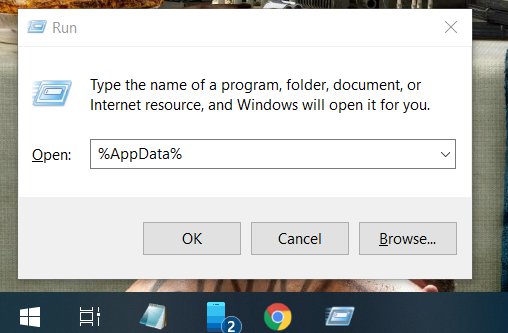
STEP 2 -
After entering, You can a page like this.
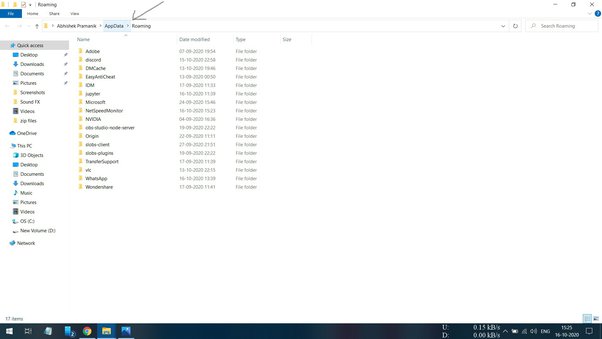
As we can see AppData as pointed with arrow mark. Click on that icon.
After clicking we can see.
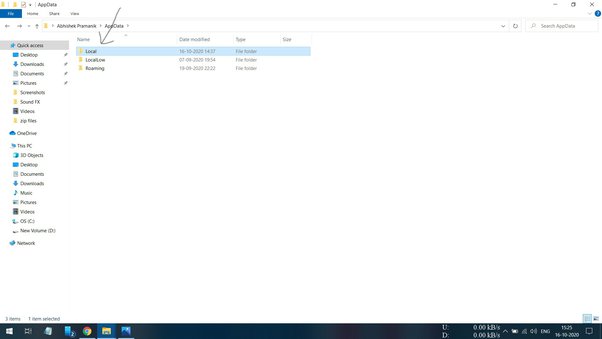
Now, Next we click on Local file.
Now we can see.
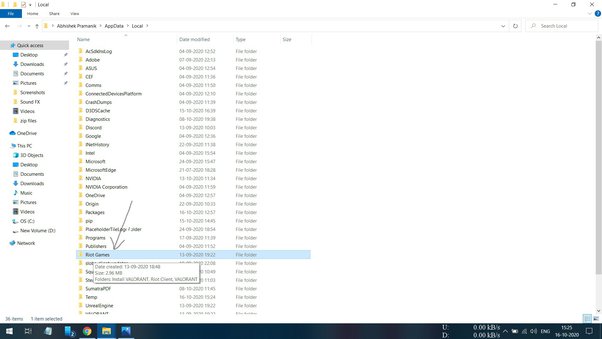
Now, Click on Riot Games files.
After clicking we can see.
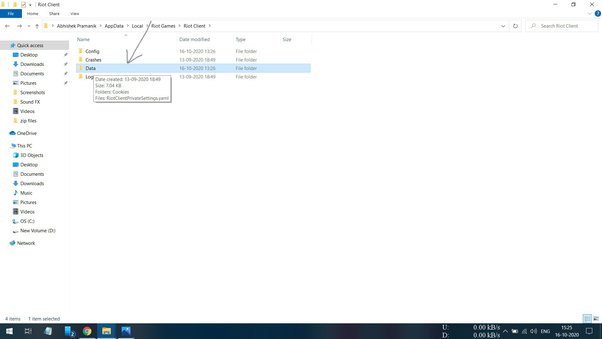
Now, We can click on Data file.
After clicking we can see below image.
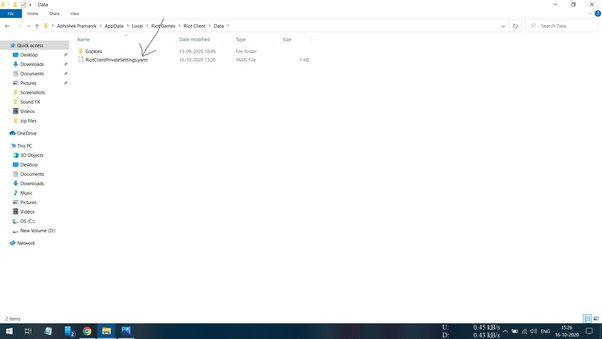
Here we will delete the RiotClientPrivacySettings.yaml file and our settings will be reverted to beginning.
After Riot Client homepage appears, Upgrade your account and log in several times.
I Hope this will work.
Uzman Üye
it works for me thanks alot you save my dayAs the game is growing exponentially, There are some errors occuring with the game.
The new error which has occured recently due to server load is the VAL 43 error.
There is no specific way to fix as there are several methods going around that promises to work 100%.
I’am not willing here to promise that this method will work 100% but it has worked for me.
There are two methods, if and else, as one is simple and other must be followed carefully.
METHOD 1 -
If after clicking on Valorant icon you are viewing below image then you are good. If you have signed in and had clicked on stay signed in then you must follow METHOD 2.
- In this you must sign in several times, Like for 4–5 times because due to some heavy loads at beginning after the update, You must see the VAL 43 error and you are been requested to restart the game client.
- If not then upgrade your account. You can see on the white side valorant symbol. Beside it there is a question mark. After moving the cursor you can see Upgrade Your Account like below image.
Then after upgrading you can login few times till you can enter the game. It can take several times as mentioned above.
METHOD 2 -
Now if you have already loged in and clicked the check where Stay signed in is written then you have to go back to Riot client login page to start from the beginning. These steps are the only way to go to the beginning by deleting RiotClientPrivacySettings.
STEP 1 -
In the homepage click windows button + r, and write %AppData% and hit enter.
STEP 2 -
After entering, You can a page like this.
As we can see AppData as pointed with arrow mark. Click on that icon.
After clicking we can see.
Now, Next we click on Local file.
Now we can see.
Now, Click on Riot Games files.
After clicking we can see.
Now, We can click on Data file.
After clicking we can see below image.
Here we will delete the RiotClientPrivacySettings.yaml file and our settings will be reverted to beginning.
After Riot Client homepage appears, Upgrade your account and log in several times.
I Hope this will work.
Onaylı Üye
can you tell me how the hwid ban really works? And how cleaners and spoofers work to counter them? And how reliable they are.. Because I had tried countless of them and none worked. Probably because I'm on a laptop but eh who knows they all claim to work on laptops too but there's a whole faction of people religiously saying it only works on computers

Ultra Üye
uninstall vangarud and install again
Nothing But Special
Seçkin Üye
holly shi- im just wake up and my valo is getiin erorr and i dont know what to do, lucky me to find your usefull guide!As the game is growing exponentially, There are some errors occuring with the game.
The new error which has occured recently due to server load is the VAL 43 error.
There is no specific way to fix as there are several methods going around that promises to work 100%.
I’am not willing here to promise that this method will work 100% but it has worked for me.
There are two methods, if and else, as one is simple and other must be followed carefully.
METHOD 1 -
If after clicking on Valorant icon you are viewing below image then you are good. If you have signed in and had clicked on stay signed in then you must follow METHOD 2.
- In this you must sign in several times, Like for 4–5 times because due to some heavy loads at beginning after the update, You must see the VAL 43 error and you are been requested to restart the game client.
- If not then upgrade your account. You can see on the white side valorant symbol. Beside it there is a question mark. After moving the cursor you can see Upgrade Your Account like below image.
Then after upgrading you can login few times till you can enter the game. It can take several times as mentioned above.
METHOD 2 -
Now if you have already loged in and clicked the check where Stay signed in is written then you have to go back to Riot client login page to start from the beginning. These steps are the only way to go to the beginning by deleting RiotClientPrivacySettings.
STEP 1 -
In the homepage click windows button + r, and write %AppData% and hit enter.
STEP 2 -
After entering, You can a page like this.
As we can see AppData as pointed with arrow mark. Click on that icon.
After clicking we can see.
Now, Next we click on Local file.
Now we can see.
Now, Click on Riot Games files.
After clicking we can see.
Now, We can click on Data file.
After clicking we can see below image.
Here we will delete the RiotClientPrivacySettings.yaml file and our settings will be reverted to beginning.
After Riot Client homepage appears, Upgrade your account and log in several times.
I Hope this will work.

Monke
Ultra Üye
Thanks for in depth tutorial even tho I have never encountered this error it will be helpful for others or even for me for future use
Sssshhhh
Ultra Üye
Thanks for the explanation
Onaylı Üye
omg thanks for your effort.
Noted for this method jihyoAs the game is growing exponentially, There are some errors occuring with the game.
The new error which has occured recently due to server load is the VAL 43 error.
There is no specific way to fix as there are several methods going around that promises to work 100%.
I’am not willing here to promise that this method will work 100% but it has worked for me.
There are two methods, if and else, as one is simple and other must be followed carefully.
METHOD 1 -
If after clicking on Valorant icon you are viewing below image then you are good. If you have signed in and had clicked on stay signed in then you must follow METHOD 2.
- In this you must sign in several times, Like for 4–5 times because due to some heavy loads at beginning after the update, You must see the VAL 43 error and you are been requested to restart the game client.
- If not then upgrade your account. You can see on the white side valorant symbol. Beside it there is a question mark. After moving the cursor you can see Upgrade Your Account like below image.
Then after upgrading you can login few times till you can enter the game. It can take several times as mentioned above.
METHOD 2 -
Now if you have already loged in and clicked the check where Stay signed in is written then you have to go back to Riot client login page to start from the beginning. These steps are the only way to go to the beginning by deleting RiotClientPrivacySettings.
STEP 1 -
In the homepage click windows button + r, and write %AppData% and hit enter.
STEP 2 -
After entering, You can a page like this.
As we can see AppData as pointed with arrow mark. Click on that icon.
After clicking we can see.
Now, Next we click on Local file.
Now we can see.
Now, Click on Riot Games files.
After clicking we can see.
Now, We can click on Data file.
After clicking we can see below image.
Here we will delete the RiotClientPrivacySettings.yaml file and our settings will be reverted to beginning.
After Riot Client homepage appears, Upgrade your account and log in several times.
I Hope this will work.
Uzman Üye
wow, working bro thank u so much,
Onaylı Üye
thank you for the effort helped a lot

- Durum
- Üzgünüz bu konu cevaplar için kapatılmıştır...
Benzer Konular

- Cevaplar
- 2
- Görüntüleme
- 574

- Cevaplar
- 0
- Görüntüleme
- 372
- Cevaplar
- 0
- Görüntüleme
- 71
- Cevaplar
- 1
- Görüntüleme
- 87

- Cevaplar
- 1
- Görüntüleme
- 64