What causes error code in Valorant Error 43 and how to fix it?

Durum
Üzgünüz bu konu cevaplar için kapatılmıştır...
patience has limits
Ultra Üye
Katılım
11 Tem 2018
Mesajlar
1,605
Çözümler
2
Tepki puanı
97
Ödüller
9
7 HİZMET YILI
thx for sharing the method to solve the error code in Valorant Error 43. if i get this problem i will be able to solve it with your method
 
Ultra Üye
Katılım
22 Mar 2019
Mesajlar
1,538
Çözümler
10
Tepki puanı
125
Ödüller
7
Yaş
29
7 HİZMET YILI
I really needed it thank you very much and it worked very well
 
Onaylı Üye
Katılım
4 Eki 2020
Mesajlar
55
Tepki puanı
1
Ödüller
4
5 HİZMET YILI
thanks for sharing I appreciate it, I had this error few times
 
Onaylı Üye
Katılım
31 Tem 2022
Mesajlar
54
Tepki puanı
2
Ödüller
1
Yaş
31
3 HİZMET YILI
on the dis site itself A system did not respond. Restart the Riot client.
 
Onaylı Üye
Katılım
9 Ağu 2018
Mesajlar
53
Tepki puanı
2
Ödüller
7
Yaş
25
7 HİZMET YILI
dude helped me a lot, i had the same problem too, thanks a lot
 
Ultra Üye
Katılım
30 Nis 2022
Mesajlar
1,645
Çözümler
7
Tepki puanı
147
Ödüller
5
4 HİZMET YILI
it happens to me only when i change to another account this error appear so i restart the client and it works again and i can log in, if i followed the steps will this fix my problem too ?
 
𝕾𝖍𝖔𝖜 𝖒𝖊 𝖞𝖔𝖚𝖗 𝖒𝖔𝖙𝖎𝖛𝖆𝖙𝖎𝖔𝖓
Onaylı Üye
Katılım
20 Ocak 2023
Mesajlar
107
Tepki puanı
8
Ödüller
1
3 HİZMET YILI
mine not work :< i should install new windows?
 
Pillar of Eternity
Ultra Üye
Katılım
5 Ara 2020
Mesajlar
1,549
Çözümler
22
Tepki puanı
143
Ödüller
7
Yaş
26
5 HİZMET YILI
Reinstall fixed it for me you also may try to repair via the launcher to see if that works out for you
 
Süper Üye
Katılım
3 Şub 2019
Mesajlar
1,412
Tepki puanı
131
Ödüller
8
Yaş
26
7 HİZMET YILI
do you know how to fix server packet loss issue in the game??
 
Ultra Üye
Katılım
5 Nis 2019
Mesajlar
1,508
Çözümler
1
Tepki puanı
81
Ödüller
8
Yaş
26
7 HİZMET YILI
just reinstall the game ez pz lol
 
Ultra Üye
Katılım
12 Ocak 2021
Mesajlar
1,517
Çözümler
2
Tepki puanı
206
Ödüller
5
Yaş
27
5 HİZMET YILI
Method 2 works, method 1 didnt work for me
 
Ultra Üye
Katılım
16 Kas 2022
Mesajlar
1,510
Çözümler
1
Tepki puanı
65
Ödüller
5
3 HİZMET YILI
As the game is growing exponentially, There are some errors occuring with the game.

The new error which has occured recently due to server load is the VAL 43 error.

There is no specific way to fix as there are several methods going around that promises to work 100%.

I’am not willing here to promise that this method will work 100% but it has worked for me.

There are two methods, if and else, as one is simple and other must be followed carefully.

METHOD 1 -

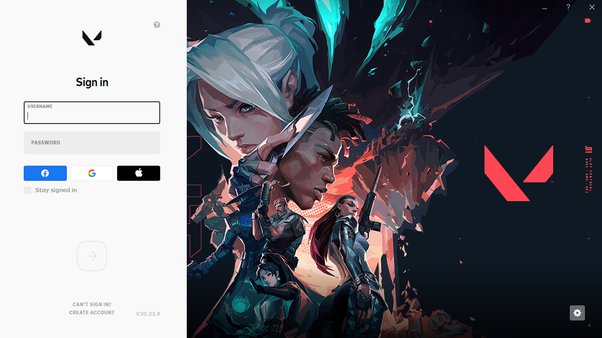
If after clicking on Valorant icon you are viewing below image then you are good. If you have signed in and had clicked on stay signed in then you must follow METHOD 2.
main-qimg-59c3ad0f0ada66fee017aed5bf795b6f-pjlq

  • In this you must sign in several times, Like for 4–5 times because due to some heavy loads at beginning after the update, You must see the VAL 43 error and you are been requested to restart the game client.
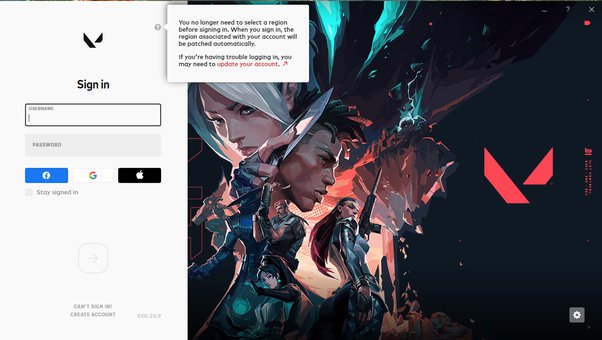
  • If not then upgrade your account. You can see on the white side valorant symbol. Beside it there is a question mark. After moving the cursor you can see Upgrade Your Account like below image.
main-qimg-aca784313f69a6b9c8590c8f0c3677ad-pjlq

Then after upgrading you can login few times till you can enter the game. It can take several times as mentioned above.

METHOD 2 -

Now if you have already loged in and clicked the check where Stay signed in is written then you have to go back to Riot client login page to start from the beginning. These steps are the only way to go to the beginning by deleting RiotClientPrivacySettings.

STEP 1 -

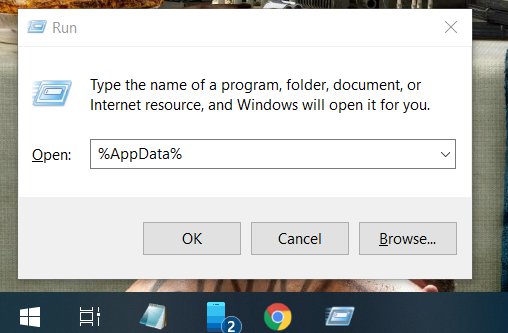
In the homepage click windows button + r, and write %AppData% and hit enter.
main-qimg-4130ec19d8d2e4060853ca87b4c71527-pjlq

STEP 2 -

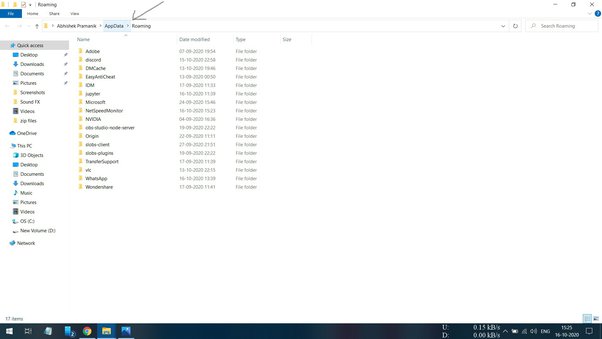
After entering, You can a page like this.
main-qimg-6152944beeef48d8623fa06baa0245bc-lq

As we can see AppData as pointed with arrow mark. Click on that icon.

After clicking we can see.
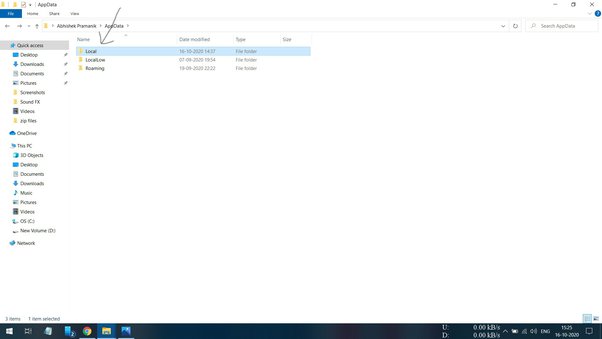
main-qimg-fadac673abb6355c76096d6b4815d93d-lq

Now, Next we click on Local file.

Now we can see.
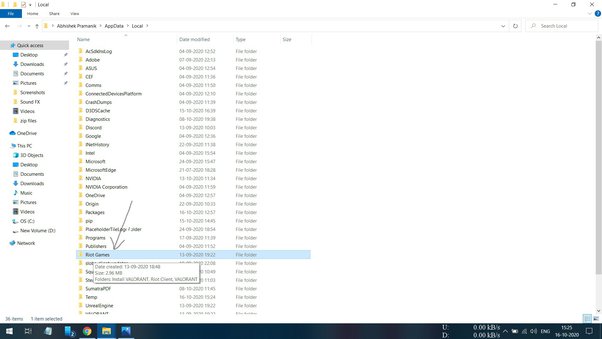
main-qimg-1383b97e1df0a8c719a99ea20499e07e-lq

Now, Click on Riot Games files.

After clicking we can see.
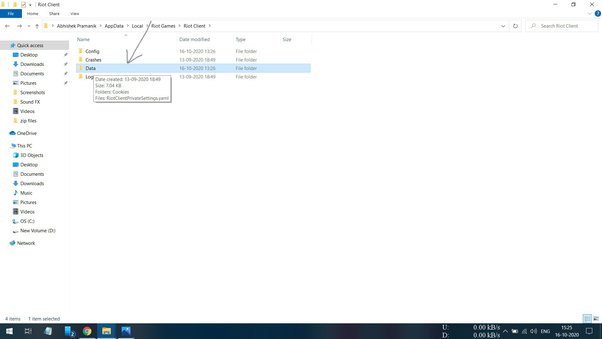
main-qimg-ae61149860c359692fc2f8be298f3fae-lq

Now, We can click on Data file.

After clicking we can see below image.
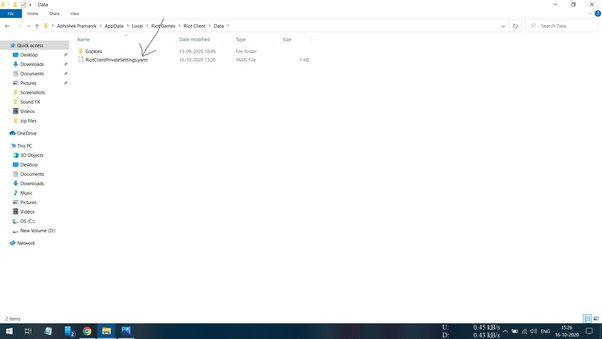
main-qimg-82de88cd6970740dd04075162f429421-lq

Here we will delete the RiotClientPrivacySettings.yaml file and our settings will be reverted to beginning.

After Riot Client homepage appears, Upgrade your account and log in several times.

I Hope this will work.
Hope this helps some ppl. Thx for sharing mate!
 
Ultra Üye
Katılım
13 Ağu 2018
Mesajlar
1,504
Çözümler
3
Tepki puanı
64
Ödüller
10
Yaş
38
7 HİZMET YILI
Thanks man i had this error earlier this week and i had to install a new windows this will help me so much in the future
 
Durum
Üzgünüz bu konu cevaplar için kapatılmıştır...
Üst