[Yardım]Custom Windowsform

Durum
Üzgünüz bu konu cevaplar için kapatılmıştır...
Uzman Üye
Katılım
6 Mar 2016
Mesajlar
187
Tepki puanı
24
Ödüller
7
10 HİZMET YILI
formu resim üzerinden yapmayı planlıyorum şu şekilde diyelim:
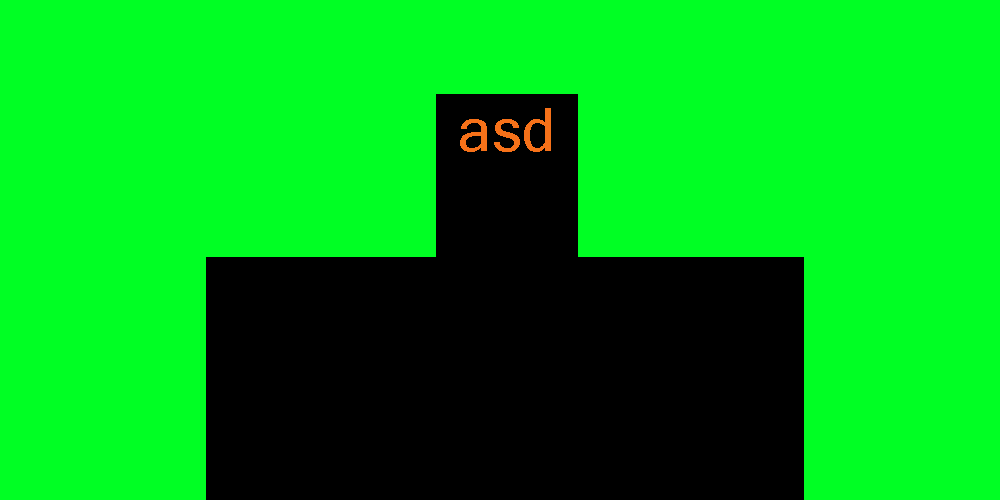
a2.png

bunu şöyle maskeleyip:
a1.png

custom form yapmak istiyorum teşekkürler.
yeşil rengi kaldırmak istemiyorum maskelemek istiyorum teşekkürler.
 
Onaylı Üye
Katılım
30 Mar 2019
Mesajlar
100
Tepki puanı
8
Yaş
27
7 HİZMET YILI
arkaplanı yeşil yap geri kalanı hpotoshoptan buton mu ne yaparsan onlara uygun yerleştir herşeyi öyle yapmana gerke yok
 
Uzman Üye
Katılım
6 Mar 2016
Mesajlar
187
Tepki puanı
24
Ödüller
7
10 HİZMET YILI
arkaplanı yeşil yap geri kalanı hpotoshoptan buton mu ne yaparsan onlara uygun yerleştir herşeyi öyle yapmana gerke yok
custom form yapmak istiyorum teşekkürler.
yeşil rengi kaldırmak istemiyorum maskelemek istiyorum teşekkürler.
senin dediğin gibi olsa şunu kullanırdım
C#:
//Downloaded from
//Visual C# Kicks - http://vckicks.110mb.com/
using System;
using System.Collections.Generic;
using System.Text;
//Needed
using System.Drawing;
using System.Drawing.Drawing2D;
using System.Drawing.Imaging;

namespace System.Windows.Forms
{
    class BitmapToRegion
    {
        //This method uses only safe code (no pointers) to scan an imagine
        //and create a region from it
        public static Region getRegion(Bitmap inputBmp, Color transperancyKey, int tolerance)
        {
            //Stores all the rectangles for the region
            GraphicsPath path = new GraphicsPath();

            //Scan the image
            for (int x = 0; x < inputBmp.Width; x++)
            {
                for (int y = 0; y < inputBmp.Height; y++)
                {
                    if (!colorsMatch(inputBmp.GetPixel(x, y), transperancyKey, tolerance))
                        path.AddRectangle(new Rectangle(x, y, 1, 1));
                }
            }

            //Create the Region
            Region outputRegion = new Region(path);

            //Clean up
            path.Dispose();

            //Finish
            return outputRegion;
        }

        private static bool colorsMatch(Color color1, Color color2, int tolerance)
        {
            if (tolerance < 0) tolerance = 0;
            return Math.Abs(color1.R - color2.R) <= tolerance &&
                   Math.Abs(color1.G - color2.G) <= tolerance &&
                   Math.Abs(color1.B - color2.B) <= tolerance;
        }

        private unsafe static bool colorsMatch(uint* pixelPtr, Color color1, int tolerance)
        {
            if (tolerance < 0) tolerance = 0;

            //Convert the pixel pointer into a color
            byte a = (byte)(*pixelPtr >> 24);
            byte r = (byte)(*pixelPtr >> 16);
            byte g = (byte)(*pixelPtr >> 8);
            byte b = (byte)(*pixelPtr >> 0);
            Color pointer = Color.FromArgb(a, r, g, b);

            //Each value between the two colors cannot differ more than tolerance
            return Math.Abs(color1.A - pointer.A) <= tolerance &&
                   Math.Abs(color1.R - pointer.R) <= tolerance &&
                   Math.Abs(color1.G - pointer.G) <= tolerance &&
                   Math.Abs(color1.B - pointer.B) <= tolerance;
        }

        //Uses pointers to scan through the bitmap a LOT faster
        //Make sure to check "Allow unsafe code" in the project properties     
        public unsafe static Region getRegionFast(Bitmap bitmap, Color transparencyKey, int tolerance)
        {
            //Bounds
            GraphicsUnit unit = GraphicsUnit.Pixel;
            RectangleF boundsF = bitmap.GetBounds(ref unit);
            Rectangle bounds = new Rectangle((int)boundsF.Left, (int)boundsF.Top,
                                             (int)boundsF.Width, (int)boundsF.Height);

            int yMax = (int)boundsF.Height;
            int xMax = (int)boundsF.Width;

            //Transparency Color
            if (tolerance <= 0) tolerance = 1;


            //Lock Image
            BitmapData bitmapData = bitmap.LockBits(bounds, ImageLockMode.ReadOnly, PixelFormat.Format32bppArgb);
            uint* pixelPtr = (uint*)bitmapData.Scan0.ToPointer();

            //Stores all the rectangles for the region
            GraphicsPath path = new GraphicsPath();

            //Scan the image, looking for lines that are NOT the transperancy color
            for (int y = 0; y < yMax; y++)
            {
                byte* basePos = (byte*)pixelPtr;

                for (int x = 0; x < xMax; x++, pixelPtr++)
                {
                    //Go on with the loop if its transperancy color

                    if (colorsMatch(pixelPtr, transparencyKey, tolerance))
                        continue;

                    //Line start
                    int x0 = x;

                    //Find the next transparency colored pixel
                    while (x < xMax && !colorsMatch(pixelPtr, transparencyKey, tolerance))
                    {
                        x++;
                        pixelPtr++;
                    }

                    //Add the line as a rectangle
                    path.AddRectangle(new Rectangle(x0, y, x - x0, 1));
                }

                //Go to next line
                pixelPtr = (uint*)(basePos + bitmapData.Stride);
            }           

            //Create the Region
            Region outputRegion = new Region(path);

            //Clean Up
            path.Dispose();
            bitmap.UnlockBits(bitmapData);

            return outputRegion;
        }
    }
}
 
Cehalet Mutluluktur
Süper Üye
Katılım
5 Mar 2016
Mesajlar
1,345
Çözümler
1
Tepki puanı
359
Ödüller
10
10 HİZMET YILI
Transparency Key özelliğini hangi rengi kaldırmak istiyorsan o şekilde ayarla. Resimdeki yeşil rengin hex kodunu alıp değiştirebilirsin.
 
Uzman Üye
Katılım
6 Mar 2016
Mesajlar
187
Tepki puanı
24
Ödüller
7
10 HİZMET YILI
Transparency Key özelliğini hangi rengi kaldırmak istiyorsan o şekilde ayarla. Resimdeki yeşil rengin hex kodunu alıp değiştirebilirsin.
custom form yapmak istiyorum teşekkürler.
yeşil rengi kaldırmak istemiyorum maskelemek istiyorum teşekkürler.
rengi kaldırınca bazı yaptıklarımda kötü gözüküyor ve kenarlarda izi çıkıyor onun yerine direk maskelemek istiyorum
 
Durum
Üzgünüz bu konu cevaplar için kapatılmıştır...
Üst