
perfectionist totally entitled
Ultra Üye
I don't know if someone else has done before but that's how I solved it
Simple step (Read all of them before applying) :
1- Press Win+R and this little Run tap should pop up
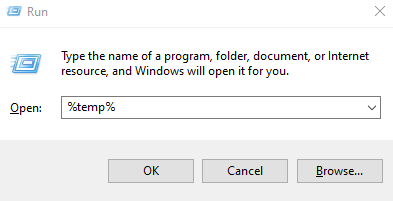
2- Type %temp% in that open bar just like the previous picture
3- Click OK
4- And now you should be able to see the second application (It might have a different name just don't worry about it)

5- You gotta right click on the second application and then click properties and then move to compatibility and then you wanna check the (Disable fullscreen optimizations - Run this program as an administrator) options, Keep them ON
6- Open battlefield 4 (Don't forget to set it on windowed/borderless) and then open the second application from the previous picture (With administrator permissions) After opening the second application there should be a cmd window right infront of you (For some reason I always move the window before it closes lol)
7- Enjoy the cheeto brotha
Simple step (Read all of them before applying) :
1- Press Win+R and this little Run tap should pop up
2- Type %temp% in that open bar just like the previous picture
3- Click OK
4- And now you should be able to see the second application (It might have a different name just don't worry about it)
5- You gotta right click on the second application and then click properties and then move to compatibility and then you wanna check the (Disable fullscreen optimizations - Run this program as an administrator) options, Keep them ON
6- Open battlefield 4 (Don't forget to set it on windowed/borderless) and then open the second application from the previous picture (With administrator permissions) After opening the second application there should be a cmd window right infront of you (For some reason I always move the window before it closes lol)
7- Enjoy the cheeto brotha


 i know that skills


