Battlefield 4 cheat exit solution

Durum
Üzgünüz bu konu cevaplar için kapatılmıştır...
perfectionist totally entitled
Ultra Üye
Katılım
4 Ocak 2021
Mesajlar
1,508
Tepki puanı
177
Ödüller
4
5 HİZMET YILI
I don't know if someone else has done before but that's how I solved it

Simple step (Read all of them before applying) :
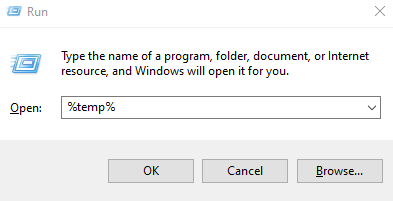
1- Press Win+R and this little Run tap should pop up
1675595817647.png


2- Type %temp% in that open bar just like the previous picture

3- Click OK

4- And now you should be able to see the second application (It might have a different name just don't worry about it)

1675595894462.png

5- You gotta right click on the second application and then click properties and then move to compatibility and then you wanna check the (Disable fullscreen optimizations - Run this program as an administrator) options, Keep them ON

6- Open battlefield 4 (Don't forget to set it on windowed/borderless) and then open the second application from the previous picture (With administrator permissions) After opening the second application there should be a cmd window right infront of you (For some reason I always move the window before it closes lol)

7- Enjoy the cheeto brotha
 
Ultra Üye
Katılım
28 Nis 2019
Mesajlar
1,612
Çözümler
6
Tepki puanı
133
Ödüller
10
Yaş
31
7 HİZMET YILI
Thx sir
I always reboot my pc to exit this..
great thing!
 
perfectionist totally entitled
Ultra Üye
Katılım
4 Ocak 2021
Mesajlar
1,508
Tepki puanı
177
Ödüller
4
5 HİZMET YILI
Any way you can script it?
so If I just click on the script he will do all ur guide automatically?
absolutely
(Takes around 5m don't worry about how long it is I just like typing)
-
How to use this script
1- You need to download python by typing python in the browser and downloading the latest version
2- You need to open up your cmd and type in that command
python -m pip install pyautogui
or py -m pip install pyautogui
3- After doing all of this you wanna head to %temp% and copy the name of your second application (And during that process you might as well enable the Run as administrator - Disable fullscreen optimization)
4- Go back to the script and press right click on it, Then click on edit (You can edit it using notepad++ which is something you can download)
5- Paste the name of your second application in here :
1675614558962.png

but don't delete the .exe

6- Save and then enjoy it.
The script :

import pyautogui
import time

# Open the Run
pyautogui.hotkey('win', 'r')
time.sleep(1)

# Type %temp% in the Run dialog
pyautogui.typewrite('%temp%')
pyautogui.press('enter')

# Wait for the %temp% directory to open
time.sleep(1)

# Type the name of the program you want to open in the %temp% directory
pyautogui.typewrite('kubujqms.exe')

pyautogui.press('enter')
(Paste it in a notepad and save it as a py file since I'm not allowed to upload files)
 
Süper Üye
Katılım
11 Haz 2020
Mesajlar
659
Çözümler
3
Tepki puanı
127
Ödüller
4
Yaş
35
5 HİZMET YILI
One question, is this to fix a cheat bug or for people who are being kicked off the servers?

I got banned on all 3 BF4 accounts I owned on most servers.
 
perfectionist totally entitled
Ultra Üye
Katılım
4 Ocak 2021
Mesajlar
1,508
Tepki puanı
177
Ödüller
4
5 HİZMET YILI
One question, is this to fix a cheat bug or for people who are being kicked off the servers?

I got banned on all 3 BF4 accounts I owned on most servers.
its a solution for the exit bug.

I'm sorry man can't help with that
 
ERROR PROBLEM FIXER
Support
Katılım
25 Eyl 2018
Mesajlar
5,366
Çözümler
1,450
Tepki puanı
2,351
Ödüller
20
Sosyal
7 HİZMET YILI
I don't know if someone else has done before but that's how I solved it

Simple step (Read all of them before applying) :
1- Press Win+R and this little Run tap should pop up

Ekli dosyayı görüntüle 85217

2- Type %temp% in that open bar just like the previous picture

3- Click OK

4- And now you should be able to see the second application (It might have a different name just don't worry about it)
Ekli dosyayı görüntüle 85218
5- You gotta right click on the second application and then click properties and then move to compatibility and then you wanna check the (Disable fullscreen optimizations - Run this program as an administrator) options, Keep them ON

6- Open battlefield 4 (Don't forget to set it on windowed/borderless) and then open the second application from the previous picture (With administrator permissions) After opening the second application there should be a cmd window right infront of you (For some reason I always move the window before it closes lol)

7- Enjoy the cheeto brotha
:peepo: i know that skills :brainfree:
its a solution for the exit bug.

I'm sorry man can't help with that
:metanira1:i do not have any issue exit we load direct XD
:peepoBusiness: cheat exit cause loader issue / window's not match
1675687642673.png

@ImRange
 
Son düzenleme:
perfectionist totally entitled
Ultra Üye
Katılım
4 Ocak 2021
Mesajlar
1,508
Tepki puanı
177
Ödüller
4
5 HİZMET YILI
Onaylı Üye
Katılım
19 Ocak 2019
Mesajlar
124
Çözümler
1
Tepki puanı
8
Ödüller
7
Yaş
39
7 HİZMET YILI
2nd app not showing up for me
 
perfectionist totally entitled
Ultra Üye
Katılım
4 Ocak 2021
Mesajlar
1,508
Tepki puanı
177
Ödüller
4
5 HİZMET YILI
Try to open up the cheat through the loader again... or check your recycle bin it might be there somehow (The second application gets deleted automatically after restarting I guess (at least that's what happened to me)), And then you can you find it in temp after restoring it from your recycle bin or opening the cheat through the loader
 
Son düzenleme:
Ultra Üye
Katılım
28 Nis 2019
Mesajlar
1,612
Çözümler
6
Tepki puanı
133
Ödüller
10
Yaş
31
7 HİZMET YILI
absolutely
(Takes around 5m don't worry about how long it is I just like typing)
-
How to use this script
1- You need to download python by typing python in the browser and downloading the latest version
2- You need to open up your cmd and type in that command
python -m pip install pyautogui
or py -m pip install pyautogui
3- After doing all of this you wanna head to %temp% and copy the name of your second application (And during that process you might as well enable the Run as administrator - Disable fullscreen optimization)
4- Go back to the script and press right click on it, Then click on edit (You can edit it using notepad++ which is something you can download)
5- Paste the name of your second application in here :
Ekli dosyayı görüntüle 85234
but don't delete the .exe

6- Save and then enjoy it.
The script :

import pyautogui
import time

# Open the Run
pyautogui.hotkey('win', 'r')
time.sleep(1)

# Type %temp% in the Run dialog
pyautogui.typewrite('%temp%')
pyautogui.press('enter')

# Wait for the %temp% directory to open
time.sleep(1)

# Type the name of the program you want to open in the %temp% directory
pyautogui.typewrite('kubujqms.exe')

pyautogui.press('enter')
(Paste it in a notepad and save it as a py file since I'm not allowed to upload files)
Huge, thank you very much
Im gonna use it
 
Pillar of Eternity
Ultra Üye
Katılım
5 Ara 2020
Mesajlar
1,549
Çözümler
22
Tepki puanı
143
Ödüller
7
Yaş
26
5 HİZMET YILI
The issue happened after I started the game and played couple of servers then decided to restart the game on 1909, I'm just saying, What a lucky frog :peepo:
Most unfortunate I got messaged bc of this and I will redirect some of them here to this thread
 
Durum
Üzgünüz bu konu cevaplar için kapatılmıştır...
Üst