Isn't that right?You are getting this problem because you did not choose the file path properly.
Post automatically merged:
Yes, everything seems to be correct, I no longer have a path to the fileIsn't that right?

Isn't that right?You are getting this problem because you did not choose the file path properly.
Yes, everything seems to be correct, I no longer have a path to the fileIsn't that right?

yes i am playing right nowHala çalışıyor mu
mention not if u got issue tell

D:\Program Files\Genshin Impact\Genshin Impact gameIsn't that right?
Yes, everything seems to be correct, I no longer have a path to the file
Yes, I choose it anyway, the menu does not start, thank you for helping in any way you could))D:\Program Files\Genshin Impact\Genshin Impact game
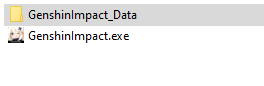
Select: GenshinImpact.exe
have you download cfd.json file on first page and place it in the drive C: ?Yes, I choose it anyway, the menu does not start, thank you for helping in any way you could))
yes i am using it right now and its totally safe 100%is this still undetected? anyone using it rn?
nice akebi pasteGenshin Impact hack, Genshin Impact wish hack, Genshin Impact primogem hack, Genshin Impact speed hack, Genshin Impact mod menu PC, Genshin Impact hile, Genshin Impact cheatsGenshin Impact oyunu için çalışan ve güncel hack hile, her saat otomatik güncellemeleri ile ücretsiz olarak erişebilirsiniz. Kolay menü, NoClip, KillAura, RapidFire, GodMode, Dumb düşmanları, Otomatik yağma ve diğer özellikler gibi birçok farklı işlevi vardır. Dünyanın en güzel oyununu kolayca geçmek istiyorsanız, bu hile gereksinimleriniz için mükemmeldir.
Ban status: Undetected
Access: ALL

Genshin'in büyüleyici bir hikayesi, bol içeriği ve hoş, karikatürize bir tarzı var. Keşfedilecek geniş oynanabilir bir alan var, ancak önemli bir ikilem var: karakterinizi geliştirmek ve tüm gizli yerleri keşfetmek için çok çaba harcamanız gerekiyor. Kaynak toplamak da bir süre sonra sıkılabilir ve düşmanlarla tekrarlanan savaş sahneleri yorucu olabilir. Oyunu kolaylaştırmak için bu ücretsiz hileyi indirebilirsiniz. MemoryUI ile kolaylıkla yükleyebilir ve oyuna giriş yapabilirsiniz. Programa dosya yolu belirtmeniz yeterlidir ve otomatik olarak diğer girişinde oyunu açacaktır.
Requirements
Bağlantıları görmek için lütfen Giriş Yap
Bağlantıları görmek için lütfen Giriş Yap
Hotkeys
F1 - Insert Menu
Features
GeneralProtection Bypass
In-Game GUI
Hotkeys
Notifications
PlayerGod Mode(Invincible)
Attack Modifier: Multi-Hit/Target/Animation
No Cooldown: Skill/Ultimate/Sprint/Bow
Unlimited Stamina
No Clip
WorldAuto Seelie
Open Team Immediately
Dumb Enemies
Freeze Enemies
Auto Destroy: Ores/Shields/Doodads/Plants
Auto Loot/Open Chests
Pickup Range
Auto Talk
Auto Tree Farm
Auto Cook
Fake Time
Auto Fish
Kill Aura
Mob Vacuum
Vacuum Loot
TeleportChest/Oculi Teleport (Teleports to nearest)
Map Teleport (Teleport to mark on map)
Custom Teleport (Teleport through list)
VisualsESP
Interactive Map
Elemental Sight
No Fog
FPS Unlock
Camera Zoom
Chest Indicator
Hide UI
In-game Embedded Browser
Enable Peeking
Profile Changer: UID/Nickname/AR/WorldLevel/Avatar/Namecard
Custom Weather
Free Camera
Paimon Follow
Texture Changer
DebuggingEntities ManagerTürkçe
Position Info
FPS Graph
Packet Sniffer
CONFIG
Config Download / İndir
Dosya Yolu : C:/
File Path: C:/
Config menü: Insert
Capslock = Noclip açıp kapatır / noclip toggle
U = killaura açıp kapatır / killaura toggle
How to use:
1- Open memoryui and select Genshin Impact hack, and press load.
2- Open the game
3- Enjoy.
Nasıl kullanılır:
1- Memoryui açın ve Genshin Impact hilesini seçip yükleye basın.
2- Oyunu açın.
3- İyi eğlenceler.
[Soru:] Hile nasıl kurulur?
[Cevap:] MemoryUI çalıştırın ve dosya yolunu seçin. [Genshin Impact/Genshin Impact Game/GenshinImpact.exe] yolunu belirtin.
[Soru:] Hile menüm yok, ne yapmalıyım?
[Cevap:] hileyi yönetici olarak çalıştırın, eğer oyun açılıyor ancak hile menüsü yoksa, [msi, riva, geforce] kaplamalarını devre dışı bırakın ve antivirüsü devre dışı bırakın ve yeniden başlayın.
[Soru:] Hile nasıl etkinleştirilir?
[Cevap:] Oyunda [F1] tuşuna basın veya dizüstü bilgisayarınız varsa [FN] tuşunu basılı tutup [F1] tuşuna basın. Config Kullananlar için "insert" tuşudur.
English
[Question:] How to install cheat?
[Answer:] Run MemoryUI and select the file path. Specify the [Genshin Impact/Genshin Impact Game/GenshinImpact.exe] path.
[Question:] I don't have a cheat menu, what should I do?
[Answer:] run cheat as administrator, if game starts but no cheat menu, disable [msi, riva, geforce] skins and disable antivirus and start again.
[Question:] How to enable cheat?
[Answer:] Press [F1] in game or if you have a laptop hold [FN] and press [F1]. It is the "insert" key for Config Users.
NOTE:
DO NOT USE AUTO LOOT ABOVE 25 METERS. / YOU CAN BE BANNED.
25 METRE ÜZERİNDE OTOMATİK LOOT KULLANMAYIN. / YASAKLANABİLİRSİNİZ.
Download / İndir