how to stop windows update automatically

Durum
Üzgünüz bu konu cevaplar için kapatılmıştır...
Seçkin Üye
Katılım
6 Nis 2018
Mesajlar
593
Tepki puanı
66
Ödüller
7
8 HİZMET YILI
Go here if you want to disable the automatic windows update:
Bağlantıları görmek için lütfen Giriş Yap
I suggest not doing that though since windows updates are important
 
Rank Demon
Süper Üye
Katılım
22 May 2020
Mesajlar
788
Çözümler
10
Tepki puanı
118
Ödüller
9
6 HİZMET YILI
Save this into a bat file, run it as admin. This script stops the Windows Update service and then disables it so that it does not start automatically on boot.

@Echo Stopping the Windows Update Service ... @echo off Net stop wuauserv @echo *********************************** @Echo Disabling the Windows Update Service ... @echo off sc config "wuauserv" start=disabled @echo *********************************** @echo Finished .... pause
 
Onaylı Üye
Katılım
3 Ocak 2023
Mesajlar
51
Tepki puanı
30
Yaş
28
3 HİZMET YILI
  1. Click start>Settings>Control Panel>System.
  2. Select the Automatic Updates tab.
  3. Click Turn off Automatic Updates.
  4. Click Apply.
  5. Click OK.
 
Onaylı Üye
Katılım
1 Ara 2022
Mesajlar
74
Tepki puanı
3
Ödüller
2
Yaş
25
3 HİZMET YILI
you can turn off automatic windows upgrade in settings, google for more details
 
Üye
Katılım
11 Eyl 2019
Mesajlar
26
Çözümler
1
Tepki puanı
1
Ödüller
3
6 HİZMET YILI
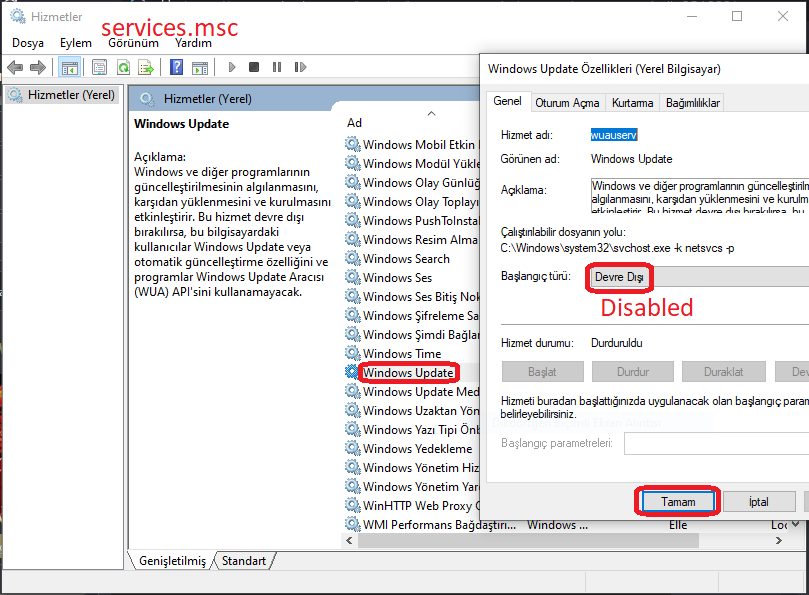
You can stop windows update via services.msc.
izt0cu9.PNG
 
Üye
Katılım
7 Ara 2022
Mesajlar
26
Tepki puanı
4
Ödüller
1
Yaş
30
3 HİZMET YILI
This guy explained it very well. Just follow the steps it worked for me. Link = >
< =
Post automatically merged:

You can stop windows update via services.msc.
izt0cu9.PNG
It will not work i mean after every reboot it will start automatically. i just shared the method just follow that to turn off your windows 10 updates permanently.
 
Uzman Üye
Katılım
27 Haz 2022
Mesajlar
153
Tepki puanı
13
Ödüller
2
3 HİZMET YILI
Go to windows Services as an adminstrator or use Processor Hacker
 
Onaylı Üye
Katılım
5 Ara 2020
Mesajlar
55
Tepki puanı
3
Ödüller
4
Yaş
35
5 HİZMET YILI
You have to turn off window update service "Press Win+R than write services.msc and find window update services than disable and turn it off apply and out"
 
VaporMan
Onaylı Üye
Katılım
5 Ocak 2023
Mesajlar
58
Tepki puanı
8
Ödüller
1
Yaş
25
3 HİZMET YILI

Search in the google Windows Update Blocker v1.7​

 
Monke
Ultra Üye
Katılım
7 Ocak 2021
Mesajlar
1,560
Çözümler
1
Tepki puanı
81
Ödüller
7
Yaş
25
5 HİZMET YILI
u could just delay it from settings every once in awhile or disable from regedit but sometimes does not work
 
Süper Üye
Katılım
4 Nis 2022
Mesajlar
1,183
Çözümler
12
Tepki puanı
230
Ödüller
4
Yaş
30
4 HİZMET YILI
how to we ignore this update or delete it and stop windows update automatically
To disable the Automatic Updates for Windows Servers and Workstations manually, follow the steps given below:
  1. Click start>Settings>Control Panel>System.
  2. Select the Automatic Updates tab.
  3. Click Turn off Automatic Updates.
  4. Click Apply.
  5. Click OK.
 
Onaylı Üye
Katılım
17 Ocak 2022
Mesajlar
51
Tepki puanı
13
Ödüller
1
Yaş
35
4 HİZMET YILI
go to windows settings and search windows update and turn it off by choosing manual updates
 
Onaylı Üye
Katılım
15 May 2020
Mesajlar
101
Tepki puanı
5
Ödüller
5
Yaş
25
6 HİZMET YILI
I think there is no solution for this soo
 
Durum
Üzgünüz bu konu cevaplar için kapatılmıştır...
Üst