
Navigasyon
Uygulamayı Yükle
Daha fazla seçenek
Eski bir web tarayıcısı kullanıyorsunuz. Bu veya diğer siteleri görüntülemekte sorunlar yaşayabilirsiniz..
Tarayıcınızı güncellemeli veya alternatif bir tarayıcı kullanmalısınız.
Tarayıcınızı güncellemeli veya alternatif bir tarayıcı kullanmalısınız.
Pubg mobile en iyi ayar
- Konuyu başlatan grandx79
- Başlangıç tarihi
- Durum
- Üzgünüz bu konu cevaplar için kapatılmıştır...

Seçkin Üye
Ney ayarını soruyorsun aim ayarımı ? Aim kullanma hesabın güzelse riske atma . Onun haricinde aim senin hassasiyetine uygun olması lazım direk kafaya odaklaması lazım benım hassasıyet yuksek magıc dırek kafaya odaklıyor mesela oyle bı ayar ıstersen yardımcı olabılırım . Tabi hassas olmaya alışkın olman lazım yoksa maus elınde dans eder bı saga bı sola jet hızında döner 
- Konuyu başlatan
- #3
knk aim ayarı istiyorum ben emülatör kullanıyorum daha önce hile kullanmadan önce hassasiyet ayarlatım baya bir düşükteydi birde hileyi kulannınca sanki attığım vuruşalr iyi gitmemeye başladı yani spray atıyorum fakat pray bozuluyor adama gitmiyor sağa sola savruluyor direk cuk diye adama oturan bir ayar söylersen süper olur
Seçkin Üye
Belli etmeden oynarsan ban yeme riskin azalır
Seçkin Üye
akıcı ve aşırı yüsek al hiç kasma olmaz bro.

Bilgisayardan bilgisayara değişiyor dostum özellikler önemli .En iyi pubg mobile ayarını söylermisiniz arkadaşlar bu sitedeki hilenin en iyi ayarın söylerseniz sevinirm
Süper Üye
Kardeşim senin hassasiyet ayarların yüksekte o yüzden aim sapıtıyor hassasiyetini düşür ve aim kitlenme hızı da yüksekteyse biraz azalt. Main hesapla girme 3 ay ban atıyor bilgin olsun.knk aim ayarı istiyorum ben emülatör kullanıyorum daha önce hile kullanmadan önce hassasiyet ayarlatım baya bir düşükteydi birde hileyi kulannınca sanki attığım vuruşalr iyi gitmemeye başladı yani spray atıyorum fakat pray bozuluyor adama gitmiyor sağa sola savruluyor direk cuk diye adama oturan bir ayar söylersen süper olur
- Konuyu başlatan
- #8
aim ayarıÖrnek verebilir misin neyin ayarı?
Post automatically merged:
bir görsel yollama şansınız varmı. hassasiyet ayarı derken oyunun hassasiyet ayarlarından bahsediyorsanız zaten oyun hassasiyetindeki ayarlarım çok düşkte özel ayarlar 10 20 falan max ama hileden bashediyorsanız onu pek anşayamadım hassasiyet var x6 açı falan var ne olduklaarını pek anlayamdımKardeşim senin hassasiyet ayarların yüksekte o yüzden aim sapıtıyor hassasiyetini düşür ve aim kitlenme hızı da yüksekteyse biraz azalt. Main hesapla girme 3 ay ban atıyor bilgin olsun.
vücuda vurdur sadece yeter gerisi
Gamer
Seçkin Üye
Default settings is best man
The Chosen One
Seçkin Üye
1. Switch off the mic and speakers
Every single new player of PUBG Mobile finds it annoying to hear other players screaming into their mics or sometimes even using profanity in the middle of a game. There's an easy way to disable this in the game. Once you're in a game tap the Speaker icon and set it to Off, and then tap the Microphone icon and set it to Off. This will mute everyone and you can focus on sharpening your skills till you're ready to chat while playing.
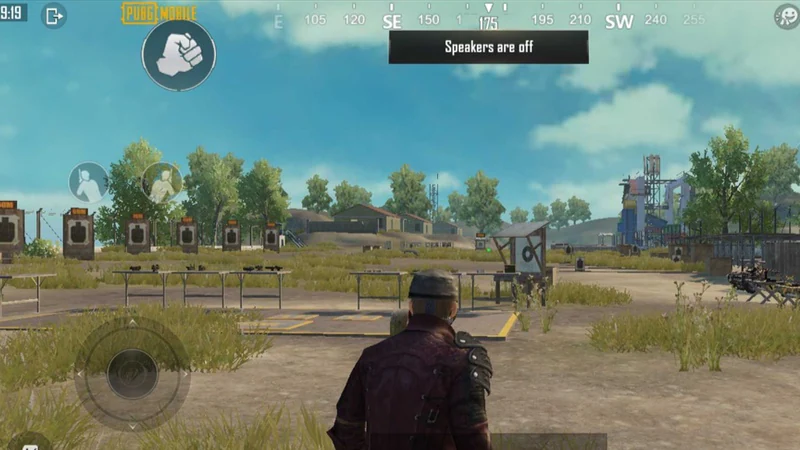
2. Optimise PUBG Mobile graphics settings
For every smartphone, PUBG Mobile recommends certain graphics settings for best performance. This is not always accurate though, sometimes you will find better performance or visuals that you prefer when you stray away from PUBG Mobile's recommendations.
Go to Settings > Graphics and choose what you are comfortable with. You can change graphics to Smooth on low-end devices and some players on more expensive phones prefer the same setting because it allows them to use the highest possible frame rate setting.
We highly recommend that you change the frame rate to the maximum possible setting on this page, which is Extreme on high-end phones and Ultra on most other devices.
3. Style of visuals
Go to Settings > Graphics and choose your style of visuals in the game. You can choose between classic, colourful, realistic, or soft — this changes the colour tone in the game. Choose one that looks better on your phone's screen as classic doesn't work for everyone. These filters are just cosmetic changes to the visuals and some people claim that the colourful mode helps them spot enemies more easily.
However, in our team the consensus is divided on this one, with most people preferring classic mode and getting by just fine with it. We suggest that you check out all of these options and figure out which one works best for you.
4. Customise PUBG Mobile controls
The first thing you should do in PUBG Mobile is change the controls. Once you open the game go to Settings (gear icon) > Controls > Customise. This option is on the bottom-left once you're in the Controls menu. Now you can move the fire button around and place all other buttons wherever you find them to be the most comfortable.
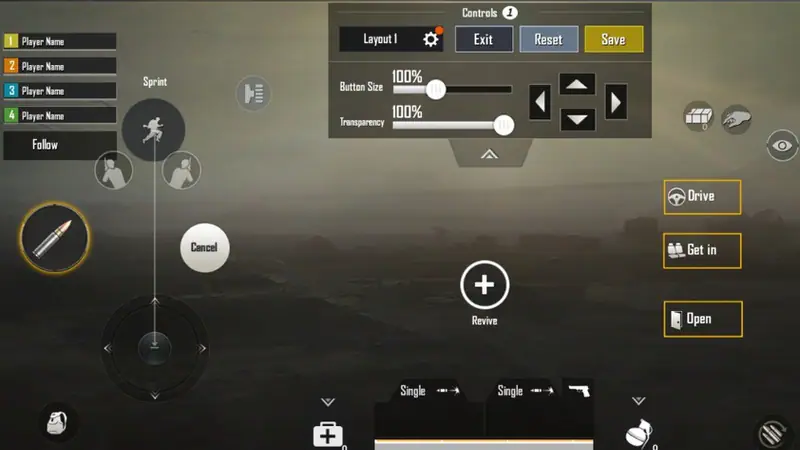
5. Peek from behind cover
This setting is so good that it's baffling it's not enabled by default. Peek and fire allows you to get pop your head out when you're hiding behind cover and to shoot at enemies. This means your foes have just your character's head to aim at — which is harder to hit than the character's body — and you get a chance to land some hits from the safety of cover. You can enable this by going to Settings > Basic and tapping Enable next to Peek & Fire.
Some players also recommend enabling Peek and open scope. This automatically opens your gun's scope when you peek, giving you a magnified view of the surroundings and a greater chance of spotting enemies. You can enable this by going to Settings > Basic and tapping Enable Peek & Open Scope.
6. Automatically pick up loot
Ideally you want to focus on the game and not keep tapping on screen to pick up loot. This setting allows you to pick up guns and ammo just by walking over these. Go to Settings > Pick Up. Now Enable Auto Pick-Up.
7. Set how much ammo you want to pick up
There's a limit to how much inventory you can carry in PUBG Mobile, but it's always better to pick up more ammo. The game has a limit on the number of rounds you can carry and we recommend that you bump it up a little to ensure that you're never short of ammo. For fast-firing guns, set it to around 200 rounds. You can set different limits for different guns, so set these wisely. Head over to Settings > Pick Up and set ammo limits there for each gun.
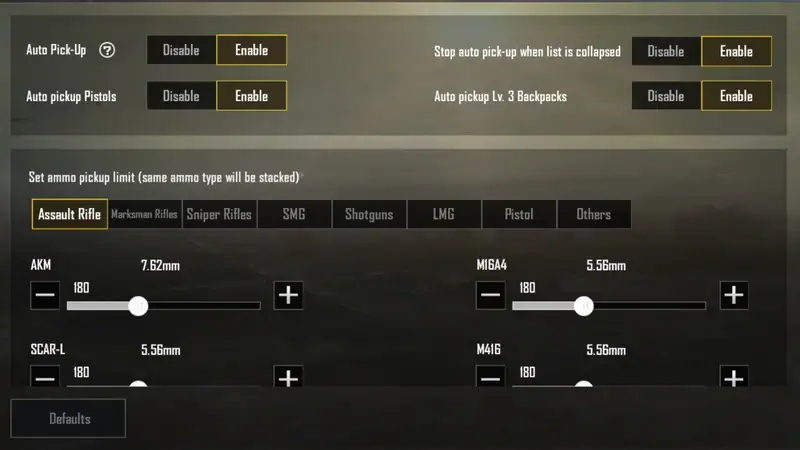
8. Change angle of view in PUBG Mobile
By default you have a field of view of 90 degrees. Some players prefer to increase this for a better view of the map, when playing in first-person view. You can change this by going to Settings > Basic and tweaking 1st Person Camera View.
9. Add more messages to Quick Chat
Quick Chat allows you to create set templates to quickly send pre-written messages. This is useful if you want to avoid using voice chat and communicate quickly with team mates. Go to Settings > Quick Chat and add new messages.
10. Change crosshair colour
Crosshair allows you to aim your weapon in every shooting games. You can change its colour in PUBG Mobile to make it easier to spot. Just go to Settings > Basic and choose your preferred crosshair colour.
Every single new player of PUBG Mobile finds it annoying to hear other players screaming into their mics or sometimes even using profanity in the middle of a game. There's an easy way to disable this in the game. Once you're in a game tap the Speaker icon and set it to Off, and then tap the Microphone icon and set it to Off. This will mute everyone and you can focus on sharpening your skills till you're ready to chat while playing.
2. Optimise PUBG Mobile graphics settings
For every smartphone, PUBG Mobile recommends certain graphics settings for best performance. This is not always accurate though, sometimes you will find better performance or visuals that you prefer when you stray away from PUBG Mobile's recommendations.
Go to Settings > Graphics and choose what you are comfortable with. You can change graphics to Smooth on low-end devices and some players on more expensive phones prefer the same setting because it allows them to use the highest possible frame rate setting.
We highly recommend that you change the frame rate to the maximum possible setting on this page, which is Extreme on high-end phones and Ultra on most other devices.
3. Style of visuals
Go to Settings > Graphics and choose your style of visuals in the game. You can choose between classic, colourful, realistic, or soft — this changes the colour tone in the game. Choose one that looks better on your phone's screen as classic doesn't work for everyone. These filters are just cosmetic changes to the visuals and some people claim that the colourful mode helps them spot enemies more easily.
However, in our team the consensus is divided on this one, with most people preferring classic mode and getting by just fine with it. We suggest that you check out all of these options and figure out which one works best for you.
4. Customise PUBG Mobile controls
The first thing you should do in PUBG Mobile is change the controls. Once you open the game go to Settings (gear icon) > Controls > Customise. This option is on the bottom-left once you're in the Controls menu. Now you can move the fire button around and place all other buttons wherever you find them to be the most comfortable.
5. Peek from behind cover
This setting is so good that it's baffling it's not enabled by default. Peek and fire allows you to get pop your head out when you're hiding behind cover and to shoot at enemies. This means your foes have just your character's head to aim at — which is harder to hit than the character's body — and you get a chance to land some hits from the safety of cover. You can enable this by going to Settings > Basic and tapping Enable next to Peek & Fire.
Some players also recommend enabling Peek and open scope. This automatically opens your gun's scope when you peek, giving you a magnified view of the surroundings and a greater chance of spotting enemies. You can enable this by going to Settings > Basic and tapping Enable Peek & Open Scope.
6. Automatically pick up loot
Ideally you want to focus on the game and not keep tapping on screen to pick up loot. This setting allows you to pick up guns and ammo just by walking over these. Go to Settings > Pick Up. Now Enable Auto Pick-Up.
7. Set how much ammo you want to pick up
There's a limit to how much inventory you can carry in PUBG Mobile, but it's always better to pick up more ammo. The game has a limit on the number of rounds you can carry and we recommend that you bump it up a little to ensure that you're never short of ammo. For fast-firing guns, set it to around 200 rounds. You can set different limits for different guns, so set these wisely. Head over to Settings > Pick Up and set ammo limits there for each gun.
8. Change angle of view in PUBG Mobile
By default you have a field of view of 90 degrees. Some players prefer to increase this for a better view of the map, when playing in first-person view. You can change this by going to Settings > Basic and tweaking 1st Person Camera View.
9. Add more messages to Quick Chat
Quick Chat allows you to create set templates to quickly send pre-written messages. This is useful if you want to avoid using voice chat and communicate quickly with team mates. Go to Settings > Quick Chat and add new messages.
10. Change crosshair colour
Crosshair allows you to aim your weapon in every shooting games. You can change its colour in PUBG Mobile to make it easier to spot. Just go to Settings > Basic and choose your preferred crosshair colour.
Süper Üye
oyun içi hassasiyetleriniz düşükse o zaman hiledeki x6 olan yeri oynayın antreman moduna düşürün çoğaltın zaten kendinize en iyi olanı bulursunuz.aim ayarı
Post automatically merged:
bir görsel yollama şansınız varmı. hassasiyet ayarı derken oyunun hassasiyet ayarlarından bahsediyorsanız zaten oyun hassasiyetindeki ayarlarım çok düşkte özel ayarlar 10 20 falan max ama hileden bashediyorsanız onu pek anşayamadım hassasiyet var x6 açı falan var ne olduklaarını pek anlayamdım
grafik en asagi ve fps en yüksek

Fender the telecaster
Seçkin Üye
YouTube'den araştırabilirsin
Seçkin Üye
Öyle yapıyorum yine kasıyor dostum sorun nerde acabaakıcı ve aşırı yüsek al hiç kasma olmaz bro.
- Durum
- Üzgünüz bu konu cevaplar için kapatılmıştır...
Benzer Konular
- Cevaplar
- 17
- Görüntüleme
- 1K

- Cevaplar
- 2
- Görüntüleme
- 230

- Kilitli
- Çözüldü
- Cevaplar
- 2
- Görüntüleme
- 663
- Cevaplar
- 3
- Görüntüleme
- 598

- Cevaplar
- 25
- Görüntüleme
- 2K
